having issues with saving coredump to flash or at all

Hi Nordic

I am working with nrf52840 and nrf52832 using ncs v2.8.0

I am trying to save coredump to flash according to instructions on this link - https://docs.nordicsemi.com/bundle/ncs-2.8.0/page/zephyr/services/debugging/coredump.html

I added this to my pm_static_my_board.yml

coredump_partition:
  address: 0xCF000
  size: 0x8000
  region: flash_primary

And this to my_board.overlay

&flash0 {
    /*
     * For more information, see:
     * http: //docs.zephyrproject.org/latest/guides/dts/index.html#flash-partitions
     */
    partitions {
        compatible = "fixed-partitions";
        #address-cells = <1>;
        #size-cells = <1>;

      ...
        coredump_partition: partition@000080000 { //THIS IS NOT LEGIT ADDRESS(END OF FLASH) BUT IT IS NOT TAKEN TO ACOUNT BECAUS PM_STATIC IS
            label = "coredump-partition";
            reg = <0x000080000 DT_SIZE_K(4)>;
        };
    };

A side note is that this is strange that I need to set it in the overlay which is basically ignored because pm_static partitions is the one that actually matters (unless i got something wrong ? )

And this configs to my prj.conf

# Coredump 
CONFIG_DEBUG_COREDUMP=y
CONFIG_DEBUG_COREDUMP_BACKEND_FLASH_PARTITION=y
CONFIG_DEBUG_COREDUMP_MEMORY_DUMP_THREADS=y

In my my_board/my_app/zephyr/.config i see this coredump related configs

CONFIG_ARCH_SUPPORTS_COREDUMP=y
CONFIG_ARCH_SUPPORTS_COREDUMP_THREADS=y

# CONFIG_COREDUMP_DEVICE is not set

CONFIG_DEBUG_THREAD_INFO=y
CONFIG_DEBUG_COREDUMP=y
# CONFIG_DEBUG_COREDUMP_BACKEND_LOGGING is not set
CONFIG_DEBUG_COREDUMP_BACKEND_FLASH_PARTITION=y
# CONFIG_DEBUG_COREDUMP_BACKEND_OTHER is not set
# CONFIG_DEBUG_COREDUMP_MEMORY_DUMP_MIN is not set
CONFIG_DEBUG_COREDUMP_MEMORY_DUMP_THREADS=y
# CONFIG_DEBUG_COREDUMP_MEMORY_DUMP_LINKER_RAM is not set
CONFIG_DEBUG_COREDUMP_FLASH_CHUNK_SIZE=64
CONFIG_DEBUG_COREDUMP_THREADS_METADATA=y

I am generating a coredump using this implementation 

void trigger_coredump(void)
{
    __ASSERT(0, "Forcing coredump");
}

When i try to read the flash area after generating the coredump with nrfjprog --memrd 0xCF000 --w 32 --n 0x8000
i get all 0xFF 

what i am missing ?

I also tried to check myself by replacing CONFIG_DEBUG_COREDUMP_BACKEND_FLASH_PARTITION=y

With CONFIG_DEBUG_COREDUMP_BACKEND_LOGGING=y

Hopping to see the coredump on my open rtt but nothing .. when coredump is triggered prints just stop

  1. What am I missing? Why can't I find a coredump on the flash partition or in the rtt log ?
  2. Can it be that the device does not have the time to write the coredump before the actual crash ? If so, how can I manage that ?
  3. Is there some auto deletion of the flash partition with the coredump so new coredumps can be saved or is it something i have to manage myself after i read the coredump from flash ? 

Hope to read you soon

Best regards

Ziv

Parents
  • Hi

    I will look into your case. Just a quick question to start with. Are you using MCUBOOT also?
    Regards

    Runar

  • For me, the post that I linked was a keystone to getting the _LOGGING version working. It's interesting that you say:

    so i know where it happens i just want to see that i know to save the coredump into flash

    When the Coredump works, you shouldn't do any saving yourself. The Coredump feature itself saves to flash/ external flash.

    The way you're generating the error doesn't matter as long as you can get the coredump working. This is why I suggested to first do the _LOGGING option since then you know for sure that the Coredump feature itself works. Afterwards it's just a matter of switching the Coredump feature from _LOGGING to 

    CONFIG_DEBUG_COREDUMP_BACKEND_FLASH_PARTITION or CONFIG_DEBUG_COREDUMP_BACKEND_OTHER. This is where I'm stuck at. :)
  • hi Runsiv

    catch asserts with coredump

    i wonder why there is no problem to save coredump with assertion when using memfault instead of only trying to capture coredump ???

    also, tried to generate a crash another way with 

    void trigger_coredump(void)
    {
        	*(uint32_t *) 0xFFFFFFFF = 1;
    
        // __ASSERT(0, "Forcing coredump");
    }

    instead of using assert

    same results

    no logs that are usually build in in zephyr for telling you where the crash happened and off course no coredump saved to memory ..

    if there is any farther data i can share to get some direction for this please let me know

    i am kind of stuck on this feature which supposed to be a builtin supported feature both in nordic and in zephyr

    https://docs.nordicsemi.com/bundle/ncs-2.4.2/page/zephyr/services/debugging/coredump.html

    docs.zephyrproject.org/.../coredump.html ]

    hope to read you soon

    best regards

    Ziv

  • When the Coredump works, you shouldn't do any saving yourself. The Coredump feature itself saves to flash/ external flash.

    i know, i am not trying to write to flash myself, its just a figure of speach .. meaning flash is not written by backend when coredump occurs

    the prints you show is something i usually see and i think it is a builtin in zephyr logs for crashes but it does not contain the coredump itslef .. if it would have then you would see a lot of bytes print under this logs .. like here 

    : >>> ZEPHYR FATAL ERROR 0: CPU exception on CPU 0
    E: Current thread: 0x00119080 (unknown)
    E: #CD:BEGIN#
    E: #CD:5a4501000100050000000000
    E: #CD:4101003800
    E: #CD:0e0000000200000000000000749d1100f803000000000000009d1100109d1100
    E: #CD:00000000a71a100059041000060200000800000000901100
    E: #CD:4d010080901100e0901100
    E: #CD:0100000000000000000000000180000000000000000000000000000000000000
    E: #CD:00000000000000000000000000000000e364100000000000000000004c9c1100
    E: #CD:000000000000000000000000b49911000004000000000000fc03000000000000
    E: #CD:4d0100b4991100b49d1100
    E: #CD:f8030000020000000200000002000000f8030000fd03000a02000000dc9e1100
    E: #CD:149a1160fd03000002000000dc9e1100249a110087201000049f11000a000000
    E: #CD:349a11000a4f1000049f11000a9e1100449a11000a8b10000200000002000000
    E: #CD:449a1100388b1000049f11000a000000549a1100ad201000049f11000a000000
    E: #CD:749a11000a201000049f11000a000000649a11000a201000049f11000a000000
    E: #CD:749a1100e8201000049f11000a000000949a1100890b10000a0000000a000000
    E: #CD:a49a1100890b10000a0000000a000000f8030000189b11000200000002000000
    E: #CD:f49a1100289b11000a000000189b1100049b11009b0710000a000000289b1100
    E: #CD:f49a110087201000049f110045000000f49a1100509011000a00000020901100
    E: #CD:f49a110060901100049f1100ffffffff0000000000000000049f1100ffffffff
    E: #CD:0000000000000000630b1000189b1100349b1100af0b1000630b1000289b1100
    E: #CD:55891000789b11000000000020901100549b1100480000004a891000609b1100
    E: #CD:649b1100d00b10004a891000709b110000000000609b11000a00000000000000
    E: #CD:849b1100709b11004a89100000000000949b1100794a10000000000058901100
    E: #CD:20901100c34a10000a00001734020000d001000000000000d49b110038000000
    E: #CD:c49b110078481000b49911000004000000000000000000000c9c11000c9c1100
    E: #CD:149c110000000000d49b110038000000f49b1100da481000b499110000040000
    E: #CD:0e0000000200000000000000744d0100b4991100b49d1100009d1100109d1100
    E: #CD:149c110099471000b4991100000400000800000000901100ad861000409c1100
    E: #CD:349c1100e94710008090110000000000349c1100b64710008086100045000000
    E: #CD:849c11002d53100000000000d09c11008090110020861000f5ffffff8c9c1100
    E: #CD:000000000000000000000000a71a1000a49c1100020200008090110000000000
    E: #CD:a49c1100020200000800000000000000a49c11001937100000000000d09c1100
    E: #CD:0c9d0000bc9c0000b49d1100b4991100c49c1100ae37100000000000d09c1100
    E: #CD:0800000000000000c888100000000000109d11005d031000d09c1100009d1100
    E: #CD:109d11000000000000000000a71a1000f803000000000000749d110002000000
    E: #CD:5904100008000000060200000e0000000202000002020000000000002c9d1100
    E: #CD:7704100000000000d00b1000c9881000549d110000000000489d110092041000
    E: #CD:00000000689d1100549d11000000000000000000689d1100c804100000000000
    E: #CD:c0881000000000007c9d110000000000749d11007c9d11006554100065541000
    E: #CD:00000000000000009c9d1100be1a100000000000000000000000000038041000
    E: #CD:08000000020200000000000000000000f4531000000000000000000000000000
    E: #CD:END#
    E: Halting system

  • and i am not sure why he put CONFIG_ASSERT=n .. i want to be able to catch those as well

    Just above this line in the config I included a link to the Zephyr issue explaining why asserts need to be disabled: https://github.com/zephyrproject-rtos/zephyr/issues/59116. The short answer is that flash drivers are using semaphores/mutexes that can't be acquired while in an ISR (which is true when you need to store a coredump after a fault exception) and if you have CONFIG_ASSERT enabled it will trigger an assert before the CD is stored to flash.

    If you look at the memfault implementation you will see that they are taking a different approach to this and instead of using the zephyr drivers use the NVMC nrfx HAL directly. 

    https://github.com/nrfconnect/sdk-nrf/blob/v3.0.1/modules/memfault-firmware-sdk/memfault_flash_coredump_storage.c#L15 

    You can also redefine the weakly declared error handler and store the data yourself. Have you considered just saving the CPU registers from the last stack frame like in the crash log message? Or do you feel you get more information from a coredump?

  • Hey Vidar.

    Sorry if it seems I'm "hijacking" this thread, but actually I'm just piggybacking. Grin

    I am in exactly the same boat as Ziv, this being my current task: get the coredump working with external flash. I managed to get it working with the serial CLI log but that's pretty much where I got stuck.

    Could you please provide both me and Ziv an archive with a working sample code that saves the Coredump to external flash? From the previous features which I had trouble with, I found this approach to be by far the fastest way of getting them to work.

    Note: he seems to be on NCS v2.8.0 and I'm on NCS v3.0.0.

Reply
  • Hey Vidar.

    Sorry if it seems I'm "hijacking" this thread, but actually I'm just piggybacking. Grin

    I am in exactly the same boat as Ziv, this being my current task: get the coredump working with external flash. I managed to get it working with the serial CLI log but that's pretty much where I got stuck.

    Could you please provide both me and Ziv an archive with a working sample code that saves the Coredump to external flash? From the previous features which I had trouble with, I found this approach to be by far the fastest way of getting them to work.

    Note: he seems to be on NCS v2.8.0 and I'm on NCS v3.0.0.

Children
  • Hi,

    To write to external flash, you would need a QSPI/SPI and flash driver tailored for the coredump that is capable of operating in the hardfault interrupt context, which we don’t have. But as I asked OP, what’s the motivation for storing a minimal coredump when you could instead store just the information that would normally be included in the crash logs? That would only require a few 10s of bytes, not several kilobytes. Have you tested a minimal coredump using another backends to see what you actually get?

  • I'm not sure what's the difference between "a minimal coredump" and "information included in the crash logs"?

    For my case in particular, we want the coredump since we want to see what causes stack overflows/ hard faults/ etc.:

    Additionally, it'd be great to store the reset reason also and on top of that to have "custom reset reasons". I.e.: let's say I wanna do an OTA, the file is downloaded on the device and we're gonna reset to boot from the new image -> store as reset reason "successful OTA, reboot to new image"; or let's say a device is pushing LoRa data to a server but it didn't get any confirmation (ACK) of reception from the server/ gateway for the last few cycles, so the module decides to reset -> store as reset reason "failed several consecutive uplinks to server, reboot to reconnect". Does such a feature exist?

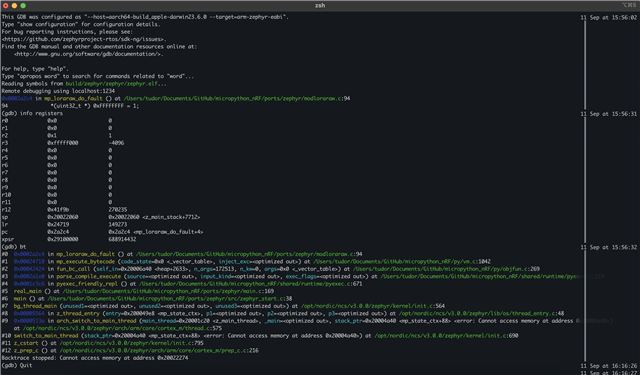
    But mainly: coredump to external flash with stack trace for stack overflows/ hard faults, just like in the image above.

  • You posted this earlier which is a typical crashlog:

    [00:00:14.148,559] <err> os: ***** USAGE FAULT *****
    [00:00:14.148,559] <err> os:   Attempt to execute undefined instruction
    [00:00:14.148,590] <err> os: r0/a1:  0x0bad0000  r1/a2:  0x00000000  r2/a3:  0x00000000
    [00:00:14.148,590] <err> os: r3/a4:  0xffffffff r12/ip:  0x0004e4bb r14/lr:  0x0001b203
    [00:00:14.148,620] <err> os:  xpsr:  0x49100000
    [00:00:14.148,620] <err> os: s[ 0]:  0x200099e4  s[ 1]:  0x00000000  s[ 2]:  0x00000009  s[ 3]:  0x00021cc7
    [00:00:14.148,651] <err> os: s[ 4]:  0x00000001  s[ 5]:  0x00000030  s[ 6]:  0x0005ac30  s[ 7]:  0x0004dd57
    [00:00:14.148,651] <err> os: s[ 8]:  0x00000000  s[ 9]:  0x200099e0  s[10]:  0x20009ae0  s[11]:  0x00001972
    [00:00:14.148,681] <err> os: s[12]:  0x20005a94  s[13]:  0x0001df3b  s[14]:  0x20005a94  s[15]:  0x00001000
    [00:00:14.148,681] <err> os: fpscr:  0xffffffff
    [00:00:14.148,681] <err> os: Faulting instruction address (r15/pc): 0x00017a88
    [00:00:14.148,712] <err> os: >>> ZEPHYR FATAL ERROR 36: Unknown error on CPU 0
    [00:00:14.148,742] <err> os: Current thread: 0x20002758 (mp_main)
    [00:00:14.273,651] <err> os: Halting system

    It tells you the type of error (stack overflow, etc) and it includes the cpu registers from the previous stack frame. 

    EDIT: I just stumbled across this PR https://github.com/nrfconnect/sdk-nrf/pull/21418 which I assume should address the limitation of not being able to enable ASSERTs when storing to internal flash.

  • So, you'd suggest to use the filesystem to store the crashlog?

    Also, excuse my lack of knowledge, but how do you get from cpu registers to stack trace?

    I know how to reverse engineer "Faulting instruction address (r15/pc): 0x00017a88" using:
    /opt/nordic/ncs/toolchains/b8efef2ad5/opt/zephyr-sdk/arm-zephyr-eabi/bin/arm-zephyr-eabi-addr2line  -e zephyr.elf -a0x00017a88 -f -p

    What about my point regarding storing the reset reason and adding custom reset reasons?

  • You don’t need much space to store the information in the crash log, so you should be able to fit it in RAM, similar to what I suggested here:  RE: Saving coredumps to external flash  . There's also nothing that will prevent you from adding additional data such as the reset reason.

    Also, excuse my lack of knowledge, but how do you get from cpu registers to stack trace

    You won't be able to reconstruct a stack trace from the crash log.

Related