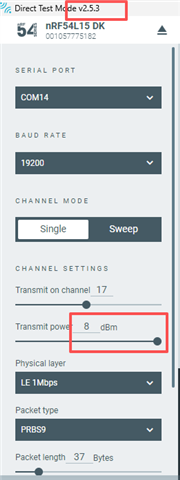
21540 PA hardware test

hi support team,

may i ask how to test 54l15+21540 dtm? i have send code to customer, but they feedback to me that the output power is 15db, not 20db(using serial send command 09 14 to set output power) in readme.

if 15db is really case, how can we debug the 21540 and make sure it works normal?

Regards,

William.

Parents Reply
  • Hi William,

    The change in DTM app is to address another compatibility issue between the app and the DTM sample.

    It seems the TX Power limit is something that was overlooked. I have reported to the app development team but cannot comment on when that will be fixed. If you need it urgently, you need to contact our sales representative.

    As a work around, you can build the DTM sample with CONFIG_DTM_POWER_CONTROL_AUTOMATIC. This will disable automatic FEM gain control from the nRF Connect for Desktop app. You can then manually change the FEM gain using the serial terminal using the vendor command FEM_TX_POWER_CONTROL_SET. You can refer to the sample's README for more information about this command.

    Our apologies for the inconveniences.

    Regards,

    Hieu

Children
Related