About nRF54L15 throughput

Hi

I used the throughput example in NCS3.0, and found that the rate decays greatly when the distance is farther away. And the rate is not stable.

I wonder if there is any way to optimize this demo.

Test object:  NCS3.0.2   nRF54L15DK(central)   nRF54L15DK(periphera)   BLE 1Mbps

When two development board antennas are very close, the rate is stable at 740kbps.

Moving a few tens of centimeters will have a great impact. The minimum will jump to 500kbps.
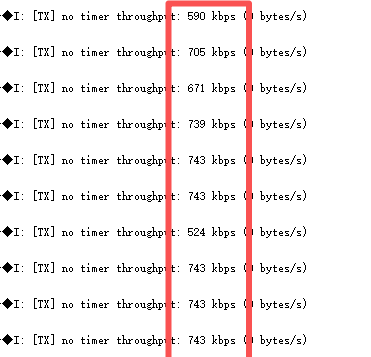
My question is how to test that the throughput is normal and stable at different distances, such as 50 cm.
Parents
  • Hi,

    I see from the screenshots that you see a mostly stable rate, but with some occasional degradation. This is for instance seen sometimes if the connection event length (and connection interval) are long. The connection event will end at the first missed packet. The longer the event, the more you risk losing from one lost packet. Therefore, sometimes you can see better results if decreasing the event length and connection interval.

    Also, the environment of the test is important. For instance, at an office desk you may typically have a wireless mouse, a wireless keyboard, devices with Wi-Fi, Bluetooth devices, and possibly other sources of interference from RF equipment. This will increase the likelihood of packet loss for the BLE connection.

    In some instances it may help to increase TX power, depending on the cause of the packet loss.

    Regards,
    Terje

Reply
  • Hi,

    I see from the screenshots that you see a mostly stable rate, but with some occasional degradation. This is for instance seen sometimes if the connection event length (and connection interval) are long. The connection event will end at the first missed packet. The longer the event, the more you risk losing from one lost packet. Therefore, sometimes you can see better results if decreasing the event length and connection interval.

    Also, the environment of the test is important. For instance, at an office desk you may typically have a wireless mouse, a wireless keyboard, devices with Wi-Fi, Bluetooth devices, and possibly other sources of interference from RF equipment. This will increase the likelihood of packet loss for the BLE connection.

    In some instances it may help to increase TX power, depending on the cause of the packet loss.

    Regards,
    Terje

Children
No Data
Related