Hello,
I have a problem with a custom board using a nRF9151.
I can flash the nRF9151 and it seams to flash successfully (I tried with a blinky program and the leds start blinking).
But a soon as I try to use RTT via nrfconnect for VScode to get logs, the board stops working and i am not getting any logs.
I think it is a problem with my configuration and maybe my nrfutil installation because when i use J-link RTT viewer (v8.18) to connect to the board, i get the same problem with the following logs :
LOG: J-Link RTT Viewer V8.18: Logging started.
LOG: Terminal 0 added.
LOG: Connecting to J-Link via USB...
LOG: Device "NRF9151_XXCA" selected.
LOG: ConfigTargetSettings() start
LOG: ---Setting ROM table---
LOG: ConfigTargetSettings() end - Took 37us
LOG: InitTarget() start
LOG: CTRL-AP indicates that the device is secured.
For debugger connection the device needs to be unsecured.
Note: Unsecuring will trigger a mass erase of the internal flash and UICR registers.


LOG: Executing default behavior previously saved in the registry.
LOG: Device will be unsecured now.
LOG: InitTarget() end - Took 287ms
LOG: Found SW-DP with ID 0x6BA02477
LOG: DPIDR: 0x6BA02477
LOG: CoreSight SoC-400 or earlier
LOG: AP map detection skipped. Manually configured AP map found.
LOG: AP[0]: AHB-AP (IDR: Not set, ADDR: 0x00000000)
LOG: AP[0]: Core found
LOG: AP[0]: AHB-AP ROM base: 0xE00FF000
LOG: CPUID register: 0x410FD212. Implementer code: 0x41 (ARM)
LOG: Feature set: Mainline
LOG: Cache: No cache
LOG: Found Cortex-M33 r0p2, Little endian.
LOG: FPUnit: 8 code (BP) slots and 0 literal slots
LOG: Security extension: implemented
LOG: Secure debug: enabled
LOG: CoreSight components:
LOG: ROMTbl[0] @ E00FF000
LOG: [0][0]: E000E000 CID B105900D PID 000BBD21 DEVARCH 47702A04 DEVTYPE 00 Cortex-M33
LOG: [0][1]: E0001000 CID B105900D PID 000BBD21 DEVARCH 47701A02 DEVTYPE 00 DWT
LOG: [0][2]: E0002000 CID B105900D PID 000BBD21 DEVARCH 47701A03 DEVTYPE 00 FPB
LOG: [0][3]: E0000000 CID B105900D PID 000BBD21 DEVARCH 47701A01 DEVTYPE 43 ITM
LOG: [0][5]: E0041000 CID B105900D PID 002BBD21 DEVARCH 47724A13 DEVTYPE 13 ETM
LOG: [0][6]: E0042000 CID B105900D PID 000BBD21 DEVARCH 47701A14 DEVTYPE 14 CSS600-CTI
LOG: RTT Viewer connected.
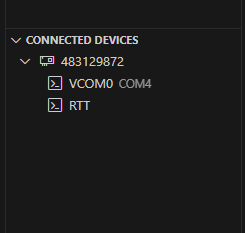
I also can't recognize the SIP from nrf connect for vscode and i get the following output when trying "Refresh the Connected Devices" :
[17:20:12] nrfutil-device device-info --serial-number 001050902774 --skip-overhead --json
[17:20:12] Error: One or more device info tasks failed:
 * 1050902774: Unable to find worker executable: Custom { kind: NotFound, error: "Failed to find file plugin-probe-worker. Looked for file in <none>, <none>, C:\\Users\\VssAdministrator\\.cargo\\registry\\src\\eu.files.nordicsemi.com-aeee3781a8ecf169\\target/release\\plugin-probe-worker.exe and c:\\Users\\Guillaume\\.vscode\\extensions\\nordic-semiconductor.nrf-connect-2025.9.754-win32-x64\\platform\\nrfutil\\bin\\plugin-probe-worker.exe" } (Generic)
It seems every command involving nrfutil fails (i also can't recognize a nrf52840 on the same custom board, but flashing and logs with RTT are successfull).
I am using nrf connect for desktop V3.0.0 and nrfutil is udate to the latest version (8.1.1).
Any help wold be welcomed,
Regards.
Guillaume;