2 NRF5340 AUdio DK's both as central?

I want to connect 2 nrf5340 Audio DK's together and have them share audio data over a bluetooth connection, however I also want every device to have a connection to its own peripheral at the same time. 

This means that both DK's function as a dual-role but also need to connect together.

How would I be able to achieve this?

Any help is welcome, thank you in advance!

Parents
  • Hello Jorrit,

    I want to connect 2 nrf5340 Audio DK's together and have them share audio data over a bluetooth connection

    By Audio data I assume you mean the entire stream? And should the other peripheral connection get the audio stream as well, or just be any other peripheral connection? I am not sure if 100% understand the use-case. 

    If it is all for audio data, I have to say that typically one-device handles just one of these roles, like eg. being a source or a sink. Though then let's say you wanted both devices to both receive a stream and broadcast one, then you might also approach the limits of the CPU of the nRF5340, as it spends about 30-33% of its CPU budget encoding a one channel high quality stream (48KHz 96kbps). Decoding one as well won't leave much for an application. 

    Regards,

    Elfving

  • Dear Elfving,

    Thank you for the response.

    I do indeed mean an audio stream.
    So the use case can be compared to a walkie talkie but actually with the added detail of the audio coming from the microphone on an earbud and going to the speaker of an earbud on the other side.
    The largest part of this project is just getting the audio through this path, so: earbud microphone -> nrf5340(1) -> nrf5340(2) -> earbud speaker.

    this feels like each device would need to be both sink and source, which I am wondering if that is even possible.

    the actual application will not need much computation.

    Any thoughts on this are welcome, and thank you.

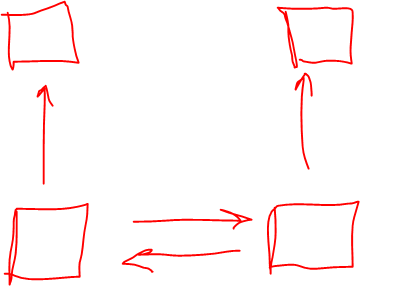
  • I am still a bit confused. So my first understanding of what you wanted to create was a bit like this. 

    Jorritv3 said:
    So the use case can be compared to a walkie talkie but actually with the added detail of the audio coming from the microphone on an earbud and going to the speaker of an earbud on the other side.

    So each side has a speaker and a mic, which is connected to opposite device on the other side? You do not need Le Audio between the mic and speaker on one side?


    Jorritv3 said:

    The largest part of this project is just getting the audio through this path, so: earbud microphone -> nrf5340(1) -> nrf5340(2) -> earbud speaker.

    This I didn't understand. The sending of the LE Audio goes through two additional nodes before ending up at the speaker?

  • So your first drawing was most similar but I think I confused you by saying: "So the use case can be compared to a walkie talkie but actually with the added detail of the audio coming from the microphone on an earbud and going to the speaker of an earbud on the other side."

    What I meant was that the earbuds connect to the nrf5340 and stream the audio through the chain to the other earphone. Meaning it is basically your first drawing but the arrows to the earbuds should also be bidirectional.


    I basically want to be able to "call" someone through the pcb using bluetooth. So I want a couple of things:

    1. Each device can get an audio stream from a microphone on a bluetooth connected earbud.
    2. Each device can stream audio to an earbud.

    3. Each device can stream and receive audio from the other device.


    I don't know how to add the clear drawings so I hope this is enough explanation.

    This I didn't understand. The sending of the LE Audio goes through two additional nodes before ending up at the speaker?

    I want to do something to the audio on the devices that is why it is important to first get it through the devices before going to the other earbud pair.

    Thanks again for your time.

  • I believe I understand it now. You just need the two headsets, right? Not multiple? These bidirectional streams are possible, if you wanted multiple headsets you could do that to with broadcasts.

    Jorritv3 said:
    the actual application will not need much computation.
    Jorritv3 said:

    I want to do something to the audio on the devices that is why it is important to first get it through the devices before going to the other earbud pair.

    Keep in mind the CPU budget here, audio tasks can often be computationally intensive. 

    I think the walkie talkie sample can be a good starting point. Have you seen it?

    EDIT: I just realized that these middle devices would then need to maybe encode two streams, and decode 2 (decoding might take about 15%). You might be on the edge of what is feasible, though if the idea is that people wont speak at the same time that might help. I'll ask the relevant R&D team to check.

    Regards,

    Elfving

Reply
  • I believe I understand it now. You just need the two headsets, right? Not multiple? These bidirectional streams are possible, if you wanted multiple headsets you could do that to with broadcasts.

    Jorritv3 said:
    the actual application will not need much computation.
    Jorritv3 said:

    I want to do something to the audio on the devices that is why it is important to first get it through the devices before going to the other earbud pair.

    Keep in mind the CPU budget here, audio tasks can often be computationally intensive. 

    I think the walkie talkie sample can be a good starting point. Have you seen it?

    EDIT: I just realized that these middle devices would then need to maybe encode two streams, and decode 2 (decoding might take about 15%). You might be on the edge of what is feasible, though if the idea is that people wont speak at the same time that might help. I'll ask the relevant R&D team to check.

    Regards,

    Elfving

Children
  • Thank you very much, indeed both devices would need to encode and decode 2 streams, so good to keep the budget in mind. 

    Thank you for your help!

  • The team confirms that this process would result in 90%, as you are doing this in both directions.

    The CPU is slightly lower when doing 16kHz, so it might still work. I guess also that the two devices in the middle here doesn't use USB, so that is not using much CPU. You should also make sure you are not resampling from 16kHz to 48kHz in every device, so make sure to disable the sample rate converter by setting CONFIG_SAMPLE_RATE_CONVERTER=n

    EDIT: If you are able to describe a bit further what you are trying to achieve, we might be able to guide you to a simpler way to achieve it though.

    Regards,

    Elfving

Related