Visual Studio Code: Unable to find worker executable / Unable to flash target

Hi all

Coming back to an nrf52840 project after some weeks, VScode nRF extension do not work anymore.

Trying to recover a board (nRF52840DK) gives error:

08:52:50] nrfutil-device recover --serial-number 001050261677 --json
[08:52:51] Error: One or more recover tasks failed:
* 1050261677: Unable to find worker executable: Custom { kind: NotFound, error: "Failed to find file plugin-probe-worker. Looked for file in <none>, <none>, /home/vsts/.cargo/registry/src/eu.files.nordicsemi.com-aeee3781a8ecf169/target/release/plugin-probe-worker and /home/developer/.vscode/extensions/nordic-semiconductor.nrf-connect-2025.9.754-linux-x64/platform/nrfutil/bin/plugin-probe-worker" } (Generic)

Trying to flash a binary to the target gives error:

Executing task: nRF Connect: Flash: <project-directory><project-name> (active)

Flashing <project-name> to nRF52840 DK
west flash -d /home/developer/work/<project-directory>/build --domain <project-name> --dev-id 1050261677

-- west flash: rebuilding
[0/10] Performing build step for '<project-name>'
ninja: no work to do.
[1/10] Performing build step for 'mcuboot'
ninja: no work to do.
[4/10] cd /home/developer/work/<project-directory>/build/_sysbuild && /home/developer/ncs/tool[7/9] cd /home/developer/work/<project-directory>/build/_sysbuild && /home/developer/ncs/toolc[8/9] cd /home/developer/work/<project-directory>/build/_sysbuild && /home/developer/ncs/toolchains/7cbc0036f4/usr/local/bin/cmake -E true
-- west flash: using runner nrfutil
-- runners.nrfutil: reset after flashing requested
FATAL ERROR: required program nrfutil not found; install it or add its location to PATH

Validating the toolchain gives no errors:

[09:09:41] =========== Toolchain validation report for nRF Connect SDK Toolchain v3.0.2 ===========
Package Using the nRF Connect SDK v3.0.2 at /home/developer/ncs/v3.0.2
No issues were detected with the toolchain.

Versions:

Visual Studio Code: 1.104.0

nRF Connect for VS Code Extension Pack: 2025.4.4

nRF Connect for VS Code: 2025.9.754

nRF DeviceTree: 2025.8.140

nRF Kconfig: 2025.9.123

nRF Terminal: 2025.8.103

Any idea what's wrong here?

Thanks!

--

Kind regards

  • Thanks for your reply.

    Flashing the flash has worked before with my setup. So I guess it should still work even after an update of the extension.

    I found nrfutil in /home/developer/.config/nrfconnect/nrfutil-sandboxes/toolchain-manager/0.15.0/bin/nrfutil

    Is there something else that changed?

    Regards

  • I agree that it's strange that it suddenly stopped working, but this should not have anything to do with the VS code extension. The error here is that the build system is not finding the nrfutil executable in any of the directories in your $PATH

    The nRF Connect extension is bundling its own copy of the nrfutil executable, but this is not made accessible to build system, so users are still expected to install nrfutil separately. 

    When nrfutil is installed correctly, you should be able to call "nrfutil" from your terminal.

  • That's unfortunate. I'm able to reproduce the same here. Will discuss this with the developers again.

  • I downloaded nrfutil from the link you provided and gave it the x-flag. I put it in /home/developer/bin which is in $PATH.

    When trying to flash from within VSCode, I get an error:

    Error: nrfutil command `device` not found. See `nrfutil list` for full list of installed commands, `nrfutil search` for installable commands, and `nrfutil install` for installation of new commands.

    Caused by:
    Subcommand nrfutil-device not found
    Error: nrfutil command `device` not found. See `nrfutil list` for full list of installed commands, `nrfutil search` for installable commands, and `nrfutil install` for installation of new commands.

    Caused by:
    Subcommand nrfutil-device not found
    Error: nrfutil command `device` not found. See `nrfutil list` for full list of installed commands, `nrfutil search` for installable commands, and `nrfutil install` for installation of new commands.

    Caused by:
    Subcommand nrfutil-device not found
    -- runners.nrfutil: Board with serial number 1050261677 flashed successfully.
    * Terminal will be reused by tasks, press any key to close it.

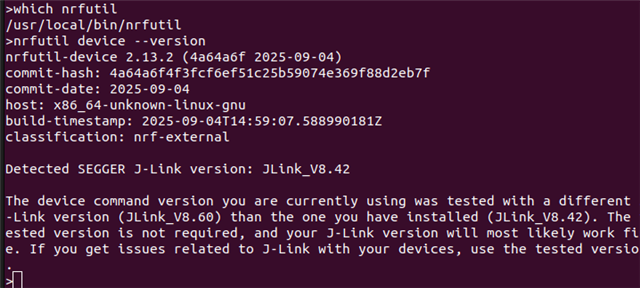
    Running your suggested command gives:

    ~/bin$ ./nrfutil device --version
    Error: nrfutil command `device` not found. See `nrfutil list` for full list of installed commands, `nrfutil search` for installable commands, and `nrfutil install` for installation of new commands.

    Caused by:
    Subcommand nrfutil-device not found

    Strange things.

    Regards

  • The device command is installed with the following command: "nrfutil install device"

Related