Combining GNSS and CoAP client in nRF Connect SDK — GNSS fix not read, CoAP request not sent

Hi Nordic team,

I’m working on an nRF9151 DK with nRF Connect SDK v3.0.0.
My goal is to send GNSS latitude/longitude data to a CoAP server.

  • The GNSS sample works fine → I get correct coordinates.

  • The CoAP client sample works fine → I can send POST requests and get responses from my server.

  • But when I combine both in one project, I get no GNSS fix and no CoAP messages are sent.

I only see: 

<inf> coap_client_sample: Starting GNSS + CoAP client
<inf> coap_client_sample: Bringing network interface up
<inf> coap_client_sample: Waiting for network connectivity

  • Is there a specific order required for modem/LTE/GNSS init when used with CoAP?

  • Any debugging tips to see why GNSS events never trigger and CoAP never sends?

Additional info

  • Board: nRF9151 DK

  • SDK: nRF Connect SDK v3.0.0

  • Both examples work independently

  • Using IPv6 CoAP server

Any guidance or example on how to properly combine GNSS fix + CoAP POST would be greatly appreciated.

Regards 

Arun

Parents Reply
  • Hi Dejan,

    Thanks for your response.

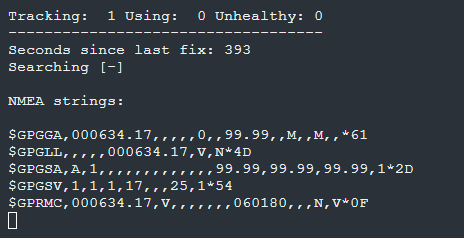
    When I mentioned “not working,” I meant that while the device is moving (even walking), the GNSS is not able to get a valid fix, and I only see repeated logs about searching for satellites. When the device is stationary outdoors, I can get a fix within a reasonable time.

    I don’t see any fix flags set in the moving case. The environment is outdoors (open sky), and I’m testing while walking in an open area without tall buildings nearby.

    Do you think additional configuration is required for GNSS to track properly while the device is moving? Or is there a recommended mode that works better?

    Best regards,
    Arun

Children
  • Hi Arun,

    Arun538 said:
    When I mentioned “not working,” I meant that while the device is moving (even walking), the GNSS is not able to get a valid fix, and I only see repeated logs about searching for satellites. When the device is stationary outdoors, I can get a fix within a reasonable time.
    Arun538 said:
    Because when I test indoors, I don’t get location, but outdoors it works.

    Is it that when the device is outside and moving (as well as inside), it cannot get a fix?
    In your testing, did you use your own application or (unmodified) GNSS sample?

    Best regards,
    Dejan

  • Hi Dejan,

    Yes, that’s correct. When the device is outdoors and stationary, I can get a fix. But when the device is outdoors and moving (even while walking), it cannot get a fix — it just keeps logging “searching for satellites.”

    I also tested the same unmodified GNSS example indoors, but I’m not able to get a fix there either.

    Best regards,

    Arun

  • Hi Arun,

    Have you tried to reset your dk board and wait longer time until you get a fix?

    In indoor environment, it is not expected that you can get GNSS fix reliably. You can look at cellular or wi-fi locationing (SSID Wi-Fi locationing) as an alternative. Additional information can be found in Location Services. Can you provide details about your outdoor environment? When moving, where and how have you kept the board? Can you provide more information about the type of movement? Did you test GNSS sample only when walking?

    Best regards,
    Dejan

  • Hi Dejan,

    Yes, I have reset the DK board and waited, but the behavior is the same. I can get a fix reliably only when the device is stationary outdoors.

    For outdoor testing, I was in an open area with minimal obstructions (no tall buildings or dense trees). When moving, I carried the board in my hand while walking at normal pace. I have tested only while walking so far.

    It seems that GNSS fix is lost or not acquired reliably when the device is in motion. Could this be due to the GNSS configuration? Is there a recommended mode or setting for continuous tracking while moving?

    Best regards,
    Arun

  • Hi Arun,

    Operation modes for GNSS sample mention this
    "By default, the sample runs in continuous tracking mode. In continuous mode, GNSS tries to acquire a fix once a second."

    Have you considered using A-GNSS / P-GPS? You can find configuration for A-GNSS and P-GPS in the documentation.

    Arun538 said:
    It seems that GNSS fix is lost or not acquired reliably when the device is in motion.

    Are you not getting fix at all or sometimes? Can you elaborate?

    Best regards,
    Dejan

Related