Compilation of nrf5340 on Bitbucket

Hi,

We are using Bitbucket as our CI system, and our project is based on the nRF5340. I can compile the project locally in VS Code without any issues.

Previously, we were using SDK v2.9 in both VS Code and Bitbucket, and everything worked fine. Due to some technical requirements, I switched to SDK v3.0.2. The project still builds successfully in VS Code with SDK v3.0.2, but when I updated Bitbucket to use the same version, I encountered the following error during compilation:

No board named 'nrf5340dk_nrf5340' found.


Could you please advise me on how to resolve this issue?

This is my yml file: 
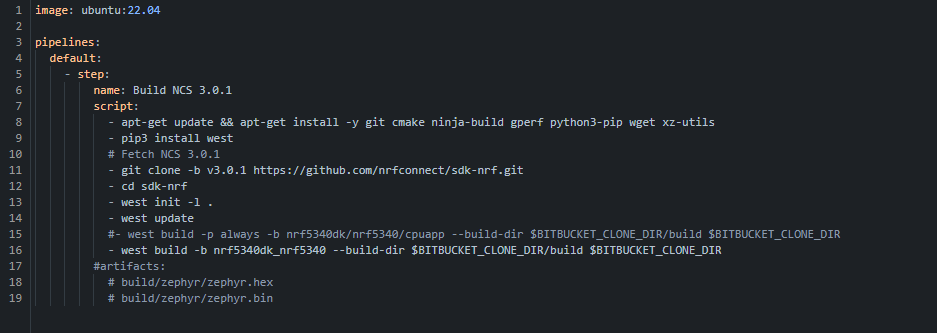
Thanks,

Alireza

Parents
  • It seems like you are missing ncs_sysbuild_extensions somehow. Do you have stray/global Zephyr that you are pulling?
    Just to confirm, do you have the correct toolchain?
    Also you said you wanted 3.0.2 in the ticket but the yml showed 3.01? You want the 3.0.1 right?


    Try to unset Zephyr base first
     - unset ZEPHYR_BASE || true

    Then your normal west
    - pip3 install -U west
    - git clone --branch v3.0.1 --depth 1 github.com/.../sdk-nrf.git
    - cd sdk-nrf
    - west init -l .
    - west update

    Also some python requirements
    - pip3 install -r zephyr/scripts/requirements.txt \
    -r nrf/scripts/requirements.txt \
    -r bootloader/mcuboot/scripts/requirements.txt

    add these flags to the build to point to the correct zephyr-sdk

    west build --pristine always \
    -b nrf5340dk/nrf5340/cpuapp \
    --build-dir "$BITBUCKET_CLONE_DIR/build" \
    "$BITBUCKET_CLONE_DIR" \
    -- \
    -DZEPHYR_TOOLCHAIN_VARIANT=zephyr \
    -DZEPHYR_SDK_INSTALL_DIR=/opt/zephyr-sdk-0.16.5             (or whatever your version is)


    Let me know if that works.
    If not then, did you install zephyr-sdk? which version? confirm your toolchain if it's for nrf connect sdk 3.0.1 or 3.0.2

    You can refer to these documentations
    Installing the nRF Connect SDK
    Getting Started Guide
    Building Nordic nRF-Connect SDK Projects with GitHub Actions | Interrupt


Reply
  • It seems like you are missing ncs_sysbuild_extensions somehow. Do you have stray/global Zephyr that you are pulling?
    Just to confirm, do you have the correct toolchain?
    Also you said you wanted 3.0.2 in the ticket but the yml showed 3.01? You want the 3.0.1 right?


    Try to unset Zephyr base first
     - unset ZEPHYR_BASE || true

    Then your normal west
    - pip3 install -U west
    - git clone --branch v3.0.1 --depth 1 github.com/.../sdk-nrf.git
    - cd sdk-nrf
    - west init -l .
    - west update

    Also some python requirements
    - pip3 install -r zephyr/scripts/requirements.txt \
    -r nrf/scripts/requirements.txt \
    -r bootloader/mcuboot/scripts/requirements.txt

    add these flags to the build to point to the correct zephyr-sdk

    west build --pristine always \
    -b nrf5340dk/nrf5340/cpuapp \
    --build-dir "$BITBUCKET_CLONE_DIR/build" \
    "$BITBUCKET_CLONE_DIR" \
    -- \
    -DZEPHYR_TOOLCHAIN_VARIANT=zephyr \
    -DZEPHYR_SDK_INSTALL_DIR=/opt/zephyr-sdk-0.16.5             (or whatever your version is)


    Let me know if that works.
    If not then, did you install zephyr-sdk? which version? confirm your toolchain if it's for nrf connect sdk 3.0.1 or 3.0.2

    You can refer to these documentations
    Installing the nRF Connect SDK
    Getting Started Guide
    Building Nordic nRF-Connect SDK Projects with GitHub Actions | Interrupt


Children
No Data
Related