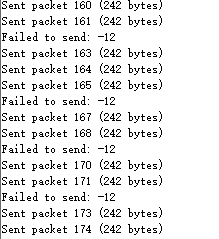
Bluetooth cannot send data packets within the connection interval.

Our company has previously used the NRF52840, and we know that by modifying the GAP event length (NRF_SDH_BLE_GAP_EVENT_LENGTH), we can enable Bluetooth to transmit multiple data packets within one connection interval. Currently, our NRF5340 is encountering a similar issue: when its transmission speed is greater than the connection interval, it can send normally, but when its transmission speed is less than the connection interval, there will be cases where data packets fail to send (just like packet loss). We want to know what parameters can be configured in NRF5340 with nrf connect v3.1.0 to achieve the effect of GAP event length. We hope you can help us

Parents
  • Hello,

    So when you are saying that you are seeing packets are being failed to send, you mean that you are not able to queue them properly? If a packet is queued, it will be sent, however many retries it uses. This is according to the Bluetooth specification.

    So you should see it in the API that you are using to send packets. At some point, it should stop returning 0, and it will start returning an error value. 

    But the root problem here is that the bluetooth connection doesn't have enough throughput, I guess. You are queuing up packets faster than the device is able to send them, and eventually, you will have packets that are not able to be queued properly.

    I can recommend that you check the sample:

    v3.1.0\nrf\samples\bluetooth\throughput

    Relevant for the nRF5340 are the files:

    boards\nrf5340dk_nrf5340_cpuapp.conf
    prj.conf
    Kconfig.sysbuild
    sysbuild\ipc_radio\prj.conf

    Note that it is in the last file, sysbuild\ipc_radio\prj.conf that the parameters for connection event length and increased MTU is set. All the parameters that belongs to the radio core on the nRF5340.

    This is also described in our DevAcademy Bluetooth Low Energy Fundamentals course. Particularly Lesson 3 is describing how to change the connection parameters.

    Best regards,

    Edvin

  • Thanks bro

    According to your suggestions, our performance has been improved.

    We have set the connection interval to 7.5ms and the transmission timing to 3ms. We found that Bluetooth can send data packets normally within the 7.5ms interval. However, after sending the second data packet, Bluetooth will force the next transmission to wait until the end of the 7.5ms connection interval, which causes blockage on the transmitting end.
    Currently, we have configured the connection event extension with CONFIG_BT_USER_DATA_LEN_UPDATE=y, CONFIG_BT_CTLR_DATA_LENGTH_MAX=251, and the GAP event interval with CONFIG_BT_CTLR_SDC_MAX_CONN_EVENT_LEN_DEFAULT=7500.
    Are we missing any key configurations such as the "Connection event length extension" in nRF52840, like setting opt.common_opt.conn_evt_evt.enable=true; err_code=sd_ble_opt_set(BLE_COMMON_OPT_CONN_EVT_EVT,&opt);? Or are there any existing configurations that need to be enabled in the main function?
Reply
  • Thanks bro

    According to your suggestions, our performance has been improved.

    We have set the connection interval to 7.5ms and the transmission timing to 3ms. We found that Bluetooth can send data packets normally within the 7.5ms interval. However, after sending the second data packet, Bluetooth will force the next transmission to wait until the end of the 7.5ms connection interval, which causes blockage on the transmitting end.
    Currently, we have configured the connection event extension with CONFIG_BT_USER_DATA_LEN_UPDATE=y, CONFIG_BT_CTLR_DATA_LENGTH_MAX=251, and the GAP event interval with CONFIG_BT_CTLR_SDC_MAX_CONN_EVENT_LEN_DEFAULT=7500.
    Are we missing any key configurations such as the "Connection event length extension" in nRF52840, like setting opt.common_opt.conn_evt_evt.enable=true; err_code=sd_ble_opt_set(BLE_COMMON_OPT_CONN_EVT_EVT,&opt);? Or are there any existing configurations that need to be enabled in the main function?
Children
  • Hello,

    I am not sure I understand exactly what you mean, but I'll try to explain, and please correct me if I misunderstood. Also, if you capture a sniffer trace of the connection, showing these packets being sent, feel free to upload it here, as it may shed some light on what is actually going on. You can use the nRF Sniffer for Bluetooth LE, and upload the .pcapng file here. Remember to select the advertising device from the drop-down menu on the top before entering the connection, so that the sniffer will follow that peripheral into the connection. 

    Every connection interval (7.5ms) there is a connection event. At this event, the central will start sending a packet to the peripheral. If it has any data to send, it will send it. If not, it will send an "empty" packet, only containing some headers. This is used for timekeeping between the devices. 

    The peripheral will then respond to the packet. If it has any data to send, that will be sent, but if not, then it will just be another "empty" packet, being used to keep the connection alive.

    Both of these packets have a bit in it's headers saying whether or not it has additional data (in addition to the data being sent in that very packet). We call it the "more-data flag"

    Let us say that the central doesn't have any data to send, but the peripheral has enough data for two packets. This is how it will look on air:

    1: central -> peripheral: empty packet (more data = false)

    2: peripheral -> central: data packet (more data = true)

    3: central -> peripheral: empty packet (more data = false)

    4: peripheral -> central: data packet (more data = false)

    Then there is radio silence until the next connection event.

    If the peripheral now receives more data from one of it's sensors, it needs to wait for the central to send the next packet in the next connection event. The central's radio is off until that event.

    But what happens if the peripheral receives more data to transmit while the connection event is ongoing, let us say after the first packet is sent from the central, but before the peripheral has sent any data, so that would be between step 1 and 2 above. In this case, the softdevice will  schedule this data for the next connection event, as the CPU is busy handling the connection event at this point in time. Therefore, the more-data flag will still be false in packet 4, and instead, it will be added to the first packet from the peripheral to the central in the next connection event. 

    So even if your connection event length is set to 7.5ms, the same as the connection interval, as soon as the more data flag from the peripheral is set to false, the central's radio will be turned off until the next connection event. And even if you decide to add the new packet while there is still communication between the two devices, the SoftDevice controller doesn't have time to change the already scheduled packets before they are aired.

    I believe this covers what you are seeing, but if I misunderstood anything, pleaese feel free to correct me.

    Best regards,

    Edvin

  • I'm sorry, I think I didn't express myself clearly earlier. My timer generates and sends a set of data every 3ms. However, regardless of whether the connection interval is 7.5ms or 15ms, Bluetooth will reply in the next connection interval after receiving the second data packet. Especially with the 15ms connection interval, Bluetooth will reply after more than 10ms. I believe this situation is abnormal and does not conform to our Bluetooth logic. Currently, we are not sure where the problem lies. These are the pcapng files captured by nrf niffer for the 7.5ms and 15ms connection intervals respectively. We look forward to your reply.15ms.pcapng7.5ms.pcapng

  • I sent the wrong file for the 15ms connection interval earlier. This one is the correct file for the 15ms connection interval.7167.15MS_2.pcapng

  • Did you do something to your sniffer traces before uploading them? There are a lot of packets with the exact same timestamp in both your traces (which is not the case for the first 15ms.pcapng that you uploaded).

    HHJ said:
    regardless of whether the connection interval is 7.5ms or 15ms, Bluetooth will reply in the next connection interval after receiving the second data packet

    What do you mean by this? Which device will reply? The one sending (peripheral) or the one receiving (central)?

    BR,

    Edvin

  • Thanks bro
    I haven't modified the sniffer traces in any way. It's normal for some data packets to have identical timestamps because the responses occur at the 150µs level. Your sniffer might only be configured to display at the millisecond level, which makes the timestamps appear the same.
    Please ignore 15ms.pcapng as it's the incorrect file. Instead, focus on 7ms.pcapng and the 15ms_2.pcapng I'll send later.
    Here's my transmission logic: The NRF5340 continuously sends data packets to the host computer, which sends a reply upon receipt. Let me explain with a detailed example from 15ms_2.pcapng. At 4843 23.404347, Bluetooth sends a data packet to the host computer, which replies at 4854 23.405538 – this 1ms+ interval is normal. The next set is also normal. However, in the following set, Bluetooth sends a data packet to the host computer at 4857 23.407117, but the host computer doesn't reply until 4854 23.419153, resulting in a 12ms+ interval. This is abnormal because it prevents 4 sets of newly generated data from being sent during those 12ms.
Related