Wi-Fi STA sample not connecting in NCS v3.1.0 (works in v2.9.2)

Hi,
I am trying to run the Wi-Fi STA sample on nRF7002DK.

  • With nRF Connect SDK v2.9.2, the STA sample connects successfully to my Wi-Fi AP (router).

  • With NCS v3.1.0, the exact same STA sample does not connect.

Logs in v2.9.2 show that the STA attempts to connect, connection success.
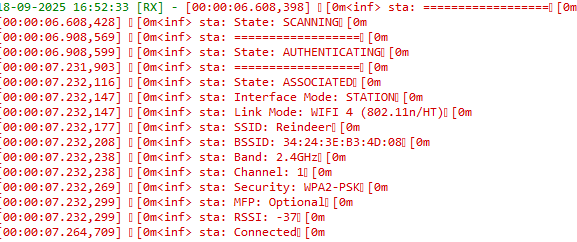
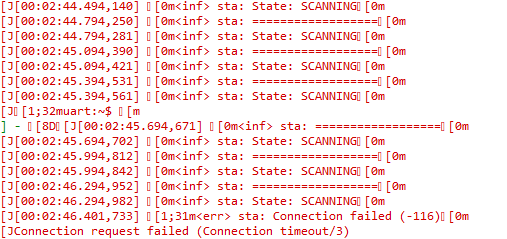
Logs in v3.1.0 show that the STA attempts to connect with same nrf7002dk, but fails 
Questions:

  1. Is there any restriction, change, or configuration update required for Wi-Fi STA in v3.1.0 compared to v2.9.2?

  2. Has anything changed in the Wi-Fi driver, supplicant, or configuration (Kconfig/prj.conf) that would prevent connection in v3.1.0?

  3. Could you please guide me on how to fix this issue and get STA working in v3.1.0?

Setup:

  • Board: nRF7002DK

  • SDK versions tested:

    • v2.9.2 → STA connects fine

    •  v3.1.0 → STA fails to connect

Parents
  • Hi Krishnan,
    I tested the sample with v3.1.0, and interestingly it connects over Wi-Fi 5 but not over Wi-Fi 4. I’ll dig deeper into this and get back to you within 1-2 days.

    Best regards,
    Benjamin

  • Hi Benjamin,

    Thanks for your update. Along with the Wi-Fi router, I also tested using my mobile phone as an access point. It was able to connect over Wi-Fi 4, but when I tried with another mobile phone, it couldn’t connect to the same network. I’m not sure how to proceed with this issue, so kindly help me figure it out.

  • Just another question, have you successfully connected to another AP using NCS 3.1.0? If yes, what are the differences between you working and non working AP? If no, could you test and report back?

  • Yes, I am able to connect using another access point, such as a mobile hotspot, which has the same configuration as I shared in the initial screenshot. I even changed that Mobile AP’s settings from Wi-Fi 4 to Wi-Fi 6 and updated the security from WPA2 to WPA3, and it still connects using NCS v3.1.0. However, my concern is that my Wi-Fi router does not connect with v3.1.0 but connecting in v2.9.2, even though it has the same configuration as the connecting AP.

  • I understand. I’d like to reproduce the issue, so could you please share as much detail as possible about the failing AP?

    Thanks,
    Benjamin

  • Name                   : Wi-Fi
    Description            : Intel(R) Dual Band Wireless-AC 8265
    GUID                   : 82dc2db3-3338-499e-bec3-39b89a9aa4bd
    Physical address       : a8:6d:aa:4d:09:cc
    Interface type         : Primary
    State                  : connected
    SSID                   : Reindeer
    AP BSSID               : 34:24:3e:b3:4d:08
    Band                   : 2.4 GHz
    Channel                : 1
    Connected Akm-cipher   : [ akm = 00-0f-ac:02, cipher =  00-0f-ac:04 ]
    Network type           : Infrastructure
    Radio type             : 802.11n
    Authentication         : WPA2-Personal
    Cipher                 : CCMP
    Connection mode        : Profile
    Receive rate (Mbps)    : 130
    Transmit rate (Mbps)   : 130
    Signal                 : 92%
    Rssi                   : -36
    Profile                : Reindeer
    QoS MSCS Configured         : 0
    QoS Map Configured          : 0
    QoS Map Allowed by Policy   : 0

    This is my Wi‑Fi router information. I retrieved it on my laptop from the Command Prompt by running: netsh wlan show interfaces.
    My lap also connected with the same wifi router.


  • Krishhh said:
    If I build with NS, QSPI encryption is not used. Without NS, encryption is enabled.

    Both versions should work out of the box. Could you try to build without /ns ?

Reply Children
No Data
Related