peripheral_hids_mouse example from NCS v3.0.2.What's the correct way from SC(Secure Connections) to enable Just Works pairing?
peripheral_hids_mouse example from NCS v3.0.2.Hi,
"Just Works" is one of the key generation methods in BLE pairing. What key generation method is used, depend on the IO capabilities of the devices. Therefore, the best way to ensure the Just Works method, is to ensure the local device is "NoInput NoOutput".
In main.c of the Peripheral HIDS Mouse sample, you should find, close to line 654 or so:
static struct bt_conn_auth_cb conn_auth_callbacks = {
.passkey_display = auth_passkey_display,
.passkey_confirm = auth_passkey_confirm,
.cancel = auth_cancel,
};
This bt_conn_auth_cb structure contains callbacks for use of the input and output capabilities of your device. Some of those callbacks can be set to NULL, for signalling that the device does not have those capabilities. Hence, in order to force both NoInput and NoOutput for your device, you can configure it like this:
static struct bt_conn_auth_cb conn_auth_callbacks = {
.passkey_display = NULL,
.passkey_entry = NULL,
.passkey_confirm = NULL,
.cancel = auth_cancel,
};
With that configuration, Just Works would be the only possible key generation method for paring with your device.
Please note that with Just Works, the key will be unauthenticated, which may have implications for what functionality from Bluetooth profiles can be used or not during the connection.
Regards,
Terje
Thanks again for your quick and clear guidance!
One more question: for debugging purposes I’d like to **disable Secure Connections completely**
This makes it possible to follow the packets with a plain BLE-sniffer that does not support SC.
Could you point out the minimal Kconfig / code changes that **force Legacy pairing only** (no SC at all) in the *peripheral_hids_mouse* sample?
Thank you very much!
Ozzy
Hi,
LE Secure Connections (LESC) is forced if either CONFIG_BT_SMP_SC_ONLY=y or CONFIG_BT_SMP_SC_PAIR_ONLY=y. Setting them both to n makes it possible to connect without LESC. Then, when connecting from e.g. the nRF Connect for Desktop BLE app, make sure to not enable LESC and the connection will use legacy pairing.
Regards,
Terje
Hi,
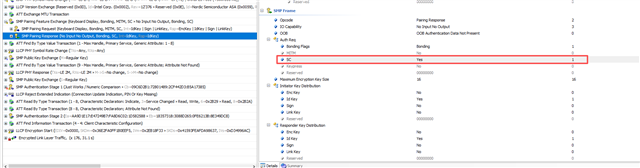
Thanks for the suggestion! Unfortunately, those parameter settings still didn’t achieve what I need. I’ve attached a screenshot of the capture I took with Ellisys Bluetooth Analyzer. My goal is to force the SC bit to 0 so I can analyze the data without having to enter the SC LTK for decryption every time.
Looking forward to your reply!
Best regards,
Ozzy
Hi,
What is the peer device?
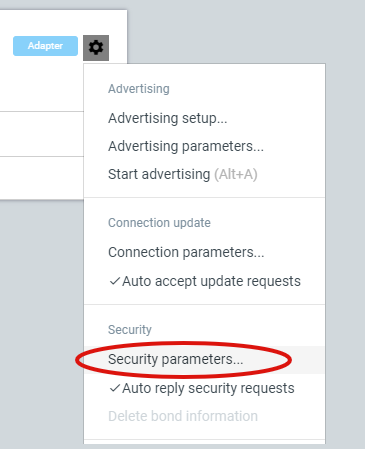
If for instance it is the Bluetooth Low Energy app in nRF Connect for Desktop, then you can control the security parameters from the drop-down menu on the cogwheel of the connectivity device:

Regards,
Terje
Hi,
What is the peer device?
If for instance it is the Bluetooth Low Energy app in nRF Connect for Desktop, then you can control the security parameters from the drop-down menu on the cogwheel of the connectivity device:

Regards,
Terje