Failed to erase device nrf52840dk quick start

I am getting started with the nrf52840 dk, and I am unable to clear the flash with the Quick start . Here are my logs:

2025-09-24T02:11:29.285Z INFO Initialising the bundled nrfutil device
2025-09-24T02:11:29.344Z DEBUG Started watching devices
2025-09-24T02:11:29.779Z INFO Using the bundled core version for nrfutil device: 8.0.0
2025-09-24T02:11:29.920Z INFO Using nrfutil device version: 2.13.2
2025-09-24T02:11:29.920Z INFO Using nrf-device-lib version: 0.19.0
2025-09-24T02:11:29.921Z INFO Using nrf-probe version: 0.45.0
2025-09-24T02:11:29.921Z INFO Using SEGGER J-Link version: JLink_V8.60
2025-09-24T02:11:32.285Z DEBUG Selected device: nRF52840 DK
2025-09-24T02:11:32.306Z DEBUG Changed step: Info
2025-09-24T02:11:33.475Z DEBUG Changed step: Rename
2025-09-24T02:11:34.498Z DEBUG Changed step: Program
2025-09-24T02:11:37.039Z ERROR device Some(DeviceBasicInfo { serial_number: Some("0001"), vendor_id: "174F", product_id: "244C", interface_number: None }) has driver issue: 16 check CM_PROP if it is valid one
2025-09-24T02:11:47.133Z ERROR Failed to initialize worker: Timed out waiting for response from worker.
2025-09-24T02:11:51.333Z ERROR Trace channel disconnected unexpectedly.
2025-09-24T02:11:51.335Z ERROR Worker exited with error code 1.

Some other factors:

- Nrf power source is set to USB

- sw6 is set to DEFAULT. 

- The board is on.

- The usb cable is good. I have tried several, and it is the same. I have also tried the cables with other devices, and those work fine. 

  • Also, when I was installing the Segger drivers, I did select the legacy version update checkbox.

  • I also changed it to vdd. This seems to have the default program work better on the pcb, but it still does not clean. I tried reverting to an old version of the NRF connect software, and that did not work either:

    2025-09-24T02:52:02.327Z INFO Initialising the bundled nrfutil device
    2025-09-24T02:52:02.384Z DEBUG Started watching devices
    2025-09-24T02:52:03.766Z INFO Using the bundled core version for nrfutil device: 8.1.1
    2025-09-24T02:52:03.859Z INFO Using nrfutil-device version: 2.10.2
    2025-09-24T02:52:03.859Z INFO Using nrf-device-lib version: 0.17.71
    2025-09-24T02:52:03.860Z INFO Using nrf-probe version: 0.38.0
    2025-09-24T02:52:03.860Z INFO Using JLink version: JLink_V8.18
    2025-09-24T02:52:05.328Z DEBUG Selected device: nRF52840 DK
    2025-09-24T02:52:05.349Z DEBUG Changed step: Info
    2025-09-24T02:52:06.570Z DEBUG Changed step: Rename
    2025-09-24T02:52:07.862Z DEBUG Changed step: Program
    2025-09-24T02:52:20.503Z ERROR [ProbeLib] [2025-09-24 02:52:20.503086Z] Failed to initialize worker: Timed out waiting for response from worker.
    2025-09-24T02:52:24.702Z ERROR [ProbeLib] [2025-09-24 02:52:24.702334Z] Trace channel disconnected unexpectedly.
    2025-09-24T02:52:24.705Z ERROR [ProbeLib] [2025-09-24 02:52:24.705392Z] Worker exited with error code 1.

     Working in vs code to manually build and flash the hello world code yields this:

    Flashing hello_world to Steve
    west flash -d c:\ncs\v3.1.1\zephyr\samples\cpp\hello_world\build_1 --domain hello_world --dev-id 1050265629

    -- west flash: rebuilding
    [0/5] Performing build step for 'hello_world'
    ninja: no work to do.
    [3/5] cmd.exe /C "cd /D C:\ncs\v3.1.1\zephyr\samples\cpp\hello_world\build_1\_sysbuild && C:\ncs\toolchains\c1a76fddb2\opt\bin\cmake.exe -[4/5] cmd.exe /C "cd /D C:\ncs\v3.1.1\zephyr\samples\cpp\hello_world\build_1\_sysbuild && C:\ncs\toolchains\c1a76fddb2\opt\bin\cmake.exe -E true"
    -- west flash: using runner nrfutil
    -- runners.nrfutil: reset after flashing requested
    -- runners.nrfutil: Flashing file: C:\ncs\v3.1.1\zephyr\samples\cpp\hello_world\build_1\merged.hex
    Error: One or more batch tasks failed:
    * 1050265629: Timed out waiting for response from worker. (Generic)

    FATAL ERROR: command exited with status 1: nrfutil --json device --x-ext-mem-config-file C:/ncs/v3.1.1/zephyr/boards/nordic/nrf52840dk/support/nrf52840dk_qspi_nrfutil_config.json x-execute-batch --bat
    ch-path 'C:\ncs\v3.1.1\zephyr\samples\cpp\hello_world\build_1\generated_nrfutil_batch.json' --serial-number 1050265629

  • Hello,

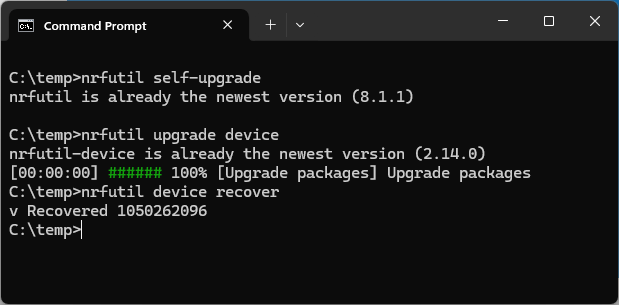
    If you haven't already, try to use the nrfutil directly from command line to see if you are for instance able to run the following 3 commands (you may also need to install j-link):

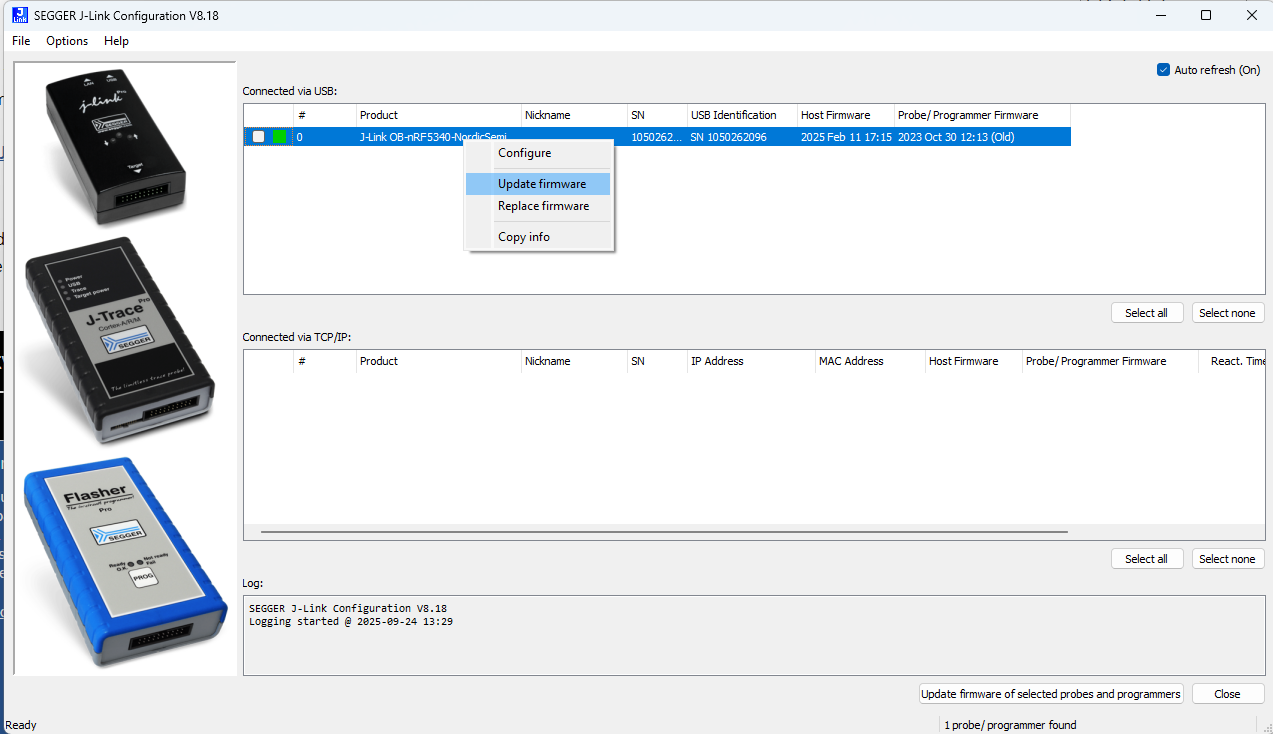
    If that doesn't work, then try to run JLinkConfig and right-clicking the probe, and then selecting Update firmware:

    Normally though, you don't need the Quick start, you may as well just follow: https://academy.nordicsemi.com/ Starting with https://academy.nordicsemi.com/courses/nrf-connect-sdk-fundamentals/ 

    Kenneth

  • Yep, that did it. The first `nrfutil upgrade device` command did not work. So I went to the jlink configure software and it said that there was no valid firmware on the board. I think it also said that whatever was on the board was from 2021 while the current firmware is from Feb of 2025.

    I was able to compile and run the hello world sample and have it print out. 

    Thanks!

Related