Show "Debug options not enabled" while upgrade nRF Connect for VS Code Extenstion Pack

Hi I have updated th nRF Connect for VS Code Extension Pack to the newest version. But when I want to enter Debug in VSCODE, the error comes out. Before upgrade, the debug is ok.
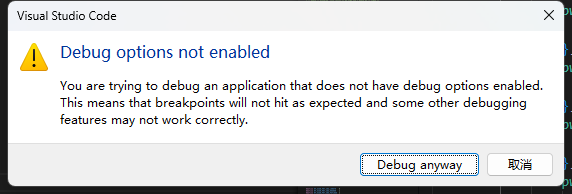
Here are the version number of installed nRF Connect VS Code:

nRF Connect for VS Code  v2025.9.798 

nRF Connect for VS Code Extension Pack  v2025.4.4 

nRF DeviceTree  v2025.8.140 

nRF Kconfig  v2025.9.123

nRF Terminal  v2025.8.103


How can I fix it?

Parents
  • Hello,

    Yes, in multi-image (multi-domain) builds—such as when using MCUboot, TFM, and your application—each image/domain can have its own optimization and debug settings. By default, setting the optimization level to "debug" in your main build configuration only applies to the main domain (usually your application). This has been documented here: How to work with sysbuild domains 

    So, to fix your issue:

    1. Go to the Build Configurations in VS Code.
    2. Edit the build configuration for the MCUboot domain.
    3. Set its optimization level to Optimize for debugging.
    4. Rebuild the project.

    Regards,

    Swathy

  • I'm dealing with something similar to this.  Is there a mechanism to disable this check and pop-up dialog.  I enable debugging settings through a different mechanism because I want to debug the code with -Os rather than -Og optimization and the default settings prevent this configuration.  This means for my use case, the dialog is completely useless and incorrect.  I would rather turn it off completely.

Reply
  • I'm dealing with something similar to this.  Is there a mechanism to disable this check and pop-up dialog.  I enable debugging settings through a different mechanism because I want to debug the code with -Os rather than -Og optimization and the default settings prevent this configuration.  This means for my use case, the dialog is completely useless and incorrect.  I would rather turn it off completely.

Children
No Data
Related