How to implement DFU for blinky sample code with LED status logs for nRF54L15

Reference link: https://academy.nordicsemi.com/courses/nrf-connect-sdk-intermediate/lessons/lesson-9-bootloaders-and-dfu-fota/topic/exercise-1-dfu-over-uart/

I have an nRF54L15 dk board upon which I want to implement DFU, I have followed all the steps until "4. Build and flash the application to your board." where I could build and flash to the board. I understand that the UART console is disabled, and I wont be able to see any logs. But the LED is not blinking and I am not able to DFU using auterm.

Could anyone guide me on how to implement DFU for this board using serial recovery and also be able to print logs perhaps on a different UART channel.


I am attaching my project file for your reference.Blinky5.zip 

Parents
  • Hi, real quick from your log before I look deeper into this

    Building try1
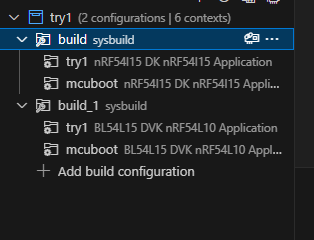
    west build --build-dir c:/ncs/Working_Directory/DFU_UART/DFU_with_app/DFU_Try2/try1/build c:/ncs/Working_Directory/DFU_UART/DFU_with_app/DFU_Try2/try1 --pristine --board bl54l15_dvk/nrf54l15/cpuapp --sysbuild -- -DCONF_FILE="prj.conf

    it should be nrf54l15dk/nrf54l15/cpuapp.

    I tried 2 builds one with your current board target and one with the correct one.

    The one with your current board target doesn't work while the one with nrf54l15dk/nrf54l15/cpuapp works as intended which makes sense to me looking at your warnings in your logs.

    Can you try this? If it still doesn't work, send me the logs again in a doc.

  • Hi thank you very much for your help. The target board was the issue. The application is running and I am able to DFU.


Reply Children
No Data
Related