Understanding the nRF54H20DK DeviceTree for multi-core

My understanding from the documentation is that:

- The application core (app) can use any pins/peripherals

- The radio core (rad) can use any pins/peripherals

- The PPR (ppr) core can use any pins/peripherals that are low-speed (16MHz)

- The FLPR (flpr) core can use any pins/peripherals

In the nRF54H20DK device tree though, most of the peripherals (buttons, LEDs, PWM) are only included in the nrf54h20dk_nrf54h20_cpuapp.dts file, meaning they can't be accessed by any of the other cores (rad, ppr, flpr).

Is there a reason for this (vs. defining them in the nrf54h20dk_nrf54h20-common.dtsi file), and is my understanding correct? How do I code this if I want to read one of the buttons from the PPR core, for example?

Parents
  • Hi,

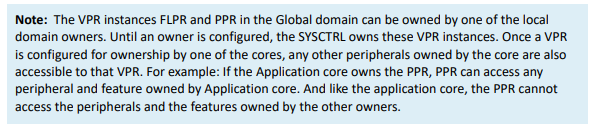
    Only the domain that have the peripheral defined in the devicetree can use the peripheral yes. By default everything might be setup to be used by the appcore, so if you want other domains or cores to use a specific peripheral then you need to add overlay files that ensure the peripheral is allocated to the domain you want to use the peripheral yes. One thing to be aware is the following text in the OPS that apply to the flpr and ppr cores:

    So I would say it's like this:

    If you search through the ncs repositories for instance for status = "okay" in the devicetree files for the ppr or flpr cores you can find some examples:
    *h20_cpuppr*.dts*,*h20_cpuppr*.overlay, *h20_cpuflpr*.dts*,*h20_cpuflpr*.overlay

    Then you can find a list of examples of how to assign a peripheral to be used by the flpr and ppr core.

    To avoid that appcore also initiated these peripherals the appcore can use status = "reserved" for the same peripheral, for instance search for status = "reserved" in appcore devicetree files:
    *h20_cpuapp*.dts*,*h20_cpuapp*.overlay

    If the peripheral is used by the radio core, then the appcore should use status = "disabled" for those peripherals the radio core use.

    Kenneth

Reply
  • Hi,

    Only the domain that have the peripheral defined in the devicetree can use the peripheral yes. By default everything might be setup to be used by the appcore, so if you want other domains or cores to use a specific peripheral then you need to add overlay files that ensure the peripheral is allocated to the domain you want to use the peripheral yes. One thing to be aware is the following text in the OPS that apply to the flpr and ppr cores:

    So I would say it's like this:

    If you search through the ncs repositories for instance for status = "okay" in the devicetree files for the ppr or flpr cores you can find some examples:
    *h20_cpuppr*.dts*,*h20_cpuppr*.overlay, *h20_cpuflpr*.dts*,*h20_cpuflpr*.overlay

    Then you can find a list of examples of how to assign a peripheral to be used by the flpr and ppr core.

    To avoid that appcore also initiated these peripherals the appcore can use status = "reserved" for the same peripheral, for instance search for status = "reserved" in appcore devicetree files:
    *h20_cpuapp*.dts*,*h20_cpuapp*.overlay

    If the peripheral is used by the radio core, then the appcore should use status = "disabled" for those peripherals the radio core use.

    Kenneth

Children
No Data
Related