Can not connect icarus 9160 with JLink of 9160 DK board and flash.

I'm trying to leverage the asset tracker project form nordic 9160dk to actinius icarus 9160 board, i use tagconnect 2030 to connect P19 of dk and icaurs, but the jlink cannot connect the board. I already register the board at actinius I/O, i'm sure i connected the tagconnect tightly. but here is the output of JLink:

$ "C:\Program Files\SEGGER\JLink_V794i\JLink.exe" -if SWD -device NRF9160_xxAA -speed 100
SEGGER J-Link Commander V7.94i (Compiled Feb 7 2024 17:10:08)
DLL version V7.94i, compiled Feb 7 2024 17:08:52

Connecting to J-Link via USB...O.K.
Firmware: J-Link OB-K22-NordicSemi compiled Oct 9 2024 11:01:23
Hardware version: V1.00
J-Link uptime (since boot): 0d 00h 51m 49s
S/N: 960065762
License(s): RDI, FlashBP, FlashDL, JFlash, GDB
USB speed mode: Full speed (12 MBit/s)
VTref=3.300V


Type "connect" to establish a target connection, '?' for help
J-Link>connect
Device "NRF9160_XXAA" selected.


Connecting to target via SWD
ConfigTargetSettings() start
---Setting ROM table---
ConfigTargetSettings() end - Took 552us
ConfigTargetSettings() start
---Setting ROM table---
ConfigTargetSettings() end - Took 644us
Cannot connect to target.

The dk number is visible via nrfjprog --ids, but any --memrd or --recover command fails.

here is how i connect dk and icarus:
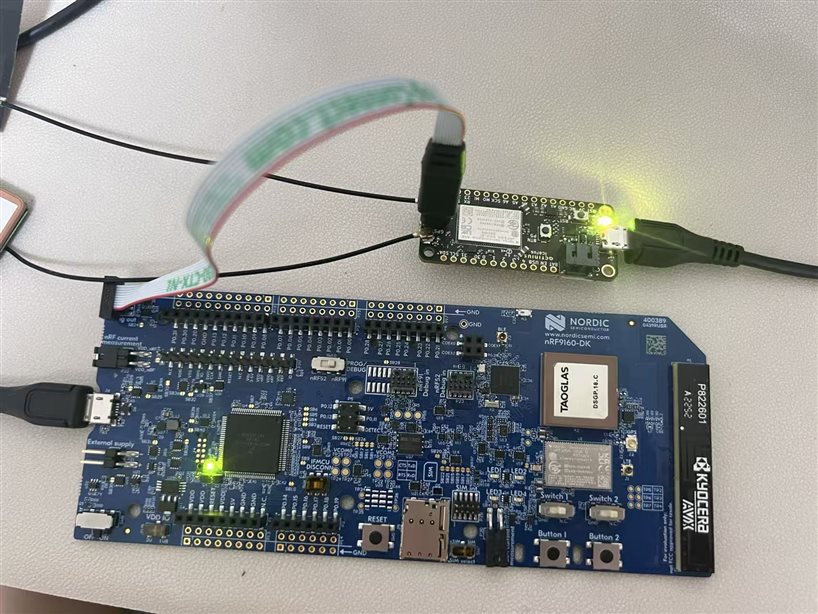
please help...

Parents
  • Hi,


    Have you set the "VDDIO" dip switch into 3V position? It is located just to the right of the power switch on the nRF9160-DK.

    i'm sure i connected the tagconnect tightly.

    If used often, these cables will degrade over time. Do you have another tagconnect to test with?

    The dk number is visible via nrfjprog --ids, but any --memrd or --recover command fails.

    Could you try to run recover in a loop via a batch script?

    :loop
    nrfjprog --recover -f NRF91
    goto loop


    Then power cycle your external board (icarus) and see if this is able to recover it.


    Kind regards,

    Håkon

Reply
  • Hi,


    Have you set the "VDDIO" dip switch into 3V position? It is located just to the right of the power switch on the nRF9160-DK.

    i'm sure i connected the tagconnect tightly.

    If used often, these cables will degrade over time. Do you have another tagconnect to test with?

    The dk number is visible via nrfjprog --ids, but any --memrd or --recover command fails.

    Could you try to run recover in a loop via a batch script?

    :loop
    nrfjprog --recover -f NRF91
    goto loop


    Then power cycle your external board (icarus) and see if this is able to recover it.


    Kind regards,

    Håkon

Children
No Data
Related