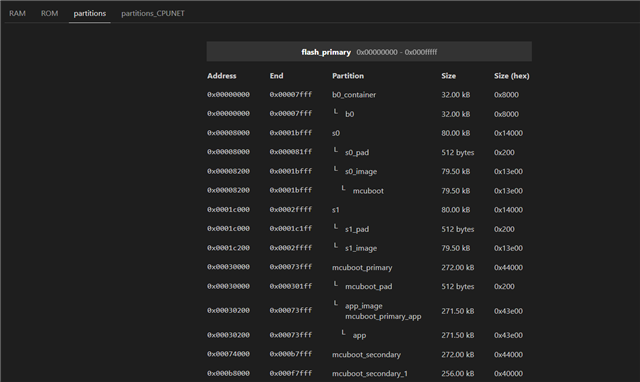
Hello,
I’m using the Thingy91X board (nRF5340). For my application, I need to run BLE and Wi-Fi simultaneously, so I have to increase the application size. To do this, I moved the secondary and secondary_1 slots to the external flash (I simply applied Nordic’s thingy91x_nrf5340_pm_static_ext_flash.yml in /nrf/boards/nordic/thingy91x).
According to common.dts, I enabled the external flash in my overlay:
/{
	chosen {
		zephyr,console = &rtt0;
		zephyr,shell-uart = &rtt0;
		zephyr,uart-mcumgr = &rtt0;
		zephyr,bt-mon-uart = &rtt0;
		zephyr,bt-c2h-uart = &rtt0;
        nordic,pm-ext-flash = &flash_ext; //here
	};
};

&spi3 {
    status = "okay";

    flash_ext: GD25LE255E@0 {
        status = "okay";
        reg = <0>;
        compatible = "jedec,spi-nor";
    };
};
I added the following Kconfig options to my prj.conf:
CONFIG_GPIO=y
CONFIG_SPI=y
CONFIG_SPI_NOR=y
CONFIG_SPI_NOR_SFDP_DEVICETREE=y
CONFIG_SPI_NOR_FLASH_LAYOUT_PAGE_SIZE=4096

CONFIG_FLASH=y
CONFIG_FLASH_MAP=y

CONFIG_PM_EXTERNAL_FLASH_MCUBOOT_SECONDARY=y
Following this tutorial: https://academy.nordicsemi.com/courses/nrf-connect-sdk-intermediate/lessons/lesson-9-bootloaders-and-dfu-fota/topic/exercise-3-dfu-with-external-flash/
mcuboot.conf
# Step 1.2 - Enable SPI driver for MCUboot
CONFIG_GPIO=y
CONFIG_SPI=y
CONFIG_SPI_NOR=y
CONFIG_SPI_NOR_SFDP_DEVICETREE=y
CONFIG_SPI_NOR_FLASH_LAYOUT_PAGE_SIZE=4096
# QSPI drivers are enabled by defualt for some chips.
# Disable it explicitly to be sure QSPI is disabled.
CONFIG_NORDIC_QSPI_NOR=n

# required by SPI driver
CONFIG_MULTITHREADING=y

CONFIG_BOOT_MAX_IMG_SECTORS=512
mucboot.overlay
/ {
	chosen {
        nordic,pm-ext-flash = &flash_ext;
	};
};

&spi3 {
    status = "okay";
    pinctrl-0 = <&spi3_default>;
    pinctrl-1 = <&spi3_sleep>;
    pinctrl-names = "default", "sleep";


    flash_ext: GD25LE255E@0 {
        status = "okay";
        reg = <0>;
        compatible = "jedec,spi-nor";
    };
};
Then, I created the sysbuild.conf and added the Kconfigs :
SB_CONFIG_PM_EXTERNAL_FLASH_MCUBOOT_SECONDARY=y
SB_CONFIG_PM_OVERRIDE_EXTERNAL_DRIVER_CHECK=y
My pm_static.yml is :
b0:
  address: 0x0
  size: 0x8000
  region: flash_primary
b0_container:
  address: 0x0
  size: 0x8000
  region: flash_primary
  span: [b0]
s0:
  address: 0x8000
  size: 0x14000
  span: [mcuboot, s0_pad]
  region: flash_primary
s0_pad:
  address: 0x8000
  size: 0x200
  share_size: [mcuboot_pad]
  region: flash_primary
s0_image:
  address: 0x8200
  size: 0x13e00
  span: [mcuboot]
  region: flash_primary
mcuboot:
  address: 0x8200
  size: 0x13e00
  region: flash_primary
s1:
  address: 0x1c000
  size: 0x14000
  span: [s1_pad, s1_image]
  region: flash_primary
s1_pad:
  address: 0x1c000
  size: 0x200
  region: flash_primary
  share_size: [mcuboot_pad]
s1_image:
  address: 0x1c200
  size: 0x13e00
  share_size: [mcuboot]
  region: flash_primary
mcuboot_primary:
  address: 0x30000
  size: 0xcc000
  span: [mcuboot_pad, app]
  region: flash_primary
mcuboot_pad:
  address: 0x30000
  size: 0x200
  region: flash_primary
mcuboot_primary_app:
  address: 0x30200
  size: 0xcbe00
  span: [app]
  region: flash_primary
app_image:
  address: 0x30200
  size: 0xcbe00
  span: [app]
  region: flash_primary
app:
  address: 0x30200
  size: 0xcbe00
  region: flash_primary
settings_storage:
  address: 0xfc000
  size: 0x4000
  region: flash_primary

external_flash:
  device: DT_CHOSEN(nordic_pm_ext_flash)
  address: 0x0
  size: 0x2000000
  span: [mcuboot_secondary]
  region: external_flash
mcuboot_secondary:
  device: DT_CHOSEN(nordic_pm_ext_flash)
  address: 0x0
  size: 0xcc000
  share_size: [mcuboot_primary]
  region: external_flash
mcuboot_secondary_1:
  address: 0xcc000
  size: 0x40000
  device: DT_CHOSEN(nordic_pm_ext_flash)
  region: external_flash
pcd_sram:
  address: 0x20000000
  size: 0x2000
  region: sram_primary
sram_retained_mem:
  region: sram_primary
  address: 0x2007FC00
  size: 0x400
My main app just blink a led (it works without changing partition).
#include <zephyr/kernel.h>
#include <zephyr/sys/printk.h>
#include <zephyr/drivers/gpio.h>

#define LED0_NODE DT_ALIAS(led0)

static const struct gpio_dt_spec led = GPIO_DT_SPEC_GET(LED0_NODE, gpios);

int main(void) {
  printk("BOOTING...\n");

  if (!gpio_is_ready_dt(&led)) {
    printk("1\n");
    return 0;
  }

  int ret = gpio_pin_configure_dt(&led, GPIO_OUTPUT_ACTIVE);
  if (ret < 0)
  {
    printk("2\n");
    return 0;
  }

  while (1) {
    k_msleep(100);
    ret = gpio_pin_toggle_dt(&led);
    if( ret < 0)
    {
      printk("3\n");
      return 0;
    }
    printk("BOOTING...\n");
  }
}
I used J-Link GDB to check whether the code is the issue. When I load the .elf and set a breakpoint at main, the breakpoint is hit, but I see nothing on RTT and the LED does not toggle.
Do you have any ideas ?