

Hello,
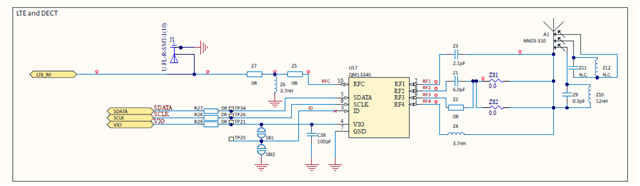
I am developing a custom IoT device based on the nRF9151 SiP with a Qorvo QM13345 SP4T antenna switch controlled via RFFE 2.1 interface. All RFFE AT commands fail with error 65536, preventing antenna switch control and resulting in no cellular signal (CSQ: 99,99).
## Hardware Configuration
- **Device**: nRF9151 (nrf9151dk/nrf9151/ns)
- **Antenna Switch**: Qorvo QM13345 SP4T (RFFE 2.1 controlled)
- **Current Modem Firmware**: mfw_nrf91x1_2.0.2
- **SDK**: nRF Connect SDK v3.0.2-89ba1294ac9b
- **Zephyr**: v4.0.99-f791c49f492c
## RFFE Hardware Connections
```
nRF9151 QM13345
Pin 27 -------> SDATA (Pin 5)
Pin 28 -------> SCLK (Pin 6)
Pin 29 -------> VIO (Pin 4)
GND ----------> GND (Pin 7)
```
**Connections**:
- SDATA (pin 27) → nRF9151 RFFE_SDATA
- SCLK (pin 28) → nRF9151 RFFE_SCLK
- VIO (pin 29) → nRF9151 RFFE_VIO
- RF1 (pin 3) → Main LTE antenna port
- RFC (pin 1) → nRF9151 RF output
QM13345 ID pin connected to solder bridge (SB1/SBI2) for USID configuration.
## Software Configuration
I've enabled Nordic's official modem antenna library:
```kconfig
CONFIG_MODEM_ANTENNA=y
CONFIG_MODEM_ANTENNA_AT_MAGPIO="AT%XMAGPIO=1,0,0,1,1,1574,1577"
CONFIG_MODEM_ANTENNA_AT_MIPIRFFEDEV="AT%XMIPIRFFEDEV=1,7,0"
CONFIG_MODEM_ANTENNA_AT_MIPIRFFECTRL_INIT="AT%XMIPIRFFECTRL=1,0,1,0,1"
CONFIG_MODEM_ANTENNA_AT_MIPIRFFECTRL_ON="AT%XMIPIRFFECTRL=1,1,1,0,1"
CONFIG_MODEM_ANTENNA_AT_MIPIRFFECTRL_OFF="AT%XMIPIRFFECTRL=1,2,1,0,0"
CONFIG_MODEM_ANTENNA_AT_MIPIRFFECTRL_PWROFF="AT%XMIPIRFFECTRL=1,3,1,0,0"
```
## Observed Behavior
During modem initialization, all RFFE configuration attempts fail:
```
[00:00:02.900,329] <err> modem_antenna: Failed to set configuration (err: 65536)
[00:00:02.909,454] <err> modem_antenna: Failed to set configuration (err: 65536)
[00:00:02.924,560] <err> modem_antenna: Failed to set configuration (err: 65536)
[00:00:02.939,697] <err> modem_antenna: Failed to set configuration (err: 65536)
[00:00:02.954,833] <err> modem_antenna: Failed to set configuration (err: 65536)
```
Manual AT command testing confirms RFFE commands are not supported:
```
AT%XMIPIRFFEDEV? → Error 65536
AT%XMIPIRFFE? → Error 65536
AT%XMIPIRFFECTRL=1,0,1,0,1 → Error 65536
AT%XRFTEST? → Error 65536
```
Modem otherwise functions correctly:
- Basic AT commands work (AT, AT+CGMI, etc.)
- SIM card detected and powered (IMSI: 222013423872426)
- Modem enters full functionality mode (CFUN=1) successfully
- No cellular signal: CSQ returns 99,99 (no signal detected)
## Comparison with Nordic Reference Design
I noticed the Thingy:91 X (PCA20035) with nRF9151 successfully uses RFFE commands in its configuration:
From `/home/nrf/boards/nordic/thingy91x/Kconfig.defconfig.nrf9151`:
```kconfig
config MODEM_ANTENNA_AT_MIPIRFFEDEV
default "AT%XMIPIRFFEDEV=1,4,71,198,248"
config MODEM_ANTENNA_AT_MIPIRFFECTRL_INIT
default "AT%XMIPIRFFECTRL=1,0,1,28,248"
config MODEM_ANTENNA_AT_MIPIRFFECTRL_ON
default "AT%XMIPIRFFECTRL=1,1,1,28,56,13,0,0,8,8,715,4,4,770,12,12,829..."
```
This confirms that nRF9151 SHOULD support RFFE commands for antenna switch control.
## Questions
1. **Does modem firmware 2.0.2 support RFFE 2.1 commands?**
- If not, which firmware version first introduced RFFE support?
- Is there a firmware update roadmap for RFFE support on nRF9151?
2. **How does the Thingy:91 X control its antenna switch with nRF9151?**
- Does it use a different modem firmware version?
- Are there any special modem configuration steps required?
3. **Is there an alternative method to control RFFE devices on nRF9151?**
- Can MAGPIO be used as a fallback for antenna switching?
- Are there any undocumented AT commands for RF path control?
4. **What is the recommended approach for antenna switching on nRF9151?**
- Should I use RFFE-controlled switches (QM13345)?
- Or should I use GPIO-controlled switches (SKY13453, PE42423)?
## Additional Information
I've tested both production firmware 2.0.2 and production test firmware 2.3.8:
- **2.0.2**: RFFE commands fail with error 65536
- **2.3.8**: PTI firmware blocks most AT commands (restricted mode for factory testing)
The hardware design follows the QM13345 datasheet requirements:
- RFFE 2.1 interface properly connected
- VIO decoupling capacitor present
- Proper grounding
- ID pin configured for USID=0x7 (GND connection)
## Expected Outcome
I need to successfully control the QM13345 antenna switch to route RF signals from the nRF9151 modem (RFC) to the main antenna (RF1 port). This is blocking cellular connectivity testing.
## Request
Please provide:
1. Confirmation of RFFE support status in nRF9151 firmware versions
2. Recommended firmware version for RFFE-controlled antenna switches
3. Example configuration or AT command sequence for QM13345 control
4. Timeline for RFFE support if not currently available
## Attachments
- Full RTT log showing RFFE command failures
- Hardware schematic (relevant RFFE section)
- prj.conf configuration file
Thank you for your assistance.
(Connection lost)
00> [00:00:00.397,033] <inf> LSM6DSO: Initialize device lsm6dso@6b
00> [00:00:00.404,602] <inf> LSM6DSO: chip id 0x6a
00> [00:00:00.409,973] <err> nt3h2111: I2C read failed: -5
00> [00:00:00.416,168] <err> nt3h2111: Failed to read configuration: -5
00> [00:00:00.423,522] <wrn> nt3h2111: NT3H2111 may not be physically connected, continuing with defaults
00> [00:00:00.439,453] <inf> veml6030: VEML6030 initialized successfully
00> *** Booting My Application v1.0.0-704e3ba7cb7b ***
00> *** Using nRF Connect SDK v3.0.2-89ba1294ac9b ***
00> *** Using Zephyr OS v4.0.99-f791c49f492c ***
00> [00:00:00.460,021] <inf> main_app: Starting Multi-Sensor IoT Device Firmware
00> [00:00:00.467,895] <inf> main_app: Skipping config manager init for debugging
00> [00:00:00.475,860] <inf> main_app: Data transmission interval set to 60 seconds
00> [00:00:00.484,039] <inf> battery_monitor: Battery monitor initialized (LTC4060 charger)
00> [00:00:00.492,919] <inf> main_app: Battery m[00:00:02.648,162] <inf> main_app: Calling nrf_modem_lib_init()...
00> [00:00:02.902,191] <err> modem_antenna: Failed to set configuration (err: 65536)
00> [00:00:02.911,254] <err> modem_antenna: Failed to set configuration (err: 65536)
00> [00:00:02.926,391] <err> modem_antenna: Failed to set configuration (err: 65536)
00> [00:00:02.941,467] <err> modem_antenna: Failed to set configuration (err: 65536)
00> [00:00:02.956,573] <err> modem_antenna: Failed to set configuration (err: 65536)
00> [00:00:02.986,389] <inf> main_app: nrf_modem_lib_init() returned: 0
00> [00:00:02.993,469] <inf> main_app: Modem library initialized successfully
00> [00:00:03.001,098] <inf> main_app: Waiting for modem to be fully ready...
00> [00:00:13.008,728] <wrn> main_app: Modem ready timeout - proceeding anyway
00> [00:00:16.016,754] <inf> main_app: Testing AT interface (attempt 2)...
00> [00:00:16.030,456] <inf> main_app: Modem responding: OK
00>
00> [00:00:16.036,651] <inf> main_app: Getting modem information...
00> [00:00:16.049,926] <wrn> main_app: Failed to get modem info (err=65536)
00> [00:00:16.064,147] <inf> main_app: Manufacturer: Nordic Semiconductor ASA
00> OK
00>
00> [00:00:16.078,765] <inf> main_app: Modem firmware version: mfw_nrf91x1_2.0.2
00> OK
00>
00> [00:00:16.087,219] <inf> main_app: === CHECKING RFFE COMMAND SUPPORT ===
00> [00:00:16.101,379] <wrn> main_app: XMIPIRFFEDEV not supported (err=65536)
00> [00:00:16.115,936] <wrn> main_app: XMIPIRFFE not supported (err=65536)
00> [00:00:16.130,218] <wrn> main_app: XRFTEST not supported (err=65536)
00> [00:00:16.144,317] <wrn> main_app: %XRFTEST not supported (err=65536)
00> [00:00:16.158,477] <wrn> main_app: %XMIPIRFFE not supported (err=65536)
00> [00:00:16.166,198] <inf> main_app: === END RFFE COMMAND CHECK ===
00> [00:00:16.173,095] <err> main_app: ====================================
00> [00:00:16.180,786] <err> main_app: CRITICAL HARDWARE ISSUE DETECTED!
00> [00:00:16.188,232] <err> main_app: ====================================
00> [00:00:16.195,953] <err> main_app: QM13345 antenna switch requires RFFE 2.1 protocol
00> [00:00:16.204,833] <err> main_app: nRF9151 modem firmware 2.0.2 does NOT support RFFE
00> [00:00:16.213,806] <err> main_app: Without RFFE, the antenna switch cannot be controlled
00> [00:00:16.223,052] <err> main_app: The switch may be in an undefined/OFF state
00> [00:00:16.231,384] <err> main_app:
00> [00:00:16.235,839] <err> main_app: WORKAROUND ATTEMPT:
00> [00:00:16.242,004] <err> main_app: The QM13345 ID pin configuration may set a default state
00> [00:00:16.251,525] <err> main_app: Your board has ID pin connected to solder bridge SB1/SBI2
00> [00:00:16.261,138] <err> main_app: Check if the solder bridge routes to GND (USID=0x7)
00> [00:00:16.270,172] <err> main_app: ====================================
00> [00:00:16.284,301] <inf> main_app: CFUN state check succeeded: +CFUN: 0
00> OK
00>
00> [00:00:16.292,297] <wrn> main_app: Modem is in offline/airplane mode - needs activation!
00> [00:00:16.301,544] <inf> main_app: Configuring cellular connection for Telnyx (APN: data00.telnyx)...
00> [00:00:16.311,676] <inf> main_app: Following Nordic forum recommended sequence...
00> [00:00:16.320,007] <inf> main_app: Step 1: Setting CFUN=0 to disable radio...
00> [00:00:16.365,478] <inf> main_app: Radio disabled: OK
00>
00> [00:00:17.371,520] <inf> main_app: Step 2: Setting automatic operator selection (AT+COPS=0)...
00> [00:00:17.387,542] <inf> main_app: Operator selection set to automatic: OK
00>
00> [00:00:17.395,446] <inf> main_app: Step 3: Setting system mode (LTE-M and NB-IoT)...
00> [00:00:17.410,705] <wrn> main_app: System mode config failed (err=65536)
00> [00:00:17.418,518] <inf> main_app: Step 4: Configuring Telnyx APN (data00.telnyx)...
00> [00:00:17.433,685] <inf> main_app: APN configured: OK
00>
00> [00:00:17.439,666] <inf> main_app: Step 7: Activating modem (AT+CFUN=1)...
00> [00:00:17.447,387] <inf> main_app: No search commands active - safe to activate!
00> [00:00:17.500,762] <inf> main_app: CFUN=1 set successfully: OK
00>
00> [00:00:17.507,568] <inf> main_app: Waiting for modem to stabilize...
00> [00:00:20.514,801] <inf> main_app: Verifying modem state...
00> [00:00:20.521,484] <inf> main_app: SUCCESS: Modem is in full functionality mode
00> [00:00:20.529,632] <inf> main_app: Enabling SIM card power supply...
00> [00:00:20.536,773] <inf> main_app: Forcing SIM card power enable...
00> [00:00:20.544,219] <inf> main_app: Network registration notifications enabled: OK
00>
00> [00:00:20.553,283] <wrn> main_app: XSIM not supported (err=65536)
00> [00:00:20.560,455] <inf> main_app: Triggering SIM communication to enable power...
00> [00:00:20.569,274] <inf> main_app: IMSI read (forces SIM power): 222013423872426
00> OK
00>
00> [00:00:20.579,040] <wrn> main_app: XICCID failed (err=65536)
00> [00:00:20.585,784] <inf> main_app: Ensuring modem is in full functionality mode...
00> [00:00:20.594,543] <inf> main_app: Current CFUN state: +CFUN: 1
00> OK
00>
00> [00:00:20.601,806] <inf> main_app: Querying SIM status multiple times to ensure power...
00> [00:00:21.111,236] <inf> main_app: SIM status attempt 1: +CPIN: READY
00> OK
00>
00> [00:00:21.119,049] <inf> main_app: SIM detected and powered!
00> [00:00:22.125,518] <inf> main_app: =====================================
00> [00:00:22.133,026] <inf> main_app: SIM POWER STATUS:
00> [00:00:22.138,763] <inf> main_app: =====================================
00> [00:00:22.146,270] <inf> main_app: IMPORTANT: Pin 19 (SIM_1V8) only outputs voltage during SIM communication!
00> [00:00:22.157,135] <inf> main_app: The voltage will appear when modem actively talks to SIM.
00> [00:00:22.166,473] <inf> main_app: RST showing -1.8V indicates partial SIM interface activation.
00> [00:00:22.176,147] <inf> main_app: Please measure NOW while firmware is running:
00> [00:00:22.184,387] <inf> main_app:   - SIM VCC (pin C1): Should show 1.8V during communication
00> [00:00:22.193,908] <inf> main_app:   - SIM RST (pin C2): -1.8V is normal (active low)
00> [00:00:22.202,575] <inf> main_app: =====================================
00> [00:00:22.710,510] <inf> main_app: SIM detection after power enable: +CPIN: READY
00> OK
00>
00> [00:00:22.719,390] <inf> main_app: SUCCESS: SIM card detected and ready!
00> [00:00:22.726,928] <inf> main_app: ====================================
00> [00:00:22.734,344] <err> main_app: ANTENNA SWITCH ISSUE DETECTED!
00> [00:00:22.741,485] <inf> main_app: ====================================
00> [00:00:22.748,931] <err> main_app: QM13345 uses RFFE 2.1 protocol
00> [00:00:22.756,072] <err> main_app: nRF9151 firmware 2.0.2 does NOT support RFFE commands
00> [00:00:22.765,319] <err> main_app: The antenna switch cannot be properly controlled!
00> [00:00:22.774,200] <inf> main_app: Attempting workarounds...
00> [00:00:22.781,280] <wrn> main_app: XMIPIRFFEDEV failed (err=65536) - device may already be configured
00> [00:00:22.792,449] <wrn> main_app: XMIPIRFFECTRL INIT failed (err=65536)
00> [00:00:22.800,964] <wrn> main_app: XMIPIRFFECTRL ON failed (err=65536)
00> [00:00:22.809,448] <wrn> main_app: XMIPIRFFEDBG read failed (err=65536)
00> [00:00:22.818,115] <wrn> main_app: XANTCFG failed (err=65536)
00> [00:00:22.824,951] <inf> main_app: ====================================
00> [00:00:22.832,397] <err> main_app: RFFE Configuration FAILED - Commands Not Supported!
00> [00:00:22.841,430] <err> main_app: QM13345 antenna switch is NOT properly configured
00> [00:00:22.850,311] <inf> main_app: ====================================
00> [00:00:22.857,727] <inf> main_app: Attempting alternative antenna configuration methods...
00> [00:00:22.867,431] <wrn> main_app: MAGPIO not available (err=65536)
00> [00:00:22.875,335] <wrn> main_app: Cannot get antenna tuning (err=65536)
00> [00:00:22.883,148] <inf> main_app: ====================================
00> [00:00:22.890,594] <err> main_app: CRITICAL: HARDWARE INCOMPATIBILITY
00> [00:00:22.898,101] <err> main_app: ====================================
00> [00:00:22.905,792] <err> main_app: Problem: QM13345 antenna switch requires RFFE 2.1 protocol
00> [00:00:22.915,496] <err> main_app: Issue: nRF9151 firmware 2.0.2 does NOT support RFFE
00> [00:00:22.924,530] <err> main_app: Result: Antenna switch stuck in unknown/OFF state
00> [00:00:22.933,380] <err> main_app:
00> [00:00:22.937,835] <err> main_app: POSSIBLE SOLUTIONS:
00> [00:00:22.944,030] <err> main_app: 1. Hardware modification: Bypass QM13345 (connect RFC to RF1 directly)
00> [00:00:22.954,772] <err> main_app: 2. Add pull-up resistor on V1 (pin 8) to force RF1 selection
00> [00:00:22.964,660] <err> main_app: 3. Wait for Nordic to release RFFE-enabled firmware
00> [00:00:22.973,693] <err> main_app: 4. Use external GPIO to control V1-V4 pins (requires PCB rework)
00> [00:00:22.983,917] <err> main_app: ====================================
00> [00:00:23.092,803] <inf> main_app: Checking RF test mode capabilities...
00> [00:00:23.100,982] <wrn> main_app: RF test mode not available (err=65536)
00> [00:00:23.109,252] <inf> main_app: Radio functionality: +CFUN: 1
00> OK
00>
00> [00:00:23.116,607] <inf> main_app: Radio is enabled (CFUN=1)
00> [00:00:23.123,626] <inf> main_app: RF switch configuration attempts completed
00> [00:00:23.131,591] <inf> main_app: ====================================
00> [00:00:23.139,038] <inf> main_app: ====================================
00> [00:00:23.146,453] <inf> main_app: QUICK SIGNAL CHECK BEFORE ATTACHMENT
00> [00:00:23.153,869] <inf> main_app: ====================================
00> [00:00:23.161,743] <inf> main_app: Signal strength: +CSQ: 99,99
00> OK
00>
00> [00:00:23.169,006] <wrn> main_app: NO SIGNAL DETECTED (CSQ: 99,99)
00> [00:00:23.176,239] <wrn> main_app: Check antenna connection!
00> [00:00:23.183,288] <inf> main_app: SIM status: +CPIN: READY
00> OK
00>
00> [00:00:23.190,185] <inf> main_app: ====================================
00> [00:00:23.197,631] <inf> main_app: Step 8: Waiting for network attachment (AT+CGATT)...
00> [00:00:23.206,909] <inf> main_app: [Attempt 1/30] Not attached yet: +CGATT: 0
00> OK
00>
(Connection lost)
 5305.prj.conf
