Power Profiler II Kit Connecting Forever / Doesn't Connect

Hi,

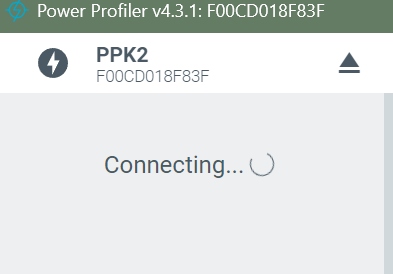
I'm unable to get the PPKII kit to "connect" to my PC.  After selecting the device it just says "Connecting..." forever.

Some notes:
- When first connecting the kit it came up and asked me to update the FW, which completed successfully.
- I'm able to force the device back into Bootloader mode and I attempted to update the FW a few more times with the same result.
- I'm using a windows 11 PC with nRF Connect Desktop v5.2.0 and Power Profiler App v4.3.1.  Verified both are the latest versions.
- I tried uninstalling and reinstalling both PPKII App and nRF Connect Desktop.
- I can see and select the device as "PPK2 (F00CD018F83F.  Log info below.
- The LED is blinking green while trying to connect
- I tried the device on another PC and it worked fine and connected right away.  Tried my PC and again it doesn't connect.
- I've used both the Programmer and Serial Terminal nRF Connect Apps with this PC with no issue.
[[UPDATED:
- Tried rebooting PC and attempting with a clean boot with nothing else running.
- Tried removing all other USB connections to the PC except for the PPKII.
- Tried multiple USB cables and multiple ports, and used the same USB cable on the other PC where the connection worked.
- Tried manual flash using the Programmer tool and file pca63100_ppk2_1.2.4_db16a94.hex found at: C:\Users\<your_user>\.nrfconnect-apps\node_modules\pc-nrfconnect-ppk\firmware
- Verified connected to USB DATA/POWER connection.  Also tried connecting to both at the same time.
]]

Device Manager shows the following while trying to connect:
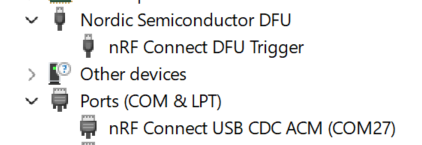


Connecting status:
Log info #1 (Segger was attached using older JLink V8.18):
12:13:22.874 Initialising the bundled nrfutil device
12:13:23.178 Using the bundled core version for nrfutil device: 8.0.0
12:13:23.224 Using nrfutil-device version: 2.10.2
12:13:23.224 Using nrf-device-lib version: 0.17.71
12:13:23.224 Using nrf-probe version: 0.38.0
12:13:23.224 Using JLink version: JLink_V8.18
12:13:23.628 Getting serial port options from the persistent store for F00CD018F83F.pc-nrfconnect-ppk
12:13:23.628 Getting serial port options from the persistent store for 000519002569.pc-nrfconnect-ppk
12:13:23.629 Device connected with the serial number F00CD018F83F
12:13:23.634 Device connected with the serial number 000519002569
12:13:29.014 Device connected with the serial number F00CD018F83F
12:13:33.196 Getting serial port options from the persistent store for F00CD018F83F.pc-nrfconnect-ppk
12:13:33.197 Device connected with the serial number F00CD018F83F
12:13:33.545 Getting serial port options from the persistent store for F00CD018F83F.pc-nrfconnect-ppk
12:13:33.889 Getting serial port options from the persistent store for F00CD018F83F.pc-nrfconnect-ppk
12:13:44.812 Selecting device with the serial number F00CD018F83F
12:13:45.385 Selected device with the serial number F00CD018F83F
12:13:45.386 Connected to the device with the serial number F00CD018F83F and family: Unknown

[[UPDATED:
Log info #2 (No Segger device attached, newer JLink V8.74):
10:25:41.774 Initialising the bundled nrfutil device
10:25:42.050 Using the bundled core version for nrfutil device: 8.0.0
10:25:42.091 Using nrfutil-device version: 2.10.2
10:25:42.091 Using nrf-device-lib version: 0.17.71
10:25:42.091 Using nrf-probe version: 0.38.0
10:25:42.091 Using JLink version: JLink_V8.74
10:25:42.092 Your version of SEGGER J-Link (8.74) is newer than the one this app was tested with (8.18). The tested version is not required, and your J-Link version will most likely work fine. If you get issues related to J-Link with your devices, use the tested version.
10:25:52.024 Getting serial port options from the persistent store for F00CD018F83F.pc-nrfconnect-ppk
10:25:52.025 Device connected with the serial number F00CD018F83F
10:25:52.344 Getting serial port options from the persistent store for F00CD018F83F.pc-nrfconnect-ppk
10:25:52.662 Getting serial port options from the persistent store for F00CD018F83F.pc-nrfconnect-ppk
10:25:57.833 Selecting device with the serial number F00CD018F83F
10:25:58.400 Selected device with the serial number F00CD018F83F
10:25:58.401 Connected to the device with the serial number F00CD018F83F and family: Unknown
]]

I searched the forums, but didn't easily find anything else.

Any help would be appreciated.  Thanks.

  • Hi Dejan,

    I enabled verbose logging.  Here is the log:

    10:48:07.359  Initialising the bundled nrfutil device
    10:48:07.625  Using the bundled core version for nrfutil device: 8.0.0
    10:48:07.642  [PID:16320] nrfutil-device (version = 2.10.2, platform = x86_64-pc-windows-msvc, classification = nrf-external) invoked with list --traits nordicUsb,nordicDfu,serialPorts,jlink --hotplug --json --log-output=stdout --log-level trace
    10:48:07.649  [PID:16320] [ProbeLib] [2025-10-08 15:48:07.649108Z] Opened J-Link DLL at C:\Program Files\SEGGER\JLink\JLink_x64.dll with version 8.18
    10:48:07.672  Using nrfutil-device version: 2.10.2
    10:48:07.672  Using nrf-device-lib version: 0.17.71
    10:48:07.673  Using nrf-probe version: 0.38.0
    10:48:07.673  Using JLink version: JLink_V8.18
    10:48:07.712  [PID:16320] [ProbeLib] [2025-10-08 15:48:07.712294Z] Opened J-Link DLL at C:\Program Files\SEGGER\JLink\JLink_x64.dll with version 8.18
    10:48:07.715  [PID:16320] [ProbeLib] [2025-10-08 15:48:07.715376Z] Found 0 attached J-Link devices
    10:48:34.160  [PID:16320] [ProbeLib] [2025-10-08 15:48:34.160507Z] Opened J-Link DLL at C:\Program Files\SEGGER\JLink\JLink_x64.dll with version 8.18
    10:48:34.162  [PID:16320] [ProbeLib] [2025-10-08 15:48:34.162507Z] Found 0 attached J-Link devices
    10:48:34.513  Getting serial port options from the persistent store for F00CD018F83F.pc-nrfconnect-ppk
    10:48:34.515  Device connected with the serial number F00CD018F83F
    10:48:34.601  [PID:16320] [ProbeLib] [2025-10-08 15:48:34.600383Z] Opened J-Link DLL at C:\Program Files\SEGGER\JLink\JLink_x64.dll with version 8.18
    10:48:34.603  [PID:16320] [ProbeLib] [2025-10-08 15:48:34.603464Z] Found 0 attached J-Link devices
    10:48:34.846  Getting serial port options from the persistent store for F00CD018F83F.pc-nrfconnect-ppk
    10:48:34.935  [PID:16320] [ProbeLib] [2025-10-08 15:48:34.934873Z] Opened J-Link DLL at C:\Program Files\SEGGER\JLink\JLink_x64.dll with version 8.18
    10:48:34.939  [PID:16320] [ProbeLib] [2025-10-08 15:48:34.939030Z] Found 0 attached J-Link devices
    10:48:35.190  Getting serial port options from the persistent store for F00CD018F83F.pc-nrfconnect-ppk
    10:48:44.386  Selecting device with the serial number F00CD018F83F
    10:48:44.485  [PID:10444] nrfutil-device (version = 2.10.2, platform = x86_64-pc-windows-msvc, classification = nrf-external) invoked with device-info --serial-number F00CD018F83F --json --log-output=stdout --log-level trace
    10:48:44.495  [PID:10444] [ProbeLib] [2025-10-08 15:48:44.495511Z] Opened J-Link DLL at C:\Program Files\SEGGER\JLink\JLink_x64.dll with version 8.18
    10:48:44.569  [PID:10444] [ProbeLib] [2025-10-08 15:48:44.568457Z] Opened J-Link DLL at C:\Program Files\SEGGER\JLink\JLink_x64.dll with version 8.18
    10:48:44.572  [PID:10444] [ProbeLib] [2025-10-08 15:48:44.572043Z] Found 0 attached J-Link devices
    10:48:44.972  Selected device with the serial number F00CD018F83F
    10:48:44.974  Connected to the device with the serial number F00CD018F83F and family: Unknown


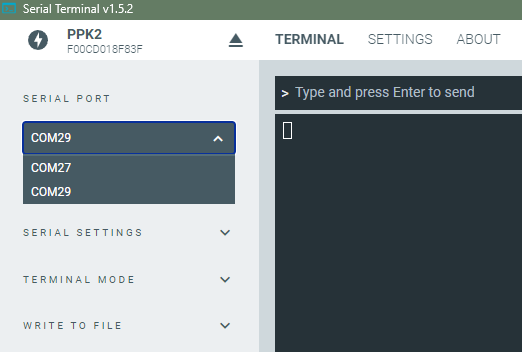
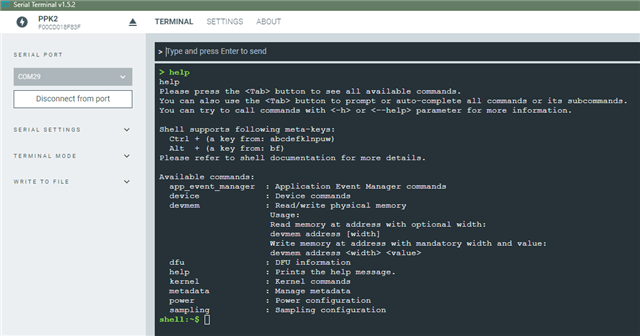
    When I connect via serial port, I don't have VCOM0 and VCOM1.  I have VCOM27 and VCOM29.  I assuming this is ok as the COM ports just increment as new devices are used.
    I can connect to the Serial Terminal, and once connected I can change from VCOM27 to VCOM29.  VCOM29 comes up with the shell.  Pictures below.


  • HI Dejan,

    Great news!  I was able to fix the issue and it works now.

    After you had told me to check the COM ports 0 and 1 and saw that mine were 27 and 29 (I didn't find it strange that they were higher numbers), but I did think it strange that they weren't consecutive.  Assumed that 28 must have already been taken somehow, but decided to see if this was the issue.

    I did some reading on how to reset the COM numbers.  I tried messing with the COM Port Arbiter in the Registry, but this just freed-up or changed the numbering (didn't impact the installed devices).

    I had previously tried uninstalling the COM ports (and drivers) from the device manager while connected to the device and it didn't help anything (they came back with the same numbers).

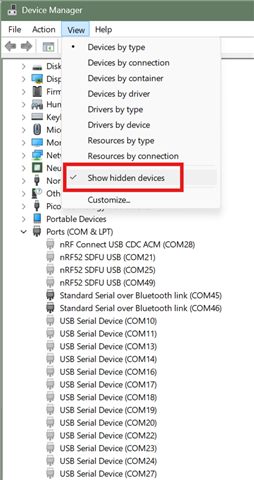
    I found a tip that you can enable hidden devices in the device manager.  This let me see all the COM ports including the PPKs while not connected to it.  I uninstalled 27, 28 and 29 and then reconnected.  I noticed the COM ports changed from 27 and 29 to 27 and 28.  However, it still didn't work.  

    I then realized when scanning down the list that COM27 was in the list twice.  No idea how this happened, but removed both 27s and 28 again and reconnected and now it works!

    Thanks for you help and sticking with this.


Related