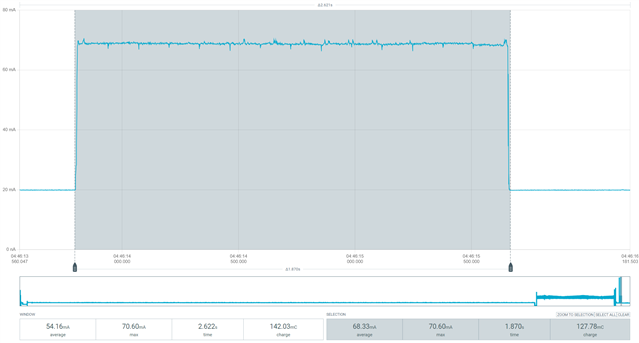
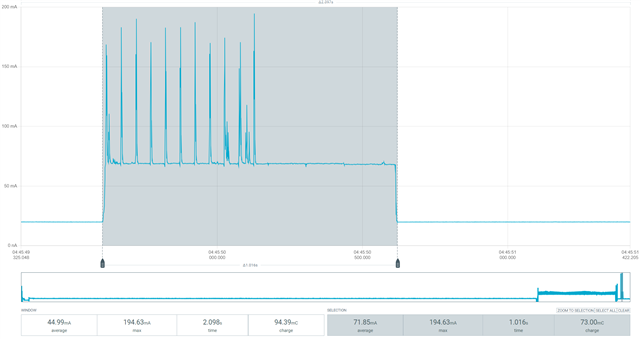
nRF7000 sleep current

Hello,

According to the nRF7000 specification, the sleep current should be around 15 µA. Electrical specification

We have a custom PCB with nRF9160 + nRF7000, and the issue is that after enabling nRF7000 support in the application, the idle current of the PCB increases by about 160 µA.

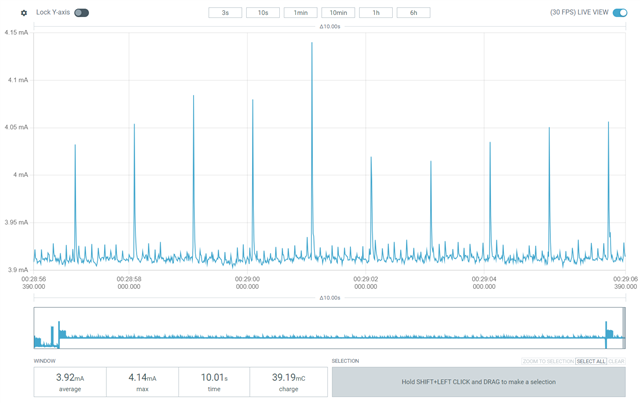
Without nRF7000
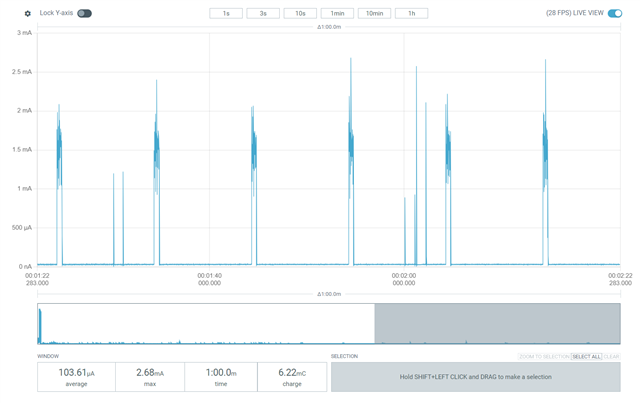
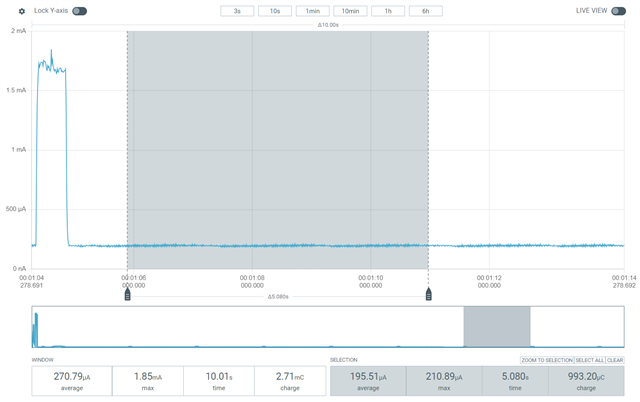
With nRF7000
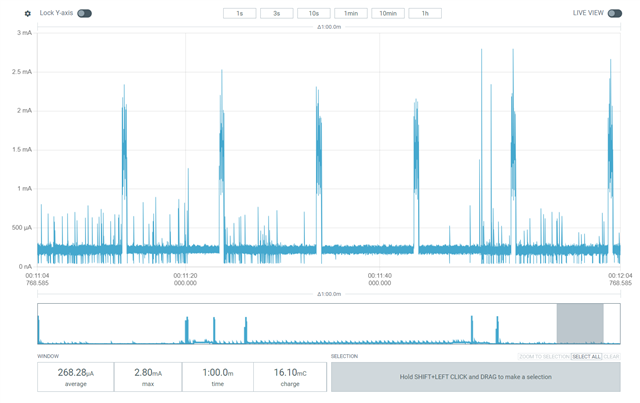
To add support, we included the following configuration:

# Actual configs for the Wi-Fi
CONFIG_WIFI=y
CONFIG_WIFI_NRF70=y
CONFIG_WIFI_NRF70_SKIP_LOCAL_ADMIN_MAC=y
# Align this with CONFIG_LOCATION_METHOD_WIFI_SCANNING_RESULTS_MAX_CNT
CONFIG_NRF_WIFI_SCAN_MAX_BSS_CNT=10

CONFIG_NRF_WIFI_CTRL_HEAP_SIZE=10240

# Wi-Fi location
CONFIG_LOCATION_METHOD_WIFI=y

# Align this with CONFIG_NRF_WIFI_SCAN_MAX_BSS_CNT
CONFIG_LOCATION_METHOD_WIFI_SCANNING_RESULTS_MAX_CNT=10

# Not for LTE throughput testing
CONFIG_NRF_MODEM_LIB_SHMEM_TX_SIZE=4096
CONFIG_NRF_MODEM_LIB_SHMEM_RX_SIZE=4096

CONFIG_NRF_WIFI_2G_BAND=y
CONFIG_NRF_WIFI_5G_BAND=n
CONFIG_NRF_WIFI_LOW_POWER=y

# System settings
CONFIG_NEWLIB_LIBC=y
CONFIG_NEWLIB_LIBC_FLOAT_PRINTF=y

# Scan only using offload API
CONFIG_WIFI_NM_WPA_SUPPLICANT=n

# For nRF9160 the default is socket interface
CONFIG_NET_DEFAULT_IF_ETHERNET=y
CONFIG_MBEDTLS=n
CONFIG_NORDIC_SECURITY_BACKEND=n

# Networking
CONFIG_NET_L2_ETHERNET=y
CONFIG_NET_NATIVE=y
CONFIG_NET_DHCPV4=y
#CONFIG_NET_STATISTICS=y
#CONFIG_NET_STATISTICS_WIFI=y
#CONFIG_NET_STATISTICS_USER_API=y
#CONFIG_NET_CONTEXT_SYNC_RECV=y
# Disable unused networking options
CONFIG_NET_IPV6=n

# Memory configurations
CONFIG_NET_BUF_RX_COUNT=1
CONFIG_NET_BUF_TX_COUNT=1
CONFIG_NET_PKT_RX_COUNT=1
CONFIG_NET_PKT_TX_COUNT=1
CONFIG_NET_TX_STACK_SIZE=512
CONFIG_NET_RX_STACK_SIZE=512
CONFIG_NET_TC_TX_COUNT=1
CONFIG_NET_MAX_CONTEXTS=1
CONFIG_NET_MGMT_EVENT_STACK_SIZE=1024
CONFIG_NRF70_PASSIVE_SCAN_ONLY=y
CONFIG_WIFI_RANDOM_MAC_ADDRESS=y

Device tree overlay:

&spi3 {
	compatible = "nordic,nrf-spim";
	status = "okay";
	cs-gpios = <&gpio0 13 GPIO_ACTIVE_LOW>;
	pinctrl-0 = <&spi3_default>;
	pinctrl-1 = <&spi3_sleep>;
	pinctrl-names = "default", "sleep";

	nrf70: nrf7002-spi@0 {
		compatible = "nordic,nrf7000-spi";
		status = "okay";
		reg = <0>;
		spi-max-frequency = <DT_FREQ_M(8)>;

		/* nRF7000 */
		iovdd-ctrl-gpios = <&gpio0 7 (GPIO_ACTIVE_HIGH | GPIO_PULL_DOWN)>;    /* D0 */
		bucken-gpios = <&gpio0 16 (GPIO_ACTIVE_HIGH | GPIO_PULL_DOWN)>;        /* D1 */
		host-irq-gpios = <&gpio0 8 GPIO_ACTIVE_HIGH>;     /* D7 */

		wifi-max-tx-pwr-2g-dsss = <21>;
		wifi-max-tx-pwr-2g-mcs0 = <16>;
		wifi-max-tx-pwr-2g-mcs7 = <16>;
		wifi-max-tx-pwr-5g-low-mcs0 = <13>;
		wifi-max-tx-pwr-5g-low-mcs7 = <13>;
		wifi-max-tx-pwr-5g-mid-mcs0 = <13>;
		wifi-max-tx-pwr-5g-mid-mcs7 = <13>;
		wifi-max-tx-pwr-5g-high-mcs0 = <12>;
		wifi-max-tx-pwr-5g-high-mcs7 = <12>;

		wlan0: wlan0 {
			compatible = "nordic,wlan";
			status = "okay";
		};
	};
};

For data collection, we use the Location library, and we expect it should handle the nRF7000 power modes automatically.

The question is:

  • Why does the nRF7000 consume more current than the 15 µA stated in the datasheet?
  • Is this caused by our configuration, or do we need to explicitly put the nRF7000 into sleep mode in our application?

SDK 3.0.0

Parents
  • Hi Roman,

    This looks odd. Just to start off, let's confirm that the board has a normal consumption with something default. Could you run the blinky sample for me, and focus on the sleep current, or how low it goes between the peaks?

    I assume you do not have a DK on hand? If you did, it would be nice to see if that acts the same way. For all we know this far, both the PPK, its connections, the custom FW, and the PCB could be at fault.

    Regards,

    Elfving

  • Hello  

    It is a custom PCB with nRF9160 + nRF52832 + nRF7000 + nPM1300. I am not sure if flashing the blinky sample will give us the actual sleep current.

    For example, this is the blinky sample built for the nRF9160DK (non-secure):

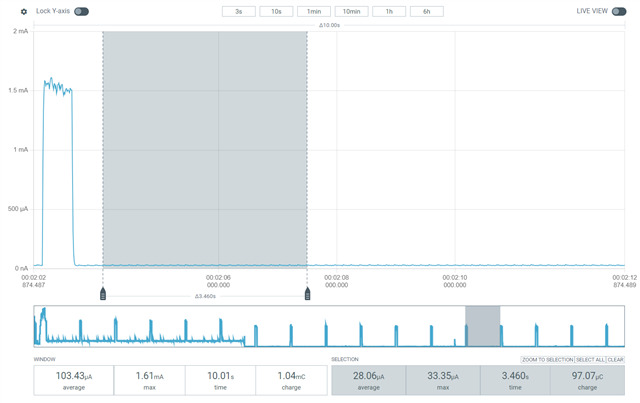
    I tested my application with one additional configuration parameter - CONFIG_NRF_WIFI_IF_AUTO_START=n

    Here are the results:


    The peak consumption at the beginning is the LED indication each10 seconds, then you may see that the floor current is 28uA.  

    This is the results with CONFIG_NRF_WIFI_IF_AUTO_START=y

    I have the nRF9160DK and nRF7002EK, but to test properly I need to run our firmware on this setup, which will take some time because of the different pin connections.

    Another point of interest for me is the configuration CONFIG_LOCATION_METHOD_WIFI_NET_IF_UPDOWN. As I understand it, this option disables and then re-enables the nRF7000 interface, which in my opinion would be the ideal scenario for our device. We use the nRF7000 only for scanning in specific situations, and it would be better to keep it disabled at other times.

    However, this option is currently disabled, and when I try to enable it I cannot build the application—it gives an error.

    error: LOCATION_METHOD_WIFI_NET_IF_UPDOWN (defined at C:/ncs/v3.0.0/nrf\lib\location/Kconfig:45) is
    assigned in a configuration file, but is not directly user-configurable (has no prompt). It gets its
    value indirectly from other symbols. See
    http://docs.zephyrproject.org/latest/kconfig.html#CONFIG_LOCATION_METHOD_WIFI_NET_IF_UPDOWN and/or
    look up LOCATION_METHOD_WIFI_NET_IF_UPDOWN in the menuconfig/guiconfig interface. The Application
    Development Primer, Setting Configuration Values, and Kconfig - Tips and Best Practices sections of
    the manual might be helpful too.

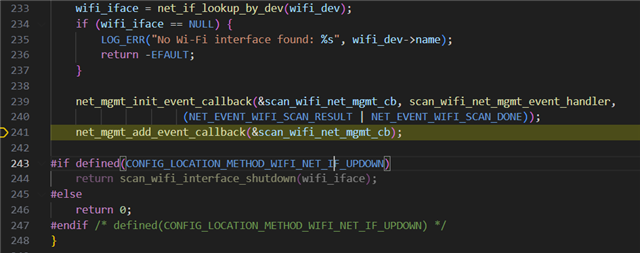
    I also tried to debug to make sure this option is disabled. As you can see, the interface shutdown function is not included.

    As I understand it is enabled only for the specific boards.

    config LOCATION_METHOD_WIFI_NET_IF_UPDOWN
    	bool
    	default y if (BOARD_THINGY91X_NRF9151 || BOARD_THINGY91X_NRF9151_NS || BOARD_THINGY91X_NRF5340_CPUAPP || BOARD_THINGY91X_NRF5340_CPUAPP_NS)
    	depends on LOCATION_METHOD_WIFI_NET_MGMT
    	help
    	  Use the Network Interface Up/Down APIs for Wi-Fi functionality.

    How to enable this one for the custom PCB? 

  • Hi Roman,

    CONFIG_LOCATION_METHOD_WIFI_NET_IF_UPDOWN not being easily selectable is a bug, so we are fixing that

    Roman Veselskyi said:
    I didn't write the OTP because we don't need that, we only scan the WIFI network and I am using the CONFIG_WIFI_RANDOM_MAC_ADDRESS=y config option.

    When it comes to the power consumption, this does look odd. So I am asking the R&D team about that as well. Are you seeing this on multiple boards?

    Could you try the wifi shell sample, so that we could look at the consumption when it is scanning?

    Regards,

    Elfving

  • Hello  ,

    Yes, I see the same behavior on 3 boars I have. For this moment I implement the power down of the interface by us in the location module it saves us 100uA, but I believe to use the library implementation should be more robust. 

    I checked already the consumption for passive scanning and active, please check.

    Passive

    Active

  • Hi again, and I am so sorry about the wait,

    Note that the issue regarding CONFIG_LOCATION_METHOD_WIFI_NET_IF_UPDOWN is fixed now. I assume this can just be cherry picked.

    Roman Veselskyi said:

    I also found this one, will migrate to 3.1.1 and test.

    I believe this issue is not just fixed in 3.1, but comes with a set of recommendations regarding pins that needs to be grounded etc. Maybe a previous version had a different IOVDD? Though if you didn't see this issue with a previous version of the board (in which the Wi-Fi part was the same) that is likely not the the cause of the issue you are seeing now, but it is still worth having another look at the schematics with those recommendations in mind. 

    If you could send the schematics we'd be happy to take a look. 

    Getting what you are seeing reproduced on a DK could also be an idea, though I understand that is not a tempting route.

    Roman Veselskyi said:

    Exactly this one no, but for the previous revision yes - WIFI part didn't changed. 

    And the power consumption wasn't an issue in those previous versions? 

    Regards,

    Elfving

  • Hello  thanks for the update. 

    We had an issue with Wi-Fi on the previous PCB as well, but that one was related to 3.3V on the IOVDD pin. We have a private ticket about it. In that case, the power consumption was 1 mA, so we created a new revision with 1.8V — which solved the 1 mA issue. However, I’ve noticed that we now have an additional ~100 µA in sleep mode.

Reply Children
No Data
Related