PWM register-based LED dimming not updating duty cycle dynamically on nRF5340

Hi,
I’m trying to generate a PWM signal directly using the nRF5340’s PWM peripheral registers (not using Zephyr’s pwm_dt_spec or driver API).

The LED turns ON correctly, so the PWM peripheral is initialized and running, but the duty cycle doesn’t change dynamically — it stays at the first value even though I update the sequence buffer in code.

Here’s the simplified code I’m using:

#include <zephyr/kernel.h>
#include <hal/nrf_pwm.h>
#include <hal/nrf_gpio.h>

static NRF_PWM_Type *pwm = NRF_PWM0;
static uint16_t seq_values[2];
static uint16_t duty = 0;
static int dir = 200;

void pwm_init(void)
{
    pwm->ENABLE = 0;
    pwm->PSEL.OUT[0] = 25; // P0.25
    pwm->PSEL.OUT[1] = 26; // P0.26
    pwm->MODE = PWM_MODE_UPDOWN_Up;
    pwm->PRESCALER = PWM_PRESCALER_PRESCALER_DIV_1;
    pwm->COUNTERTOP = 16000;
    pwm->LOOP = 0;
    pwm->DECODER = (PWM_DECODER_LOAD_Individual << PWM_DECODER_LOAD_Pos) |
                   (PWM_DECODER_MODE_RefreshCount << PWM_DECODER_MODE_Pos);
    pwm->SEQ[0].PTR = (uint32_t)&seq_values[0];
    pwm->SEQ[0].CNT = 2;
    pwm->SEQ[0].REFRESH = 0;
    pwm->SEQ[0].ENDDELAY = 0;
    pwm->ENABLE = 1;
}

void pwm_update(uint16_t duty1, uint16_t duty2)
{
    seq_values[0] = duty1;
    seq_values[1] = duty2;
    pwm->TASKS_SEQSTART[0] = 1; // restart sequence
}

int main(void)
{
    pwm_init();

    while (1)
    {
        duty += dir;
        if (duty >= 16000) dir = -200;
        if (duty <= 0) dir = 200;
        pwm_update(duty, 16000 - duty);
        k_msleep(20);
    }
}

The LED stays ON continuously — it doesn’t fade in/out as expected.

I am using nRf5340 Audio DK and SDK version 2.9

Am I missing any register configuration (like SEQ[0].REFRESH or LOOP) for dynamic updates? 

  • Hello,

    I suspect your LEDs are on because the pins are disconnected. At least unless you did something in your devicetree/overlay files?

    Can you please zip and upload your entire application?

    Is there a particular reason why you want to use the PWM registers directly like this, instead of using the PWM drivers? 

    What is your end goal for the PWM? What are you controlling? 

    Best regards,

    Edvin

  • Hi,

    Actually, I don’t have any overlay file. The only setting I have in my prj.conf is:

    CONFIG_NRFX_PWM0=y

    The code snippet I shared is from a small test program I created.

    The reason I’m doing this is that in my main project, I need to update four GPIO pins simultaneously. Currently, I’m toggling them using a timer running at 8000 Hz. This works fine for a single GPIO pin, but when I add multiple pins, it starts producing glitches.

    To improve performance and eliminate those glitches, I’m exploring the use of PWM and direct register writes.

  • Hello,

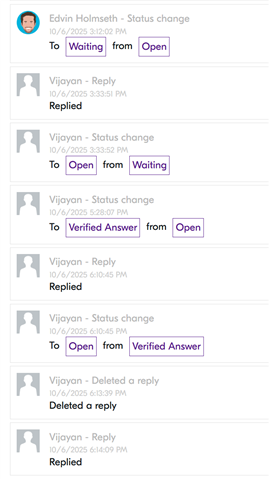
    It is not closed. It is open. But it did have the status "Verified Answer" at some point:

    So if you press "Verify answer" on one of the replies in the ticket, it will get this state. But if you then later reply in it, it will go back to open.

    However, the reason you want to use the registers directly is that you want to have them running synchronously, correct?

    While it is technically possible to run the PWM registers directly, as it is (almost) done in the nRF5 SDK's SDK\examples\peripheral\pwm_driver for the nRF52 series, it is a bit more complicated here, since there is a different method of settings GPIOs as output pins in NCS, requiring you to involve devicetree (an .overlay file). 

    Attached is a modified version of:

    NCS\modules\hal\nordic\nrfx\samples\src\nrfx_pwm\common_mode

    hello_world_nrfx_pwm.zip

    It is a quite simple app controlling the 4 LEDs as PWM pins, but it doesn't need to be the LEDs, just replace the pin numbers.

    However, when the nrfx pwm driver is finished handling the PWM sequence, it will release the pins, leaving them as disconnected input.

    If you rather want to control the pins at a fixed PWM signal "forever", but also with the possibility to turn them always on/always off, I suggest you look into the blinky_pwm implementation from NCS\zephyr\samples\basic\blinky_pwm.

    Attached here is another simplified version, using the pins that you wanted, P0.25 and P0.26. 

    hello_world_pwm.zip

    Note that if you use this approach (the overlay files and zephyr pwm library), the pins will be set as a static output 0 or 1 if you set the duty cycle to 100% or 0% of the PWM period.

    Also note that the pins are selected in the nrf5340dk_nrf5340_cpuapp.overlay file. It should be quite easy to change them (pin number, polarity, etc).

    Best regards,

    Edvin

  • My goal is to play PCM audio (48 kHz, int16) coming from a PC,  Down sampled to 8k uint8_t and play through a GPIO pin using PWM, and also mix it with other generated waveforms (like sine or custom tones).

    Here’s the concept:

    • I will use the nrfx_pwm driver in loop mode.

    • I maintain a ring buffer that continuously stores new PCM data.

    • The PWM sequence (nrf_pwm_sequence_t) will point to this buffer, and I’ll use nrfx_pwm_sequence_update() periodically to refresh it with the latest data.

    • This should allow asynchronous audio playback, avoiding glitches caused by blocking or synchronous updates.

    I believe this approach will give smooth asynchronous playback and help eliminate current glitches.
    Does this seem like a good way to handle real-time PCM playback using PWM on nRF5340?
    Any suggestions or potential pitfalls I should be aware

  • arun98475 said:
    Does this seem like a good way to handle real-time PCM playback using PWM on nRF5340?

    Yes, this is reasonable. 

    I am not aware of any good samples in NCS using PWM for playing sound. But I remember that there was a sample for the Thingy:52 in the old nRF5 SDK for Thingy. 

    You can find it here:

    https://www.nordicsemi.com/Products/Development-hardware/Nordic-Thingy-52/Download

    Search for "file with source code" on that page.

    After you download the zip file, look for the file: 

    source\drivers\drv_speaker.c -> drv_speaker_flash_pcm_play().

    It uses values from sounds.h, set up in drv_speaker_sample_play() (from drv_speaker.c)

    Best regards,

    Edvin

Related