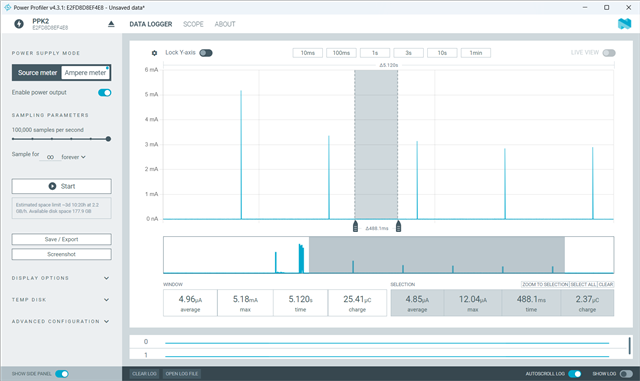
nRF5340 (NCS 2.7.0): ~1.27 mA average during BLE advertising with power save enabled (should be in µA)

Environment

  • SoC: nRF5340 (app core + net core)

  • SDK: nRF Connect SDK v2.7.0

  • Toolchain: [Zephyr/West toolchain from NCS 2.7.0, compiler version]

  • Measurement: PPK2

Application/Config

  • BLE: Peripheral power profiling

  • Advertising interval: 1280 ms

  • TX power: 0 dBm

  • Power mgmt: Power save enabled; Zephyr PM [CONFIG_PM, CONFIG_PM_DEVICE_RUNTIME] enabled

  • LFCLK source: [RC/XTAL]

  • Relevant Kconfig (prj.conf) snippets:

Steps to Reproduce

  1. Build and flash peripheral power profiling with the config above on nRF5340 (NCS 2.7.0).

  2. Start Connectable advertising at 1.28s.

  3. Measure average current on VDD using PPK2 for 60 seconds steady-state.

Expected Result

  • Average current in µA range between advertising events (short RF spikes only), consistent with low-power System ON idle.

Actual Result

  • Average current ≈ 1.27 mA during advertising despite power save enabled.

nrf_logs.zip

Parents
  • # ---- Power management
    CONFIG_PM=y
    CONFIG_PM_DEVICE=y
    CONFIG_PM_DEVICE_RUNTIME=y
    CONFIG_PM_POLICY_RESIDENCY=y
    CONFIG_PM_STATS=n         # TEMP: show PM stats
    CONFIG_PM_DEBUG=n         # TEMP: print PM state entry/exit
    
    # ---- BLE
    CONFIG_BT_PERIPHERAL=y
    CONFIG_BT_DEVICE_NAME="Nordic_Power_Profiling"
    
    # ---- Clocks
    CONFIG_CLOCK_CONTROL_NRF_K32SRC_XTAL=y
    
    # ---- Console/logs (on for debugging; turn off for final power numbers)
    CONFIG_LOG=n
    CONFIG_SERIAL=n
    CONFIG_CONSOLE=n
    CONFIG_UART_CONSOLE=n
    CONFIG_SHELL=n
    
    # ---- TX power (dBm): tweak for range vs current
    CONFIG_BT_CTLR_TX_PWR_ANTENNA=0
    

    Hi, Please find the prj.overlay.conf file

Reply
  • # ---- Power management
    CONFIG_PM=y
    CONFIG_PM_DEVICE=y
    CONFIG_PM_DEVICE_RUNTIME=y
    CONFIG_PM_POLICY_RESIDENCY=y
    CONFIG_PM_STATS=n         # TEMP: show PM stats
    CONFIG_PM_DEBUG=n         # TEMP: print PM state entry/exit
    
    # ---- BLE
    CONFIG_BT_PERIPHERAL=y
    CONFIG_BT_DEVICE_NAME="Nordic_Power_Profiling"
    
    # ---- Clocks
    CONFIG_CLOCK_CONTROL_NRF_K32SRC_XTAL=y
    
    # ---- Console/logs (on for debugging; turn off for final power numbers)
    CONFIG_LOG=n
    CONFIG_SERIAL=n
    CONFIG_CONSOLE=n
    CONFIG_UART_CONSOLE=n
    CONFIG_SHELL=n
    
    # ---- TX power (dBm): tweak for range vs current
    CONFIG_BT_CTLR_TX_PWR_ANTENNA=0
    

    Hi, Please find the prj.overlay.conf file

Children
  • Hi Siddharth,

    Before we begin, I would like to point out that nRF Connect SDK (NCS) v2.7.0 is a little old now. If you are evaluating NCS and the nRF5340 for your project, then I recommend getting started with the latest release, NCS v3.1.1.

    Regarding NCS v2.7.0 specifically, it is a release where we were transitioning from the old parent-child multi-image build system to Sysbuild. There is a fairly common issue with this release (which was fixed from the next release, 2.8.0). The samples are intended to be built with Sysbuild, but out of tree projects are not built with Sysbuild by default. A quick test showed that this pitfall causes failure to start advertising in the Power Profiling sample, keeping current above 1mA.
    I suspect you are having this issue. However, there should be a warning during the build highlighting this, as well as a clear error message on the runtime log. Furthermore, you shouldn't have any advertising peaks, so that bit is a little strange.

    To work around this issue, there are two ways:

    1. Build the sample using Sysbuild

    If you use the command line, you just need to add --sysbuild to your build command.
    If you are using the nRF Connect for VS Code Extension, you just need to remember to tick "Use sysbuild" when creating or editing the build configuration

    This is the recommended method.

    2. Restore the non-sysbuild support from NCS v2.6.0. This is not the recommended approach, so I would rather not elaborate.

    Another common issue often seen is that the PPK2 isn't connected correctly. Please follow the guide here to ensure everything is connected correctly: Setting up the Power Profiler Kit II.

    Finally, the only thing drawing significant current with the Peripheral Power Profiling sample is the UART logging. To achieve µA current consumption, you don't need any special configurations aside from setting CONFIG_SERIAL=n on both the application core and network core image.

    In the Sysbuild setup mentioned above, you can find the network core image config file in sysbuild/ipc_radio/prj.conf.

    For reference, here is the consumption I measured:

    Hieu

Related