nRF9151 custom board – GNSS sample fails with “Failed to activate GNSS functional mode”

Hi Nordic Team,

I have developed a custom board using the nRF9151 controller.
I am testing the GNSS sample from nRF Connect SDK v3.0.0.
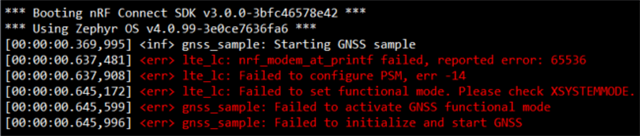
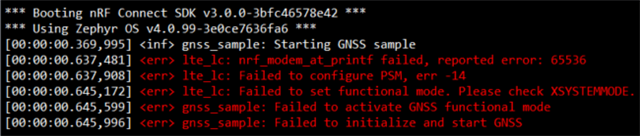
When I flash and run the firmware, I see the following output in RTT Viewer:
Hardware Details:

  • SoC: nRF9151

  • Board: Custom design (based on nRF9151 DK reference)

Software Details:

  • nRF Connect SDK: v3.0.0

  • Toolchain: nRF Connect for VS Code

  • Sample Used: nrf/samples/nrf9160/gnss

  • Build target: nrf9151dk_nrf9151

    How can I solve this issue?


Best regards

Arun

Parents
  • Hi,

    I have tested unmodified sample on nrf9151-dk and I could not replicate reported error.

    Which version of the modem firmware do you use on your custom board?

    Sample Used: nrf/samples/nrf9160/gnss

    The GNSS sample is located in nrf\samples\cellular\gnss in NCS v3.0.0.

    Build target: nrf9151dk_nrf9151

    You can try to build the sample for nrf9151dk/nrf9151/ns as specified in GNSS sample documentation.

    I have developed a custom board using the nRF9151 controller.

     Does the error come when building for nrf9151-dk or for custom board?

    Best regards,
    Dejan

Reply
  • Hi,

    I have tested unmodified sample on nrf9151-dk and I could not replicate reported error.

    Which version of the modem firmware do you use on your custom board?

    Sample Used: nrf/samples/nrf9160/gnss

    The GNSS sample is located in nrf\samples\cellular\gnss in NCS v3.0.0.

    Build target: nrf9151dk_nrf9151

    You can try to build the sample for nrf9151dk/nrf9151/ns as specified in GNSS sample documentation.

    I have developed a custom board using the nRF9151 controller.

     Does the error come when building for nrf9151-dk or for custom board?

    Best regards,
    Dejan

Children
Related