OTA DFU firmware app flashing doesn't work as intended

Hello,
I want to flash a test application to the nrf52820(on the 52833DK(it supports both 33 and 20) for test purposes. I first flashed the softdevice and the bootloader. Got a private and public key pair created the dfu zip file and tried flashing over my phone with the nrf Connect app. I work with the nrf5sdk. 

The application doesnt appear after flashing OTA.

When I flash the app over cable(how it should look like)
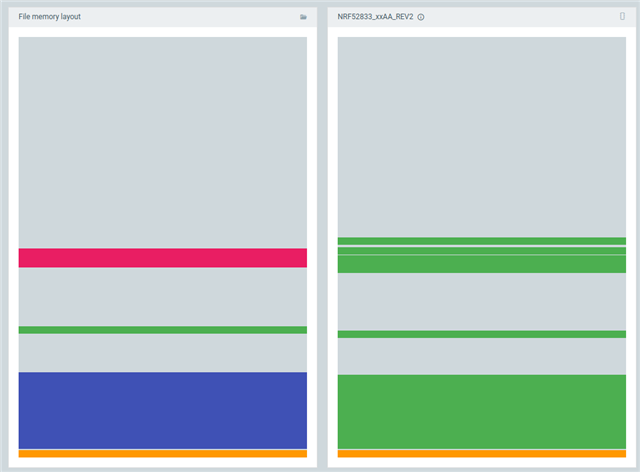
First step: flashing the bootloader + softdevice
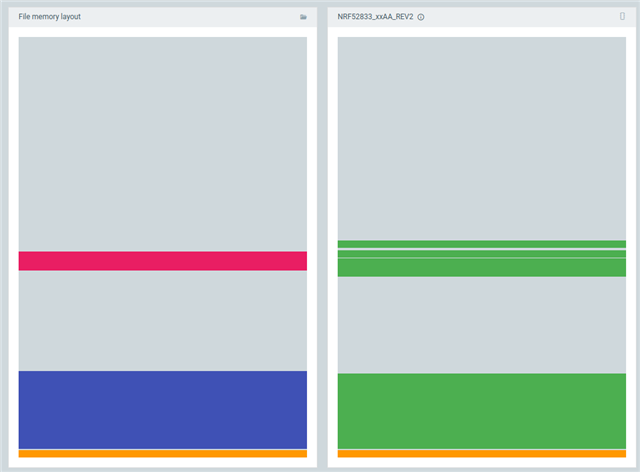

This happens after I try to flash the app OTA from my phone:
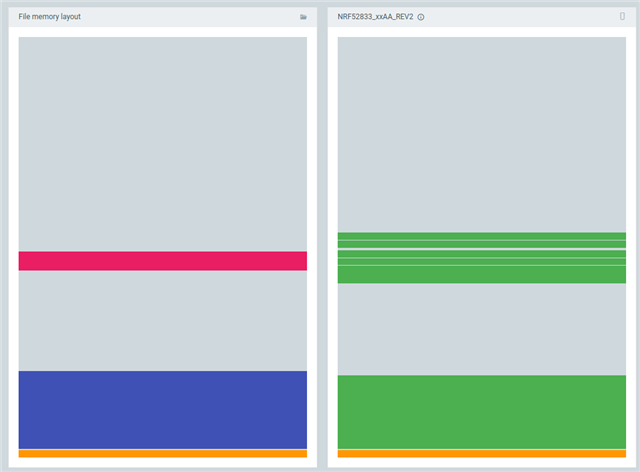

Theres no error message in the log of the nrf connect app while flashing OTA. Also after flashing the 2 leds turn off and it disappears from the bluetooth list on my phone. I used the secure_bootloader example from the github repo.

Parents Reply
  • The problem is that the blinky app hex is not compatible with the Softdevice you're using. The application is supposed to be placed directly on top of the softdevice in memory, but this SD ends at address 0x19000 while your app is being linked to start at address 0x25000 (no Softdevice compatible with nRF SDK v17.1.0 require this start address). This also explains the gap shown between the softdevice and application in your first picture.

    In other words, the issue has nothing to do with DFU but rather that the app is not compatible with the Softdevice you are using. You can use this project here as a reference for how the project should be configured: "nRF5_SDK_17.1.0_ddde560/examples/ble_peripheral/ble_app_uart/pca10100e/s112/armgcc"

    (pca10100e = nRF52820 emulation on nRF52833 DK)

Children
Related