Security failing when trying to bond

I'm using the peripheral_bms project. The only change being in the overlay to make it work with nrf52833 dk. I'm able to connect with nrfConnect and see the services (except when I try to read Bond Management Feature I get Read Operation failed: insufficient authentication). 

Following the instructions in the readMe, I'm able to see LED 1 blinking and LED 2 when connected. However, when I go to settings/pair, no matter what boxes I check, upon clicking 'Pair', the nRF connect terminal shows: Authentication failed with status BLE_GAP_SEC_STATUS_AUTH_REQ

and the peripheral (52833 dk) terminal shows: Security failed: DD:07:FC:FC:5B:D9 (random) level 1 err 4
Pairing failed conn: DD:07:FC:FC:5B:D9 (random), reason 4  

What am I missing?

Parents
  • Hi,

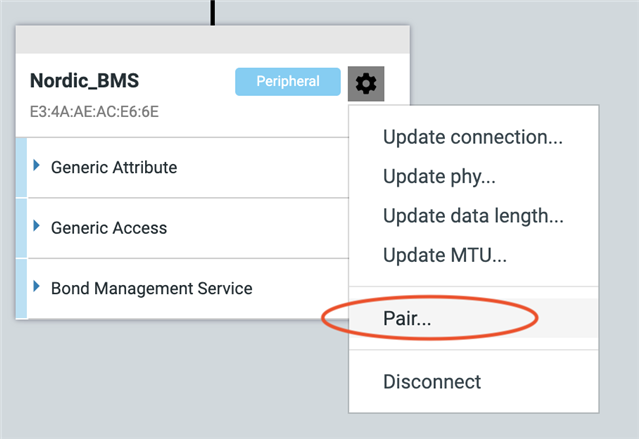
    The error indicate a problem with the security level. If ou are testing with nRF Connect for Desktop (?), make sure you initiate pairing:

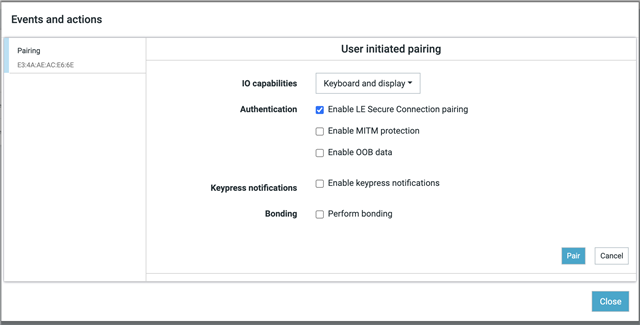
    Then check the box maked "Enbale LE Secure Connections pairing" and that IO capabilities are listed as Keyboard and display:

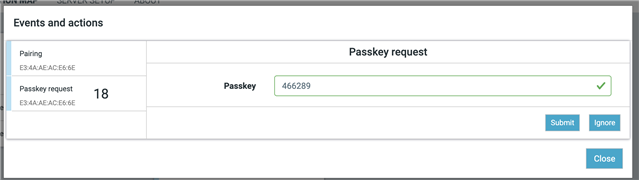
    Then the passkey should be printed in the UART log, and you enter that in nRF Connect liek this and press submitt:

    And then the link should be secured. Log from nRF (from a different run, so the passkey is different):

    *** Booting nRF Connect SDK v3.1.1-e2a97fe2578a ***
    *** Using Zephyr OS v4.1.99-ff8f0c579eeb ***
    Starting Bluetooth Peripheral BMS sample
    I: 2 Sectors of 4096 bytes
    I: alloc wra: 0, fd0
    I: data wra: 0, 1c
    I: SoftDevice Controller build revision: 
    I: fc de 41 eb a2 d1 42 24 |..A...B$
    I: 00 b5 f8 57 9f ac 9d 9e |...W....
    I: aa c9 b4 34             |...4    
    I: HW Platform: Nordic Semiconductor (0x0002)
    I: HW Variant: nRF52x (0x0002)
    I: Firmware: Standard Bluetooth controller (0x00) Version 252.16862 Build 1121034987
    I: No ID address. App must call settings_load()
    Bluetooth initialized
    I: HCI transport: SDC
    I: Identity: E3:4A:AE:AC:E6:6E (random)
    I: HCI: version 6.1 (0x0f) revision 0x1069, manufacturer 0x0059
    I: LMP: version 6.1 (0x0f) subver 0x1069
    Advertising successfully started
    Connected
    Passkey for E4:77:53:6C:C9:2B (random): 676434
    Pairing completed: E4:77:53:6C:C9:2B (random), bonded: 0
    Security changed: E4:77:53:6C:C9:2B (random) level 4

  • Hi Einar,

    Thank you for this information, it helped me proceed, where I am updating the security to level 4:

    Advertising successfully started
    Connected
    Passkey for DD:07:FC:FC:5B:D9 (random): 014152
    Pairing completed: DD:07:FC:FC:5B:D9 (random), bonded: 0
    Security changed: DD:07:FC:FC:5B:D9 (random) level 4

    However, I don't see the results I'm expecting regarding bonding. The ReadMe for the bms sample says, 

    Click the :guilabel:`Settings` button for the device in the app.
    #. Select :guilabel:`Pair`.
    #. Select :guilabel:`Keyboard and display` in the IO capabilities setting.
    #. Select :guilabel:`Perform Bonding`.
    #. Click :guilabel:`Pair`.

    #. Check the logs to verify that the connection security is updated.
    #. Disconnect the device in the app.
    #. Reconnect again and verify that the connection security is updated automatically.

    But even when I select "Enable LE Secure Connections pairing" and copy the passkey, the devices don't reconnect automatically and the security information gets lost.

  • Hi,

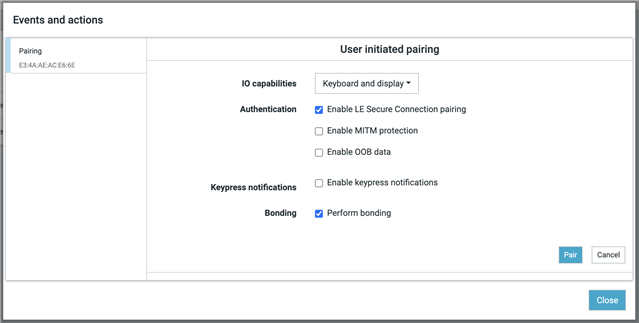
    That is correct. To keep the security information you must beform bonding. Then you need to check the box for bonding as well:

    And in the nRF log ou can see that it is bonded (here you see "bonded: 1" and in the previoius log where we only did pairing without bonding, you see "bonded: 0"):

    *** Booting nRF Connect SDK v3.1.1-e2a97fe2578a ***
    *** Using Zephyr OS v4.1.99-ff8f0c579eeb ***
    Starting Bluetooth Peripheral BMS sample
    I: 2 Sectors of 4096 bytes
    I: alloc wra: 0, fd0
    I: data wra: 0, 1c
    I: SoftDevice Controller build revision: 
    I: fc de 41 eb a2 d1 42 24 |..A...B$
    I: 00 b5 f8 57 9f ac 9d 9e |...W....
    I: aa c9 b4 34             |...4    
    I: HW Platform: Nordic Semiconductor (0x0002)
    I: HW Variant: nRF52x (0x0002)
    I: Firmware: Standard Bluetooth controller (0x00) Version 252.16862 Build 1121034987
    I: No ID address. App must call settings_load()
    Bluetooth initialized
    I: HCI transport: SDC
    I: Identity: E3:4A:AE:AC:E6:6E (random)
    I: HCI: version 6.1 (0x0f) revision 0x1069, manufacturer 0x0059
    I: LMP: version 6.1 (0x0f) subver 0x1069
    Advertising successfully started
    Connected
    Passkey for E4:77:53:6C:C9:2B (random): 358599
    Pairing completed: E4:77:53:6C:C9:2B (random), bonded: 1
    Security changed: E4:77:53:6C:C9:2B (random) level 4

  • I did that, but how can I check that the bonding is working? Shouldn't I be able to reset the board and have nRfConnect app connect automatically? That doesn't happen.

  • Hi,

    You are right. There ia a problem with nRF Connect for Desktop Bluetooth that causes this, and no new realease is imminent. I suggest you test with an iOS or Android device using nRF Connect for Mobile, where you should not have this issue. However iOS is tricky in the sense that it does not allow the app to initiate bonding, so that cannot be used with the BMS sample. If you are maintly testing bondign and not BMS specifically, you can for instance test with Peripheral CTS client and a mobile.

Reply Children
No Data
Related