OTA/DFU of identical bootloader ZIP package fails to relaunch the new bootloader.

I am running the boot loader with the default name 'DfuTarg' on a Nordic NRF52840 board very similar to the PA10056.
I download this boot loader to the board, connect to it using NRF Connect app on my Pixel phone, and select the DFU icon.
I then select the OTA DFU file that I created of the same boot loader.
The file gets transferred and validation appears to pass but at the end the Segger IDE stops at a hardware breakpoint at vector 0xA60 (hardware fault?).

I expected the boot loader to simply disconnect, reboot and be prepared again for the next DFU but it ended up with a vector exception to 0xA60.
This is a very repeatable process regardless of how many times I try it.
Before each attempt, I completely erase the flash on the board and re-download the first boot loader program that starts on the board.

I think this is my misunderstanding of the system level workflow.
Does the Nordic OTA+DFU ecosystem support a simple boot loader supporting its own update without an application?

Cheers
RVM

Parents
  • Hello,

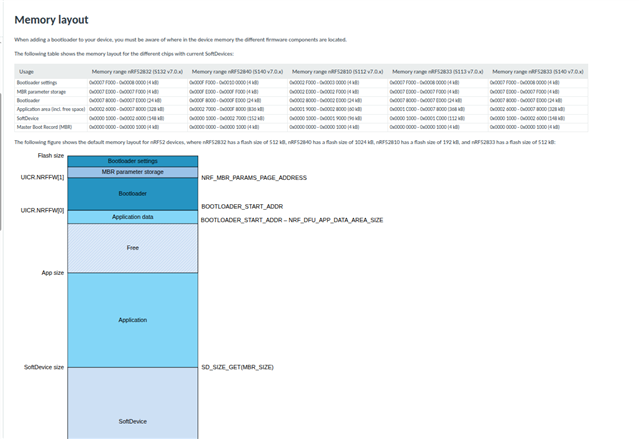
    Yes, this flow is supported and 0xA60 is the address to the HardFault_Handler() in the MBR, so the question is what triggered the fault. A good start to troubleshoot this might be to read out the flash before and after performing a DFU, then compare the two using a diff. If you are uploading the same bootloader binary as the one you programmed initially, you should expect the contents of the bootloader section to remain unchanged.

    (https://docs.nordicsemi.com/bundle/sdk_nrf5_v17.1.0/page/lib_bootloader.html )

    Reading out flash with nrfjprog

    nrfjprog --memrd 0x0 --n 0x100000 > flash_content.txt

    Best regards,

    Vidar

  • Hi Vidar

    Thanks for your responses. This problem does NOT show up if I start my experiments with the full system application (Buttonless DFU) and then download just the boot loader update.  

    NOTE: Our boot loader protects itself from modification so I do not expect the new firmware to be actually written to the device. I was simply testing that our devices resume operations with the prior boot loader itself. And that is where I ran into this issue when I used just the SD and our boot loader (without the Buttonless DFU application) on the device.

Reply
  • Hi Vidar

    Thanks for your responses. This problem does NOT show up if I start my experiments with the full system application (Buttonless DFU) and then download just the boot loader update.  

    NOTE: Our boot loader protects itself from modification so I do not expect the new firmware to be actually written to the device. I was simply testing that our devices resume operations with the prior boot loader itself. And that is where I ran into this issue when I used just the SD and our boot loader (without the Buttonless DFU application) on the device.

Children
Related