How to flash application to specific address.

Hi,

On the nRF54L15DK board, I flashed an application and then performed a full erase. However, after erasing, I noticed that approximately 2000 bytes of memory were still occupied when reading back the flash. Could you please clarify why this portion of memory remains in use even after recovering the device?

Additionally, on the nRF52833DK using nRF Connect SDK v2.5.0, I was able to flash my application to a specific address using the CONFIG_FLASH_LOAD_OFFSET configuration. However, on the nRF54L15DK with nRF Connect SDK v3.2.0, this configuration no longer works and appears to be deprecated. Could you please advise on the correct method to flash the application to a specific address as per our requirements in the newer SDK version?

Thank you for your guidance.

Best regards,
Theja.

Parents
  • Hi,

    On the nRF54L15DK board, I flashed an application and then performed a full erase. However, after erasing, I noticed that approximately 2000 bytes of memory were still occupied when reading back the flash. Could you please clarify why this portion of memory remains in use even after recovering the device?

    The recover operation includes flashing a FW after the ERASEALL operation in order to keep the APPROTECT mechanism disabled across resets.  

    Additionally, on the nRF52833DK using nRF Connect SDK v2.5.0, I was able to flash my application to a specific address using the CONFIG_FLASH_LOAD_OFFSET configuration. However, on the nRF54L15DK with nRF Connect SDK v3.2.0, this configuration no longer works and appears to be deprecated. Could you please advise on the correct method to flash the application to a specific address as per our requirements in the newer SDK version?

    If you want your app to start at an offset you need to specify a placeholder partition by creating a file named "pm_static.yml" with the following content:

    bootloader:
    address: 0x0
    end_address: <specify offset in bytes>
    placement:
    after:
    - start
    region: flash_primary
    size: <specify offset in bytes> e.g 0x10000
    The partitition is named "bootloader" but can be named anything.
    Best regards,
    Vidar
  • Hi Vidar,

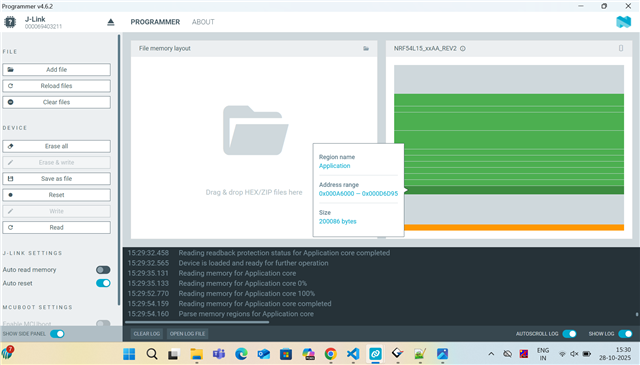
    As per your suggestion, I added the pm_static.yml file to the src folder. However, even though the slot0_partition address is defined as 0x10000, I observed that the application is actually located at a different address when checked using the programmer.

    I have attached the partition details and the memory read image from the programmer for your reference.
    Your insights on this issue would be greatly appreciated.

    boot_partition:
      address: 0x00000000
      size: 0x00010000
      region: flash_primary
    
    slot0_partition:
      address: 0x00010000
      size: 0x00051000
      region: flash_primary
    
    slot0_ns_partition:
      address: 0x00061000
      size: 0x00051000
      region: flash_primary
     
    slot1_partition:
      address: 0x000B2000
      size: 0x00051000
      region: flash_primary
    
    slot1_ns_partition:
      address: 0x00103000
      size: 0x00051000
      region: flash_primary
    
    storage_partition:
      address: 0x0015C000
      size: 0x00009000
      region: flash_primary


    Regards,
    Theja

Reply
  • Hi Vidar,

    As per your suggestion, I added the pm_static.yml file to the src folder. However, even though the slot0_partition address is defined as 0x10000, I observed that the application is actually located at a different address when checked using the programmer.

    I have attached the partition details and the memory read image from the programmer for your reference.
    Your insights on this issue would be greatly appreciated.

    boot_partition:
      address: 0x00000000
      size: 0x00010000
      region: flash_primary
    
    slot0_partition:
      address: 0x00010000
      size: 0x00051000
      region: flash_primary
    
    slot0_ns_partition:
      address: 0x00061000
      size: 0x00051000
      region: flash_primary
     
    slot1_partition:
      address: 0x000B2000
      size: 0x00051000
      region: flash_primary
    
    slot1_ns_partition:
      address: 0x00103000
      size: 0x00051000
      region: flash_primary
    
    storage_partition:
      address: 0x0015C000
      size: 0x00009000
      region: flash_primary


    Regards,
    Theja

Children
  • Hi Theja,

    Sorry, I'm not sure what you're trying to achieve now. I thought the only goal was to have the application start at an offset, but here you've redefined the partitions from the device tree and included MCUboot slots. Are you planning to use MCUboot in your project? In that case, I would recommend removing the pm_static file for now and read through this https://academy.nordicsemi.com/courses/nrf-connect-sdk-intermediate/lessons/lesson-9-bootloaders-and-dfu-fota/ to find out how to configure the bootloader for your application.

    Best regards,

    Vidar

  • Hi Vidar,

    Sorry for the misunderstanding. Here’s the requirement I wanted to clarify: we are implementing a custom bootloader that resides at the start address, along with two application slots and two custom storage partitions, as shown below. These will occupy the entire flash memory.

    bootloader:
      address: 0x00000000
      size: 0x00020000
     
    slot0_partiton:
      address: 0x00020000
      size: 0x00060000
      region: flash_primary
     
    slot0_partiton:
      address: 0x00080000
      size: 0x00060000
      region: flash_primary
     
    storage:
      address: 0x000E0000
      size: 0x00009000
      region: flash_primary
     
    custom_data:
      address: 0x000E9000
      size: 0x0007C000
      region: flash_primary


    I would like to know how to ensure that my application is placed in either slot 1 or slot 2. How can I achieve this?

  • Hi,

    corrected flash partition name:

    bootloader:
    address: 0x00000000
    size: 0x00020000

    slot0_partiton:
    address: 0x00020000
    size: 0x00060000
    region: flash_primary

    slot1_partiton:
    address: 0x00080000
    size: 0x00060000
    region: flash_primary

    storage:
    address: 0x000E0000
    size: 0x00009000
    region: flash_primary

    custom_data:
    address: 0x000E9000
    size: 0x0007C000
    region: flash_primary

  • Try to include the following in your pm_static.yml file: 

    bootloader:
      address: 0x0
      end_address: 0x20000
      region: flash_primary
      size: 0x20000
    app:
      address: 0x20000
      end_address: 0x80000
      region: flash_primary
      size: 0x60000
    slot0_partiton:
      address: 0x20000
      end_address: 0x80000
      orig_span: &id001
      - app
      region: flash_primary
      sharers: 0x1
      size: 0x60000
      span: *id001
    slot1_partiton:
      address: 0x80000
      end_address: 0xe0000
      region: flash_primary
      size: 0x60000
    storage:
      address: 0xe0000
      end_address: 0xe9000
      region: flash_primary
      size: 0x9000
    custom_data:
      address: 0xe9000
      end_address: 0x165000
      region: flash_primary
      size: 0x7c000

    Here the app is placed in slot0. You can run the "memory report" action in VS code to confirm the placement.

Related