Hi
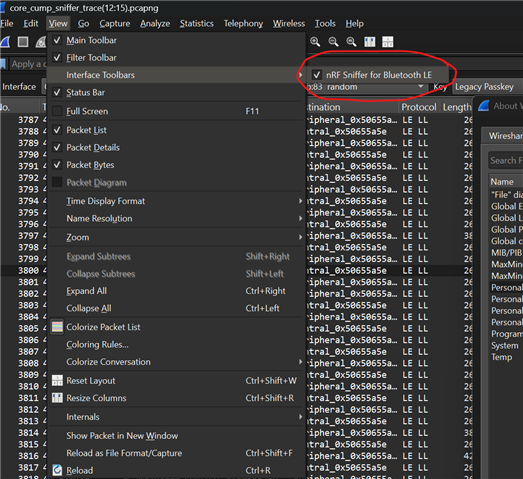
any one a clue why I see this bar twice?(see attached picture)
Some thing probably went wrong with my previous older installation.
I already reinstaled Wireshark. Same problem
Hi
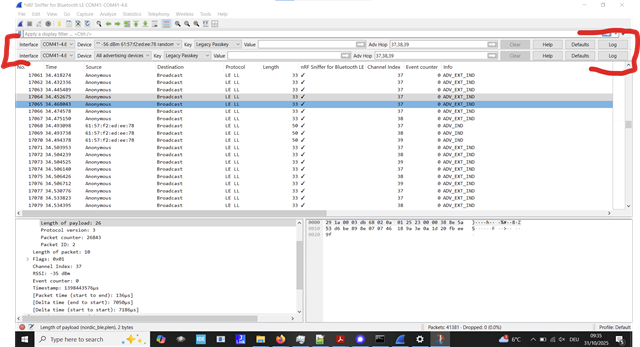
any one a clue why I see this bar twice?(see attached picture)
Some thing probably went wrong with my previous older installation.
I already reinstaled Wireshark. Same problem

Hello,
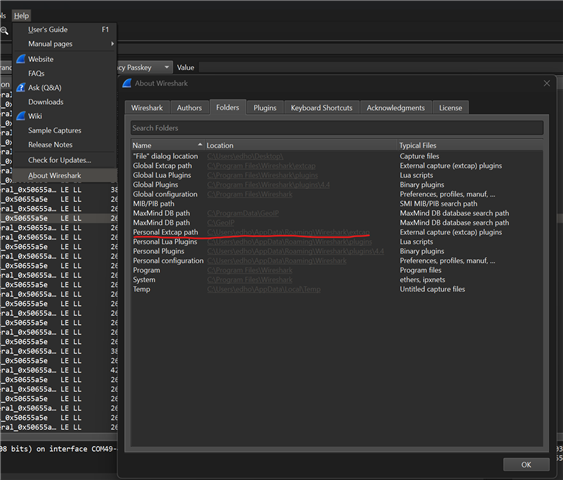
I actually encountered the same issue yesterday. Open your personal extpath folder:

and see if there is more than one set of files. You can also check the global extcap path folder, and make sure there is no sniffer related files there. Alternatively, just remove everything nRF Sniffer related in those folders, and check if there still is two instances of the menu. If there is none, try installing it again (once).
Alternatively, you just find out which of the two that works, and disable the other one from the view:

Best regards,
Edvin
Hello,
I actually encountered the same issue yesterday. Open your personal extpath folder:

and see if there is more than one set of files. You can also check the global extcap path folder, and make sure there is no sniffer related files there. Alternatively, just remove everything nRF Sniffer related in those folders, and check if there still is two instances of the menu. If there is none, try installing it again (once).
Alternatively, you just find out which of the two that works, and disable the other one from the view:

Best regards,
Edvin