nRF Connect for VS Code warns about ZEPHYR_BASE being overwritten by the shell config starting with version 2025.8.654

nRF Connect for VS Code v2025.8.654+ on Ubuntu 24.04, always shows a false warning that the shell config overwrites ZEPHYR_BASE when a terminal window is open. The variable is not defined anywhere in shell, env, or VS Code. Same config works fine in v2025.5.152 (no warning).

Is anyone else having this issue and does someone have a fix?

Steps to Reproduce:

  1. Install VS Code and nRF Connect for VS Code on Ubuntu 24.04.
  2. Use a clean workspace with no manual ZEPHYR_BASE set in shell config (.bashrc, .profile, etc.), environment, or VS Code settings.
  3. Select the nRF Connect extension.
  4. Open a terminal (with the 'Open terminal' option, CTRL-` or any other way)

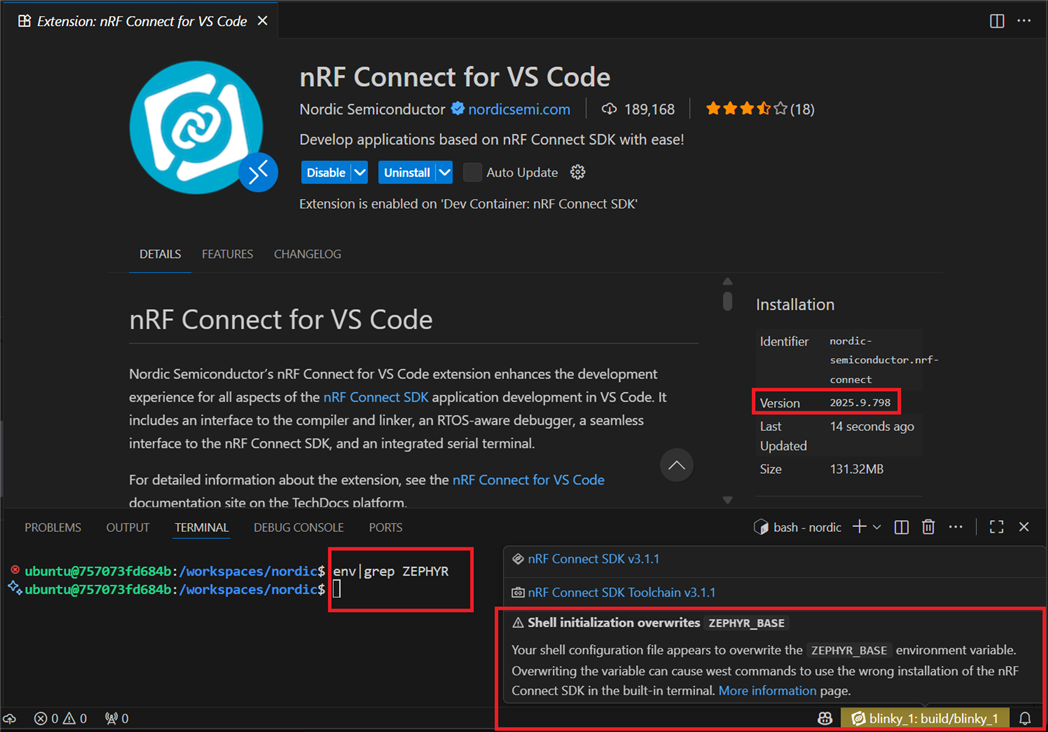
The extension shows a persistent warning in the bottom-right (see attached screenshot):
"Shell initialization overwrites ZEPHYR_BASE

Your shell configuration file appears to overwrite the ZEPHYR_BASE environment variable. Overwriting the variable can cause west commands to use the wrong installation of the nRF Connect SDK in the built-in terminal. More information page."

The screenshot below shows the warning while no ZEPHYR environment variables are set. (the screenshot was taken from a devcontainer but even a brand new Linux installation behaves this way)
  • Hi,
    There are two main ways to install the SDK.

    1. Automated by the VSCode extension
    2. System wide installation

    Please see Installing the nRF Connect SDK. Errors like the one you are seeing usually stems from combining the two methods somehow, for example by installing Zephyr independently of the SDK. How did you install the SDK?

    Regards,
    Benjamin

  • Hi Benjamin,

    Thanks so much for investigating this.

    I followed the instructions for nRF Connect for VS Code (the automated installation)

    These are the exact steps i followed:

    1. Start with a clean Ubuntu 24.04 Desktop installation (in a VM).

    2. Install the latest version of Visual Studio Code.

    3. Install the nRF Connect for VS Code Extension Pack.

    4. Open the nRF Connect extension in VS Code.

    5. From the nRF Connect interface, install SDK v3.1.1 in the default location (/home/<user>/ncs/v3.1.1). This also installs Toolchain v3.1.1 automatically.

    6. At this point, if you open a terminal within VS Code, the warning message already appears.

      (Optional) To verify the same behavior within an application context:
    7. In the nRF Connect extension, create a new application:
    • Select Create New Application.

    • Choose Copy a sample.

    • Select the Blinky sample.

    • Accept the default location (/home/<user>/blinky).

    1. Open the nRF Connect extension again and click Open Terminal.

    2. The icon in the bottom right corner turns yellow. Hovering over it shows the warning related to the ZEPHYR_BASE environment variable.

  • Hi,
    It appears this is a bug and it will be fixed in the next release. If you have not set any ZEPHYR_BASE in your environment (outside of VS Code) then this warning can be ignored. Thanks for notifying us!

    Regards,
    Benjamin

  • Hi Benjamin,

    Thank you for the quick confirmation and for filing this as a bug! Really appreciate the responsiveness.

    Kind regards,
      Matthijs.

  • I’m experiencing the exact same issue on Ubuntu 24.04 with nRF Connect for VS Code v2025.8.654.
    No ZEPHYR_BASE variable is set in my shell (.bashrc, .zshrc, .profile, etc.), nor in VS Code settings or the system environment, but the extension still shows the “Shell initialization overwrites ZEPHYR_BASE” warning whenever a terminal is opened.

    Downgrading to version undead corridor removes the warning completely, so it seems to have been introduced in the newer release.
    It looks like a false positive detection in the latest version — possibly related to how the extension initializes or checks the terminal environment.

Related