Beware that this post is related to an SDK in maintenance mode
More Info: Consider nRF Connect SDK for new designs

nRFConnect SDK Intermediate Course, L3E1 Question

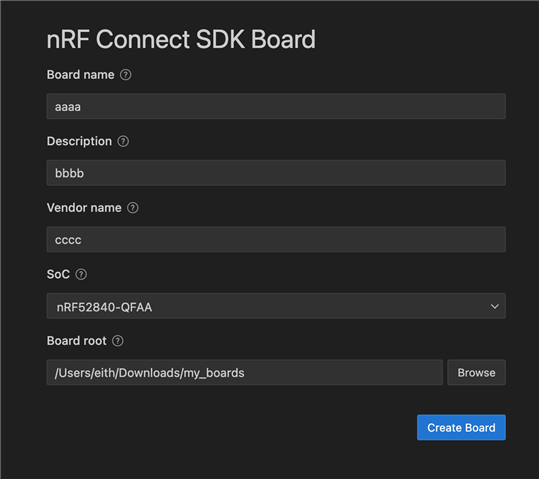
In the first steps of this lesson, we create a new directory for our custom board called my_boards. In VScode, we then Create A New Board with the board name etc. and then set the board root directory to my_boards. In step 3, we then set the build system to my_boards as well.

step 4 than says to "head to File -> Open Folder, then navigate to and select the custom board definition folder we created in the previous steps. This will open the board’s files in the Explorer window of VS Code"

I am assuming that this is the my_boards directory created previously however, there are no files in that directory i.e. the .yml files, .dts file etc., unlike what is shown in the lesson  Do we have to copy these files from the l3_e1_sol dir? Is there a step missing from the lesson? Or, is there a step that I skipped that copies the needed board files to the project directory?

Parents
  • Hi,

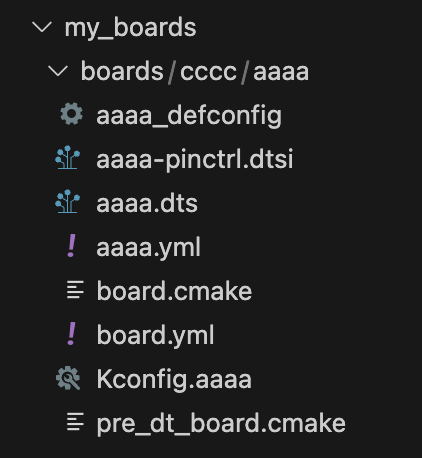
    The files should be automatically generated. I did a quick test on my end using SDK 3.1.1 and the latest VS Code (1.105.1) and latest nRF Connect for VS Code (2025.9.798) and with that I get the files generated as expected following the guidelines in the execise:

    You should see a note in the lower right corner that the board was successfully generated:

    And then opening the folder (in this case in VS Code), you can see the content:

    Do you do the same but the files are not generated? If so, which SDK version are you using, and can you share the detailsof your VS Code setup by generating support information and sharing it here (see Toolbar actions)?

Reply
  • Hi,

    The files should be automatically generated. I did a quick test on my end using SDK 3.1.1 and the latest VS Code (1.105.1) and latest nRF Connect for VS Code (2025.9.798) and with that I get the files generated as expected following the guidelines in the execise:

    You should see a note in the lower right corner that the board was successfully generated:

    And then opening the folder (in this case in VS Code), you can see the content:

    Do you do the same but the files are not generated? If so, which SDK version are you using, and can you share the detailsof your VS Code setup by generating support information and sharing it here (see Toolbar actions)?

Children
No Data
Related