bt_sdc_hci_driver: Entropy source device not ready and HCI driver open failed (-19) on nRF54L15

Hello,
I'm trying to bring up Bluetooth on the nRF54L15 DK using Zephyr. However, Bluetooth initialization fails during startup with the following error messages:

[00:00:00.011,972] <err> bt_sdc_hci_driver: Entropy source device not ready
[00:00:00.011,977] <err> bt_hci_core: HCI driver open failed (-19)
[00:00:00.011,981] <err> ble_conn: bt_enable failed: -19
[00:00:00.011,986] <err> main: Bluetooth başlatılamadı: -19

Details:

  • Board: nRF54L15 DK

  • SDK: nRF Connect SDK Visual Studio extension (3.0.2)

  • Zephyr project type: custom application (DC Motor with bluetooth peripheral, pwm and adc )

  • No crypto or PSA features enabled (I'm not using CONFIG_PSA_CRYPTO_OFFLOAD or similar)

What I’ve tried:

  • Verified that CONFIG_BT, CONFIG_BT_PERIPHERAL, and CONFIG_BT_LL_SOFTDEVICE are enabled.

  • Checked that CONFIG_ENTROPY_GENERATOR=y ,

  • Tried clean rebuild and re-flash.

Here is my prj.conf:

CONFIG_GPIO=y
CONFIG_SERIAL=y
CONFIG_CONSOLE=y
CONFIG_USE_SEGGER_RTT=n # RTT yerine UART konsolu kullan
CONFIG_PRINTK=y
CONFIG_PWM=y
CONFIG_ADC=y
CONFIG_LOG=y
CONFIG_UART_CONSOLE=y
CONFIG_LOG_BACKEND_UART=y
CONFIG_STDOUT_CONSOLE=y
CONFIG_MAIN_STACK_SIZE=2048


# Depolama için NVS (Non-Volatile Storage) kullanalım (veya CONFIG_SETTINGS_FS=y ile dosya sistemi)
CONFIG_SETTINGS=y
CONFIG_NVS=y
CONFIG_FLASH=y
CONFIG_FLASH_MAP=y
CONFIG_MPU_ALLOW_FLASH_WRITE=y

#taşmayı aşmak için
CONFIG_THREAD_STACK_INFO=y
CONFIG_THREAD_NAME=n
CONFIG_DEBUG_COREDUMP=n

# Bluetooth için olanlar
CONFIG_BT=y
CONFIG_BT_PERIPHERAL=y
CONFIG_BT_DEVICE_NAME="mertpalaKilit"
CONFIG_BT_MAX_CONN=1
CONFIG_BT_GATT_SERVICE_CHANGED=y
CONFIG_BT_SMP=y
CONFIG_BT_PRIVACY=y

CONFIG_BT_LL_SOFTDEVICE=y
CONFIG_ENTROPY_GENERATOR=y
CONFIG_SYSTEM_WORKQUEUE_STACK_SIZE=4096

What could cause the "Entropy source device not ready" and bt_enable failed (-19) errors on the nRF54L15 DK?

Thanks in advance for your help.

Best regards,
Mert

  • Hi Mert, 
    The error suggests that the controller was not ready when booting up. This is quite strange as the nRF54L doesn't have a dedicated radio core that run the controller. 

    Can you run any BLE sample in the SDK ? 


    Could you provide a minimal project that we can reproduce the issue here? 

  • I am sorry for the late reply. Last week was my midterm week Smiley


    Can you run any BLE sample in the SDK ? 

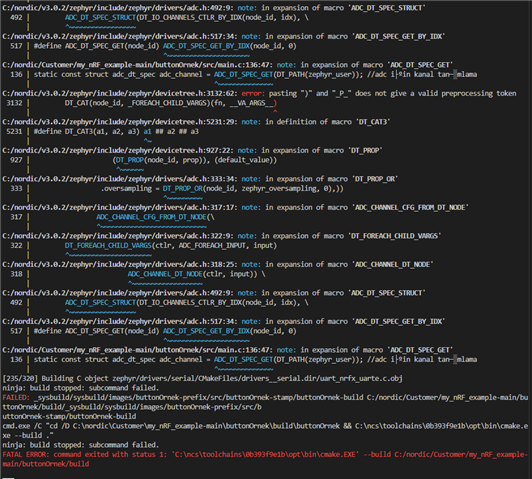
    I tried to build "peripheral_lbs" sample from sdk. I also get these errors from it (it does not use any pwm, or the example had any .overlay, I was getting the error):

    -- Found devicetree overlay: nrf54l15dk_nrf54l15_cpuapp.overlay
    devicetree error: 'pinctrl-0' is marked as required in 'properties:' in C:/ncs/v3.0.2/zephyr/dts/bindings\pwm\nordic,nrf-pwm.yaml, but does not appear in <Node /soc/peripheral@50000000/pwm@d3000 in 'C
    :/ncs/v3.0.2/zephyr/misc/empty_file.c'>
    CMake Error at C:/ncs/v3.0.2/zephyr/cmake/modules/dts.cmake:305 (execute_process):
    execute_process failed command indexes:

    1: "Child return code: 1"

    So I made an overlay file and disabled the &pwm20 node, It still gives the same error when building..

    Could you provide a minimal project that we can reproduce the issue here? 

    I am using nCS v3.0.2 and targeting the nrf54l15dk_nrf54l15_cpuapp_ns board. I am getting the error even with this slightly modified example:


    Here is my project in minimal form at github: https://github.com/mertpalaoglu1/my_nRF_example

    You can reproduce the issue here.

    Again thanks for the replies and solutions in advance.

  • Hi Mert, 
    I couldn't build your project here due to some device tree issue I think. 


    But I think it's important to make sure your DK can run a simple BLE application. My suggestion is to try downloading a fresh NCS SDK (latest version now is v3.1.1) 

    Please try to test with non _ns board. Have you gone through our academy courses  ? https://academy.nordicsemi.com/

    Please also try get hold of a 2nd board, just in case there could be a problem with the board you have. 

Related