DTS file editing autocomplete, etc.

Greetings, all.  I'm a rank beginner here with all things Nordic but almost 50 years of embedded experience with other devices, environments, etc.  I'm trying to develop for a custom board with an nRF52840 using the nRF Connect VS Code extension with SDK v3.1.1.  One critical initial task is creating a DTS for our custom board and I'm finding that all the helpful pop-ups, autocomplete, etc. that are shown in the intro tutorial here don't work for me.  I'm sure I'm missing some VS Code extension, setting, or something but I don't know where to even start looking.

Beyond that, is there some helpful tutorial or documentation for creating a non-trivial DTS for an nRF-based custom board?  When I worked with the DTS stuff for embedded Linux a decade ago it was truly all Tribal Lore and a trial-and-lots-of-error horror.  Has this improved?  I had high hopes for the Devicetree Visual Editor but don't really know where to start with that either for a custom board.

Thanks very much,

Dave

Parents
  • Hi Dave,

    Glad you're reaching out and starting with NCS and Zephyr.

    I'll give you a brief overview here over some very handy getting started resources

    1. https://academy.nordicsemi.com/, our academy pages has fundamental and intermediate courses ranging installing/setting up the SDK to implementing peripherals, BLE and DFU support in your product. All content here is created through the public documentation
      1. https://academy.nordicsemi.com/courses/nrf-connect-sdk-fundamentals/ also has an introductory course to DTS and all peripheral lesson goes through how to use the DTS
      2. https://academy.nordicsemi.com/courses/nrf-connect-sdk-intermediate the intermediate course expands on the fundamental and has 
    2. https://docs.nordicsemi.com/bundle/nrf-connect-vscode/page/guides/work_with_devicetree_editor.html the VS Code extensions "How to work with the devicetree editor"
    3. https://docs.nordicsemi.com/bundle/ncs-latest/page/zephyr/build/dts/index.html for the zephyr devicetree documentation
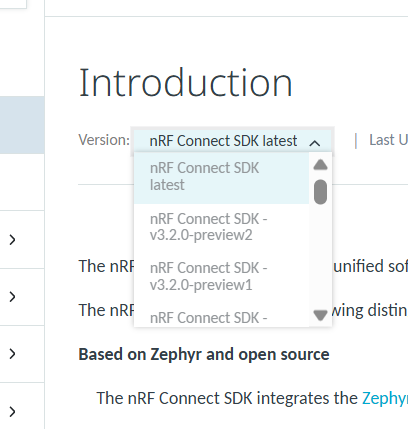
    4. https://docs.nordicsemi.com/bundle/ncs-latest/page/nrf/index.html is the landing page for the NCS documentation. Beneath the "Introduction" title, there's a menu you can expand to select which SDK version you're working with and on the left side table of contents menu you can navigate between various topics. 
        
    5. You can also see some tech webinars here: https://webinars.nordicsemi.com/events as well as visit the blogs/guides section of Devzone for some additional reading
    Beyond that, is there some helpful tutorial or documentation for creating a non-trivial DTS for an nRF-based custom board?  When I worked with the DTS stuff for embedded Linux a decade ago it was truly all Tribal Lore and a trial-and-lots-of-error horror.  Has this improved?  I had high hopes for the Devicetree Visual Editor but don't really know where to start with that either for a custom board.

    Back to your question, I would say the best angle of attack is the fundamental and intermediate NCS courses, which mainly focuses on editing the dts file directly. The intermediate takes it one step further and shows how to create your own custom board and the corresponding custom board files. This should give you a familiarization with how a project uses, sets up and allows for customization of board files.In addition, the link in item 2 above is very useful for getting to know the DTS helper.

    When you've gone through the academy courses/the relevant lessons, there is as you say the visual editor, but it requires some familiarity with the SDK/Zephyr and how to use board files in a project. 

    Has this improved? 

    It has improved significantly is my understanding when talking to colleagues who's been working with dts pre-Zephyr (or even from early days of NCS).

    Kind regards,
    Andreas

Reply
  • Hi Dave,

    Glad you're reaching out and starting with NCS and Zephyr.

    I'll give you a brief overview here over some very handy getting started resources

    1. https://academy.nordicsemi.com/, our academy pages has fundamental and intermediate courses ranging installing/setting up the SDK to implementing peripherals, BLE and DFU support in your product. All content here is created through the public documentation
      1. https://academy.nordicsemi.com/courses/nrf-connect-sdk-fundamentals/ also has an introductory course to DTS and all peripheral lesson goes through how to use the DTS
      2. https://academy.nordicsemi.com/courses/nrf-connect-sdk-intermediate the intermediate course expands on the fundamental and has 
    2. https://docs.nordicsemi.com/bundle/nrf-connect-vscode/page/guides/work_with_devicetree_editor.html the VS Code extensions "How to work with the devicetree editor"
    3. https://docs.nordicsemi.com/bundle/ncs-latest/page/zephyr/build/dts/index.html for the zephyr devicetree documentation
    4. https://docs.nordicsemi.com/bundle/ncs-latest/page/nrf/index.html is the landing page for the NCS documentation. Beneath the "Introduction" title, there's a menu you can expand to select which SDK version you're working with and on the left side table of contents menu you can navigate between various topics. 
        
    5. You can also see some tech webinars here: https://webinars.nordicsemi.com/events as well as visit the blogs/guides section of Devzone for some additional reading
    Beyond that, is there some helpful tutorial or documentation for creating a non-trivial DTS for an nRF-based custom board?  When I worked with the DTS stuff for embedded Linux a decade ago it was truly all Tribal Lore and a trial-and-lots-of-error horror.  Has this improved?  I had high hopes for the Devicetree Visual Editor but don't really know where to start with that either for a custom board.

    Back to your question, I would say the best angle of attack is the fundamental and intermediate NCS courses, which mainly focuses on editing the dts file directly. The intermediate takes it one step further and shows how to create your own custom board and the corresponding custom board files. This should give you a familiarization with how a project uses, sets up and allows for customization of board files.In addition, the link in item 2 above is very useful for getting to know the DTS helper.

    When you've gone through the academy courses/the relevant lessons, there is as you say the visual editor, but it requires some familiarity with the SDK/Zephyr and how to use board files in a project. 

    Has this improved? 

    It has improved significantly is my understanding when talking to colleagues who's been working with dts pre-Zephyr (or even from early days of NCS).

    Kind regards,
    Andreas

Children
Related