

Description
I was following the tutorial from DevAcademy regarding the setup of the nRF Sniffer for Bluetooth LE:
DevAcademy: nRF Sniffer for Bluetooth LE
However, the boards (tested on nRF52840 DK and nRF52 DK) flashed with the corresponding BLE sniffer firmware were not detected in Wireshark (with the nRF Sniffer plugin configured), neither on Windows nor under WSL.
Environment
-
Wireshark version: 4.6.0 (v4.6.0-0-gcdfb6721e77c)
-
nrfutil version:
nrfutil.exe --version nrfutil 8.1.1 (b6089d0 2025-08-21) commit-hash: b6089d08a9cfdb292f8ab8d21e0908ded814cd11 commit-date: 2025-08-21 host: x86_64-pc-windows-msvc build-timestamp: 2025-08-21T14:12:43.593658000Z classification: nrf-external -
Firmware used: (from
$NRFUTIL_HOME/share/nrfutil-ble-sniffer/firmware, version 4.1.1)-
sniffer_nrf52840dk_nrf52840_4.1.1.hex(nRF52840 DK) -
sniffer_nrf52dk_nrf52832_4.1.1.hex(nRF52 DK)
-
Bootstrap was completed using:
nrfutil ble-sniffer bootstrap
(run as Administrator).
Observed Behavior
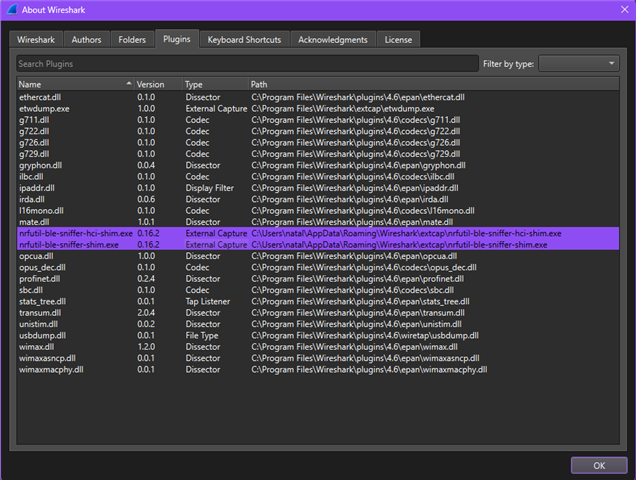
The nRF Sniffer for Bluetooth LE plugin is correctly detected by Wireshark and visible under
Help → About Wireshark → Plugins (as shown in the attached screenshots):
nrfutil-ble-sniffer-hci-shim.exe   0.16.2   External Capture
nrfutil-ble-sniffer-shim.exe       0.16.2   External Capture
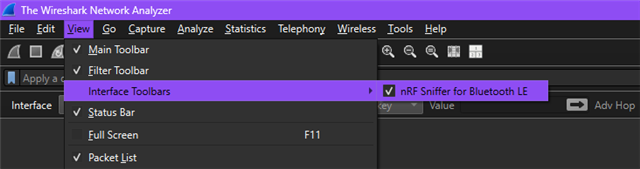
Additionally, the Interface Toolbar → nRF Sniffer for Bluetooth LE option is available under the View menu.
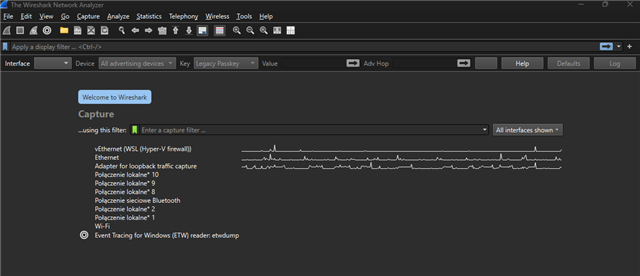
Despite the plugin being properly detected, no sniffer intefaces/devices appear under the Capture tab in Wireshark.
Debug Logs
For debug purposes I've started Wireshark from a command prompt with:
"C:\Program Files\Wireshark\Wireshark.exe" --log-level debug --log-file -
After performing Capture → Refresh Interfaces, the log shows that extcap discovery completes and the nRF Sniffer shims are loaded:
** (wireshark:6480) 11:52:48.812153 [Extcap INFO] -- extcap: completed discovery of 3 tools in 248.346ms
** (wireshark:6480) 11:52:48.812892 [Extcap INFO] -- Loading interface list for C:\Users\natal\AppData\Roaming\Wireshark\extcap\nrfutil-ble-sniffer-hci-shim.exe
** (wireshark:6480) 11:52:48.813524 [Extcap INFO] -- Loading interface list for C:\Users\natal\AppData\Roaming\Wireshark\extcap\nrfutil-ble-sniffer-shim.exe
However, the sniffer devices do not appear in the Wireshark interface list.
Full log:
C:\Users\natal>"C:\Program Files\Wireshark\Wireshark.exe" --log-level debug --log-file -

C:\Users\natal>

 ** (wireshark:6480) 11:52:45.122476 [Plugins INFO] -- Registered plugin: usbdump.dll (C:\Program Files\Wireshark\plugins\4.6\wiretap\usbdump.dll)
 ** (wireshark:6480) 11:52:45.155480 [Plugins INFO] -- Registered plugin: ethercat.dll (C:\Program Files\Wireshark\plugins\4.6\epan\ethercat.dll)
 ** (wireshark:6480) 11:52:45.156498 [Plugins INFO] -- Registered plugin: gryphon.dll (C:\Program Files\Wireshark\plugins\4.6\epan\gryphon.dll)
 ** (wireshark:6480) 11:52:45.157371 [Plugins INFO] -- Registered plugin: ipaddr.dll (C:\Program Files\Wireshark\plugins\4.6\epan\ipaddr.dll)
 ** (wireshark:6480) 11:52:45.158250 [Plugins INFO] -- Registered plugin: irda.dll (C:\Program Files\Wireshark\plugins\4.6\epan\irda.dll)
 ** (wireshark:6480) 11:52:45.159639 [Plugins INFO] -- Registered plugin: mate.dll (C:\Program Files\Wireshark\plugins\4.6\epan\mate.dll)
 ** (wireshark:6480) 11:52:45.160592 [Plugins INFO] -- Registered plugin: opcua.dll (C:\Program Files\Wireshark\plugins\4.6\epan\opcua.dll)
 ** (wireshark:6480) 11:52:45.161467 [Plugins INFO] -- Registered plugin: profinet.dll (C:\Program Files\Wireshark\plugins\4.6\epan\profinet.dll)
 ** (wireshark:6480) 11:52:45.162308 [Plugins INFO] -- Registered plugin: stats_tree.dll (C:\Program Files\Wireshark\plugins\4.6\epan\stats_tree.dll)
 ** (wireshark:6480) 11:52:45.163117 [Plugins INFO] -- Registered plugin: transum.dll (C:\Program Files\Wireshark\plugins\4.6\epan\transum.dll)
 ** (wireshark:6480) 11:52:45.164180 [Plugins INFO] -- Registered plugin: unistim.dll (C:\Program Files\Wireshark\plugins\4.6\epan\unistim.dll)
 ** (wireshark:6480) 11:52:45.165387 [Plugins INFO] -- Registered plugin: wimax.dll (C:\Program Files\Wireshark\plugins\4.6\epan\wimax.dll)
 ** (wireshark:6480) 11:52:45.166428 [Plugins INFO] -- Registered plugin: wimaxasncp.dll (C:\Program Files\Wireshark\plugins\4.6\epan\wimaxasncp.dll)
 ** (wireshark:6480) 11:52:45.167533 [Plugins INFO] -- Registered plugin: wimaxmacphy.dll (C:\Program Files\Wireshark\plugins\4.6\epan\wimaxmacphy.dll)
 ** (wireshark:6480) 11:52:45.252433 [Epan INFO] -- Failed to add Oid: mts-transfer-protocol-1984 applicationProtocol.1
 ** (wireshark:6480) 11:52:45.253428 [Epan INFO] -- Failed to add Oid: mta-transfer-protocol applicationProtocol.12
 ** (wireshark:6480) 11:52:45.264330 [Plugins INFO] -- Registered plugin: g711.dll (C:\Program Files\Wireshark\plugins\4.6\codecs\g711.dll)
 ** (wireshark:6480) 11:52:45.266037 [Plugins INFO] -- Registered plugin: g722.dll (C:\Program Files\Wireshark\plugins\4.6\codecs\g722.dll)
 ** (wireshark:6480) 11:52:45.267383 [Plugins INFO] -- Registered plugin: g726.dll (C:\Program Files\Wireshark\plugins\4.6\codecs\g726.dll)
 ** (wireshark:6480) 11:52:45.268736 [Plugins INFO] -- Registered plugin: g729.dll (C:\Program Files\Wireshark\plugins\4.6\codecs\g729.dll)
 ** (wireshark:6480) 11:52:45.270725 [Plugins INFO] -- Registered plugin: ilbc.dll (C:\Program Files\Wireshark\plugins\4.6\codecs\ilbc.dll)
 ** (wireshark:6480) 11:52:45.272228 [Plugins INFO] -- Registered plugin: l16mono.dll (C:\Program Files\Wireshark\plugins\4.6\codecs\l16mono.dll)
 ** (wireshark:6480) 11:52:45.273783 [Plugins INFO] -- Registered plugin: opus_dec.dll (C:\Program Files\Wireshark\plugins\4.6\codecs\opus_dec.dll)
 ** (wireshark:6480) 11:52:45.275146 [Plugins INFO] -- Registered plugin: sbc.dll (C:\Program Files\Wireshark\plugins\4.6\codecs\sbc.dll)
 ** (wireshark:6480) 11:52:45.287626 [Epan INFO] -- OID resolution not enabled
 ** (wireshark:6480) 11:52:45.631393 [Extcap INFO] -- extcap: completed discovery of 3 tools in 340.398ms
 ** (wireshark:6480) 11:52:45.632307 [Extcap INFO] -- Loading interface list for C:\Users\natal\AppData\Roaming\Wireshark\extcap\nrfutil-ble-sniffer-hci-shim.exe
 ** (wireshark:6480) 11:52:45.632979 [Extcap INFO] -- Loading interface list for C:\Users\natal\AppData\Roaming\Wireshark\extcap\nrfutil-ble-sniffer-shim.exe
 ** (wireshark:6480) 11:52:45.638058 [Extcap INFO] -- Loading interface list for C:\Program Files\Wireshark\extcap\etwdump.exe
 ** (wireshark:6480) 11:52:45.638536 [Extcap INFO] -- Interface found etwdump

 ** (wireshark:6480) 11:52:45.639106 [Extcap INFO] --   Interface [etwdump] "Event Tracing for Windows (ETW) reader"
 ** (wireshark:6480) 11:52:45.781743 [Extcap INFO] -- Extcap pipe C:\Program Files\Wireshark\extcap\etwdump.exe
 ** (wireshark:6480) 11:52:45.783074 [Extcap INFO] --   DLT 290 name="etwdump" display="DLT_ETW"
 ** (wireshark:6480) 11:52:45.801604 [DFilter INFO] -- Compiled display filter: tcp.analysis.flags && !tcp.analysis.window_update && !tcp.analysis.keep_alive && !tcp.analysis.keep_alive_ack
 ** (wireshark:6480) 11:52:45.802240 [DFilter INFO] -- Compiled display filter: hsrp.state != 8 && hsrp.state != 16
 ** (wireshark:6480) 11:52:45.802735 [DFilter INFO] -- Compiled display filter: stp.type == 0x80
 ** (wireshark:6480) 11:52:45.803203 [DFilter INFO] -- Compiled display filter: ospf.msg != 1
 ** (wireshark:6480) 11:52:45.803934 [DFilter INFO] -- Compiled display filter: icmp.type in { 3..5, 11 } || icmpv6.type in { 1..4 }
 ** (wireshark:6480) 11:52:45.804617 [DFilter INFO] -- Compiled display filter: arp
 ** (wireshark:6480) 11:52:45.805106 [DFilter INFO] -- Compiled display filter: icmp || icmpv6
 ** (wireshark:6480) 11:52:45.805540 [DFilter INFO] -- Compiled display filter: tcp.flags.reset eq 1
 ** (wireshark:6480) 11:52:45.806044 [DFilter INFO] -- Compiled display filter: sctp.chunk_type eq ABORT
 ** (wireshark:6480) 11:52:45.806632 [DFilter INFO] -- Compiled display filter: (ip.dst != 224.0.0.0/4 && ip.ttl < 5 && !(pim || ospf || eigrp || bgp || tcp.port==179)) || (ip.dst == 224.0.0.0/24 && ip.dst != 224.0.0.251 && ip.ttl != 1 && !(vrrp || carp || eigrp || rip || glbp))
 ** (wireshark:6480) 11:52:45.807070 [DFilter INFO] -- Compiled display filter: (ipv6.dst != ff00::/8 && ipv6.hlim < 5 && !( ospf|| bgp || tcp.port==179)) || (ipv6.dst==ff00::/8 && ipv6.hlim not in {1, 64, 255})
 ** (wireshark:6480) 11:52:45.807543 [DFilter INFO] -- Compiled display filter: eth.fcs.status=="Bad" || ip.checksum.status=="Bad" || tcp.checksum.status=="Bad" || udp.checksum.status=="Bad" || sctp.checksum.status=="Bad" || mstp.checksum.status=="Bad" || cdp.checksum.status=="Bad" || edp.checksum.status=="Bad" || wlan.fcs.status=="Bad" || stt.checksum.status=="Bad"
 ** (wireshark:6480) 11:52:45.807995 [DFilter INFO] -- Compiled display filter: smb || nbss || nbns || netbios
 ** (wireshark:6480) 11:52:45.808404 [DFilter INFO] -- Compiled display filter: http || tcp.port == 80 || http2
 ** (wireshark:6480) 11:52:45.808807 [DFilter INFO] -- Compiled display filter: dcerpc
 ** (wireshark:6480) 11:52:45.809281 [DFilter INFO] -- Compiled display filter: hsrp || eigrp || ospf || bgp || cdp || vrrp || carp || gvrp || igmp || ismp
 ** (wireshark:6480) 11:52:45.809809 [DFilter INFO] -- Compiled display filter: tcp.flags & 0x02 || tcp.flags.fin == 1
 ** (wireshark:6480) 11:52:45.810443 [DFilter INFO] -- Compiled display filter: tcp
 ** (wireshark:6480) 11:52:45.811012 [DFilter INFO] -- Compiled display filter: udp
 ** (wireshark:6480) 11:52:45.811631 [DFilter INFO] -- Compiled display filter: eth[0] & 1
 ** (wireshark:6480) 11:52:45.812544 [DFilter INFO] -- Compiled display filter: systemd_journal || sysdig
 ** (wireshark:6480) 11:52:45.815710 [DFilter INFO] -- Compiled display filter: tcp.analysis.flags && !tcp.analysis.window_update && !tcp.analysis.keep_alive && !tcp.analysis.keep_alive_ack
 ** (wireshark:6480) 11:52:45.816457 [DFilter INFO] -- Compiled display filter: hsrp.state != 8 && hsrp.state != 16
 ** (wireshark:6480) 11:52:45.816921 [DFilter INFO] -- Compiled display filter: stp.type == 0x80
 ** (wireshark:6480) 11:52:45.817401 [DFilter INFO] -- Compiled display filter: ospf.msg != 1
 ** (wireshark:6480) 11:52:45.817884 [DFilter INFO] -- Compiled display filter: icmp.type in { 3..5, 11 } || icmpv6.type in { 1..4 }
 ** (wireshark:6480) 11:52:45.818525 [DFilter INFO] -- Compiled display filter: arp
 ** (wireshark:6480) 11:52:45.818942 [DFilter INFO] -- Compiled display filter: icmp || icmpv6
 ** (wireshark:6480) 11:52:45.819388 [DFilter INFO] -- Compiled display filter: tcp.flags.reset eq 1
 ** (wireshark:6480) 11:52:45.819807 [DFilter INFO] -- Compiled display filter: sctp.chunk_type eq ABORT
 ** (wireshark:6480) 11:52:45.820258 [DFilter INFO] -- Compiled display filter: (ip.dst != 224.0.0.0/4 && ip.ttl < 5 && !(pim || ospf || eigrp || bgp || tcp.port==179)) || (ip.dst == 224.0.0.0/24 && ip.dst != 224.0.0.251 && ip.ttl != 1 && !(vrrp || carp || eigrp || rip || glbp))
 ** (wireshark:6480) 11:52:45.820687 [DFilter INFO] -- Compiled display filter: (ipv6.dst != ff00::/8 && ipv6.hlim < 5 && !( ospf|| bgp || tcp.port==179)) || (ipv6.dst==ff00::/8 && ipv6.hlim not in {1, 64, 255})
 ** (wireshark:6480) 11:52:45.821126 [DFilter INFO] -- Compiled display filter: eth.fcs.status=="Bad" || ip.checksum.status=="Bad" || tcp.checksum.status=="Bad" || udp.checksum.status=="Bad" || sctp.checksum.status=="Bad" || mstp.checksum.status=="Bad" || cdp.checksum.status=="Bad" || edp.checksum.status=="Bad" || wlan.fcs.status=="Bad" || stt.checksum.status=="Bad"
 ** (wireshark:6480) 11:52:45.821655 [DFilter INFO] -- Compiled display filter: smb || nbss || nbns || netbios
 ** (wireshark:6480) 11:52:45.822083 [DFilter INFO] -- Compiled display filter: http || tcp.port == 80 || http2
 ** (wireshark:6480) 11:52:45.822589 [DFilter INFO] -- Compiled display filter: dcerpc
 ** (wireshark:6480) 11:52:45.823013 [DFilter INFO] -- Compiled display filter: hsrp || eigrp || ospf || bgp || cdp || vrrp || carp || gvrp || igmp || ismp
 ** (wireshark:6480) 11:52:45.823479 [DFilter INFO] -- Compiled display filter: tcp.flags & 0x02 || tcp.flags.fin == 1
 ** (wireshark:6480) 11:52:45.823913 [DFilter INFO] -- Compiled display filter: tcp
 ** (wireshark:6480) 11:52:45.824382 [DFilter INFO] -- Compiled display filter: udp
 ** (wireshark:6480) 11:52:45.824872 [DFilter INFO] -- Compiled display filter: eth[0] & 1
 ** (wireshark:6480) 11:52:45.825445 [DFilter INFO] -- Compiled display filter: systemd_journal || sysdig
 ** (wireshark:6480) 11:52:45.861713 [Main INFO] -- Wireshark is up and ready to go, elapsed time 0.922s
 ** (wireshark:6480) 11:52:48.812153 [Extcap INFO] -- extcap: completed discovery of 3 tools in 248.346ms
 ** (wireshark:6480) 11:52:48.812892 [Extcap INFO] -- Loading interface list for C:\Users\natal\AppData\Roaming\Wireshark\extcap\nrfutil-ble-sniffer-hci-shim.exe
 ** (wireshark:6480) 11:52:48.813524 [Extcap INFO] -- Loading interface list for C:\Users\natal\AppData\Roaming\Wireshark\extcap\nrfutil-ble-sniffer-shim.exe
 ** (wireshark:6480) 11:52:48.818605 [Extcap INFO] -- Loading interface list for C:\Program Files\Wireshark\extcap\etwdump.exe
 ** (wireshark:6480) 11:52:48.819385 [Extcap INFO] -- Interface found etwdump

 ** (wireshark:6480) 11:52:48.819954 [Extcap INFO] --   Interface [etwdump] "Event Tracing for Windows (ETW) reader"
 ** (wireshark:6480) 11:52:48.874269 [Extcap INFO] -- Extcap pipe C:\Program Files\Wireshark\extcap\etwdump.exe
 ** (wireshark:6480) 11:52:48.874808 [Extcap INFO] --   DLT 290 name="etwdump" display="DLT_ETW"
Additional Testing
When I've manually run the extcap tools directly, both fail with the following error:
>"C:\Users\natal\AppData\Roaming\Wireshark\extcap\nrfutil-ble-sniffer-shim.exe" --extcap-interfaces
thread 'main' panicked at src\main.rs:1860:68:
called `Option::unwrap()` on a `None` value
note: run with `RUST_BACKTRACE=1` environment variable to display a backtrace
Error: Subprocess C:\Users\natal\.nrfutil\bin\nrfutil-ble-sniffer.exe failed with unexpected exit code Some(101)

>"C:\Users\natal\AppData\Roaming\Wireshark\extcap\nrfutil-ble-sniffer-hci-shim.exe" --extcap-interfaces
thread 'main' panicked at src\main.rs:1860:68:
called `Option::unwrap()` on a `None` value
note: run with `RUST_BACKTRACE=1` environment variable to display a backtrace
Error: Subprocess C:\Users\natal\.nrfutil\bin\nrfutil-ble-sniffer.exe failed with unexpected exit code Some(101)
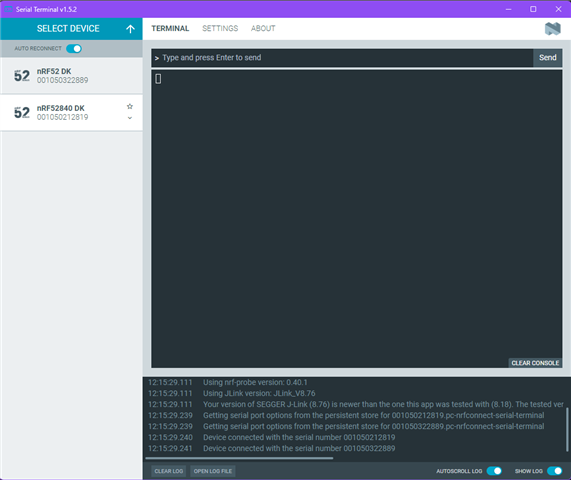
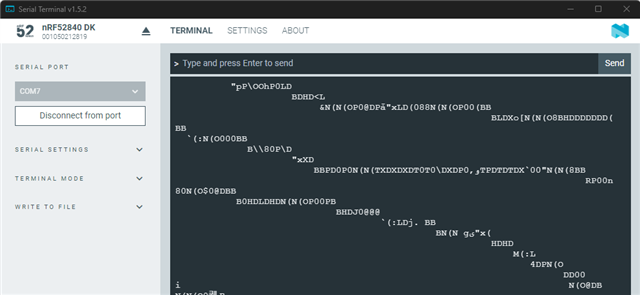
Devices’ serial ports are correctly detected in other software.
Using nRF Connect for Desktop – Serial Terminal, both boards (nRF52 DK and nRF52840 DK) appear and connect successfully via their serial ports.
Communication works without issues, and data can be read from the devices as expected (see attached screenshots).
Summary of the Issue
Even though the nRF Sniffer for BLE plugin is correctly installed, detected, and initialized within Wireshark (as confirmed by plugin listings and logs), the sniffer interfaces do not appear in the Capture list.
The extcap executables (nrfutil-ble-sniffer-shim.exe and nrfutil-ble-sniffer-hci-shim.exe) both fail to enumerate devices and terminate with exit code 101 caused by an unhandled Option::unwrap() error.


