about PAwR and EAD

Hi. 

Developing PAwR in project, I have some Question.

before Asking, My Project Structure is below.

1 Gateway (Advertiser) - Node1 (Scanner)

                                       - Node2 (Scanner)

                                       - Node3 (Scanner) ... More

Most of all is Done, but Some Encryption is Question.

1.  my understanding is correct under below?

EAD in Ble 5.4, for Encryption, need Encrypted Data Key Material characteristic, and it's characteristic require Encrypted and authenticated permission.

for this permission, security Mode need mode1, level 3. and for that, it need OOB.

2. if question 1 is correct, my project can not use OOB. so for Encrypt, need app level encryption?

3. I Saw ESL Example, the project is seem to use EAD, the EAD and Question 1 EAD is Not same?

4. in ESL Service , I think for EAD use AP Sync Key Material,  ESL Response Key Material. What difference this and Encrypted Data Key Material characteristic?

 in ESL no need OOB?

5. I also Saw ESL Example video, ( Getting started with Bluetooth Electronic Shelf Labels (ESL) and Periodic Advertising with Responses (PAwR) )

  There was nothing about how to do bonded. how satisfy AP, response key material characteristic permission?

thank you

Parents
  • Hi, 

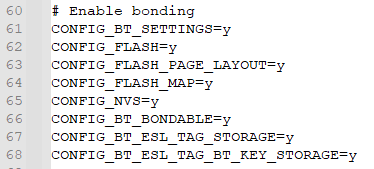
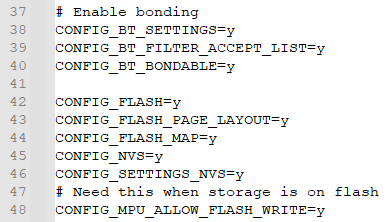
    It requires bonds, as the samples demonstrate. 

    See Nordic Bluetooth ESL Getting Started Kit v0.9.1\nrf-esl-bluetooth\samples\central_esl\prj.conf:

    Nordic Bluetooth ESL Getting Started Kit v0.9.1\nrf-esl-bluetooth\samples\peripheral_esl\conf\nrf54l15dk_nrf54l15_cpuapp\prj.conf

    Here is the Devacademy course about enabling bond: blefund-lesson-5-exercise-2

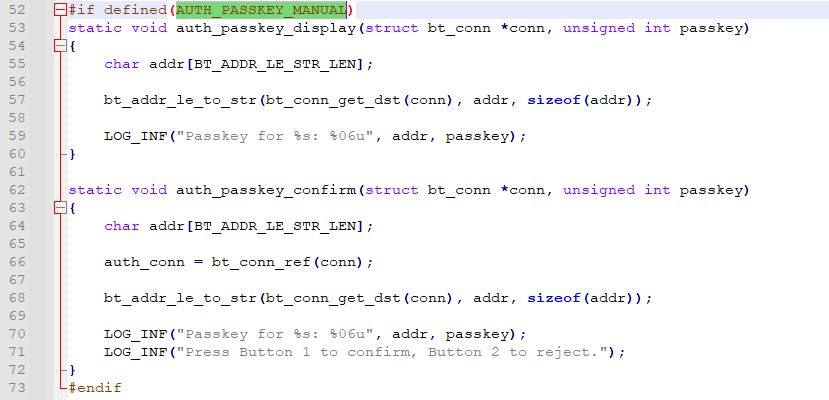
    For the authentication, you can enable AUTH_PASSKEY_MANUAL in Nordic Bluetooth ESL Getting Started Kit v0.9.1\nrf-esl-bluetooth\samples\peripheral_esl\src\main.c for passkey

    You can take a look at this Devacademy course blefund-lesson-5-exercise-1

    Regards, 
    Amanda H.

Reply
  • Hi, 

    It requires bonds, as the samples demonstrate. 

    See Nordic Bluetooth ESL Getting Started Kit v0.9.1\nrf-esl-bluetooth\samples\central_esl\prj.conf:

    Nordic Bluetooth ESL Getting Started Kit v0.9.1\nrf-esl-bluetooth\samples\peripheral_esl\conf\nrf54l15dk_nrf54l15_cpuapp\prj.conf

    Here is the Devacademy course about enabling bond: blefund-lesson-5-exercise-2

    For the authentication, you can enable AUTH_PASSKEY_MANUAL in Nordic Bluetooth ESL Getting Started Kit v0.9.1\nrf-esl-bluetooth\samples\peripheral_esl\src\main.c for passkey

    You can take a look at this Devacademy course blefund-lesson-5-exercise-1

    Regards, 
    Amanda H.

Children
Related