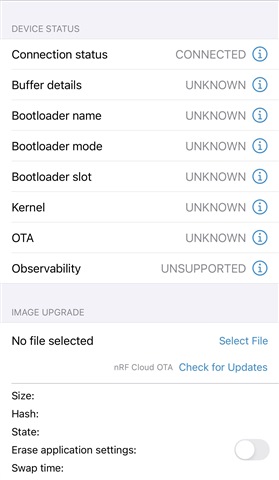
Hi,
I am following the below link to enable the FOTA over BLE in our custom project. I have tried the "Peripheral lbs" example and it is working.
And I have add the 2 line into the sysbuild and proj.conf and build to the custom project.
# STEP 2.1 Enable MCUboot
SB_CONFIG_BOOTLOADER_MCUBOOT=y
# STEP 2.2 - Enable FOTA over Bluetooth LE
CONFIG_NCS_SAMPLE_MCUMGR_BT_OTA_DFU=y
The "Device Manager" apps can find my custom device's advertisement. But when I click the "check for updates" in the Device Manager apps, it only shows the mobile phone can connect to the device but the bootloader name and bootloader mode is still unknown. And if I click the "start" to trigger the DFU, there is nothing happened. Is there anything I have configured wrongly?
Thanks.