nRF9151-DK – NCELLMEAS Command Returning Only a Single Cell

Hello,

I'm currently using the nRF9151-DK hardware to develop our product based on the nRF9151 SiP. We selected the ncs-serial-modem firmware, and the modem is controlled via AT commands by our main MCU.

We are evaluating the nRF Cloud Location feature to determine device position using cellular or Wi-Fi data. I have implemented and tested this functionality in multiple areas around Uberlândia, Brazil.

However, I’ve observed that Single Cell Location does not provide the accuracy we need, so I tried using the Multi-Cell Location service. According to the documentation (https://docs.nordicsemi.com/bundle/addon-serial_modem-latest/page/app/NRFCLOUD_AT_commands.html), the NCELLMEAS command should perform a neighboring cell scan.

During my field tests at over 15 different locations across the city, every NCELLMEAS scan returned only one cell after a few hundred milliseconds — as shown in the AT command output below. On the nRF Cloud Location web interface, my results always appear as Single Cell, never Multi-Cell.

[SER] 2023-01-01T00:00:15 TX Modem 14 bytes: AT%NCELLMEAS
[SER] 2023-01-01T00:00:15 RX Modem 6 bytes: OK
[SER] 2023-01-01T00:00:15 RX Modem 71 bytes: %NCELLMEAS: 0,"05314208","72405","9CC6",48,9610,411,71,26,7060,6733
[SER] 2023-01-01T00:00:15 TX Modem 21 bytes: AT#XNRFCLOUDPOS=2,0
[SER] 2023-01-01T00:00:15 RX Modem 6 bytes: OK
[SER] 2023-01-01T00:00:16 RX Modem 46 bytes: #XNRFCLOUDPOS: 0,-18.905003,-48.241289,546


In the coverage area of my residence, I have already observed the nRF9151 connecting to three different Cells, so I believe there is neighboring cell coverage available.

I also rebuilt and flashed the ncs-serial-modem firmware with trace logging enabled to analyze the behavior. The same issue persisted — only a single cell is reported in each scan. I’ve attached the trace log file for reference.

Could you please clarify if there are:

  1. Any specific commands or configuration parameters required to enable multi-cell scanning?

  2. Any known hardware limitations on the nRF9151 that prevent multi-cell measurements?

Thank you for your support.

trace-2025-11-18T12-54-25.346Z.mtrace

Parents Reply Children
  • However, I always get the same result: only one cell is reported, and the command returns immediately.

    I guess, the modem is not sleeping.

    To execute a neighbor cell scan, the "receiver" must be free to use. If your modem is active, that command can't use it. Therefore I wrote "requires the modem in power sleeping to start".

    %XMODEMSLEEP: 1,86386638
    I 35.102 : app> modem state: sleeping on
    scan 5 6
    I 44.218 : sh app active
    I 44.218 : >AT%NCELLMEAS=5,6
    I 44.260 : LTE modem wakes up
    %XMODEMSLEEP: 1,0
    I 44.260 : app> modem state: sleeping off
    OK
    I 44.261 : sh app inactive
    I 12.801 : CAT-M1 neighbor cell measurements 0/4
    I 12.802 :   # :  plmn    tac      cell  band earfnc pid rsrp/q dB(m)
    I 12.802 : [ 0]: 26203  0xe936 0x01656201  20  6200  251   -91/ -8
    I 12.802 : [ 1]: 26201  0x67b9 0x01CC2B03  20  6400  206   -91/ -9
    I 12.802 : [ 2]: 26201  0x67b9 0x01CC2B06   3  1444  270  -107/ -7
    I 12.803 : [*3]: 26201  0x67b9 0x01CC2B00   3  1300  151  -104/-12
    I 12.803 : (*3 : current cell)
    I 12.803 : Scans 2, improves 1, 69 s, overall 69 s
    I 12.900 : LTE modem sleeps (PSM)
    %XMODEMSLEEP: 1,86308844
    I 12.900 : app> modem state: sleeping on
    

  • What do you mean by “active”?
    I’ll attach the full AT command sequence that I’m currently using. But in summary: I first connect to a cell, then open the nRF Cloud socket, and only after that I trigger the cell scan command

    [SER] 2023-01-01T00:00:05 TX Modem 11 bytes: AT#XRESET  
    [SER] 2023-01-01T00:00:05 RX Modem 6 bytes:   OK 
    [SER] 2023-01-01T00:00:06 RX Modem 7 bytes: Ready
    [SER] 2023-01-01T00:00:06 TX Modem 13 bytes: AT+CEMODE=0  
    [SER] 2023-01-01T00:00:06 RX Modem 6 bytes:   OK  
    [SER] 2023-01-01T00:00:06 TX Modem 12 bytes: AT+CEREG=5  
    [SER] 2023-01-01T00:00:06 RX Modem 6 bytes:   OK 
    
    [SER] 2023-01-01T00:00:26 TX Modem 24 bytes: AT%XSYSTEMMODE=1,1,0,1  
    [SER] 2023-01-01T00:00:26 RX Modem 6 bytes:   OK  
    [SER] 2023-01-01T00:00:26 TX Modem 47 bytes: AT%XBANDLOCK=2,"1000000000000000000000010101"  
    [SER] 2023-01-01T00:00:26 RX Modem 6 bytes:   OK  
    [SER] 2023-01-01T00:00:26 TX Modem 69 bytes: AT%XCOUNTRYDATA=1,"4,724,1,0,3,0,5,0,28,0","5,724,1,0,3,0,5,0,28,0"  
    [SER] 2023-01-01T00:00:26 RX Modem 6 bytes:   OK  
    [SER] 2023-01-01T00:00:26 TX Modem 20 bytes: AT+CGDCONT=1,IP,em  
    [SER] 2023-01-01T00:00:26 RX Modem 6 bytes:   OK  
    [SER] 2023-01-01T00:00:26 TX Modem 11 bytes: AT%XSIM=1  
    [SER] 2023-01-01T00:00:26 RX Modem 6 bytes:   OK  
    [SER] 2023-01-01T00:00:26 TX Modem 11 bytes: AT%CESQ=1  
    [SER] 2023-01-01T00:00:26 RX Modem 6 bytes:   OK  
    [SER] 2023-01-01T00:00:26 TX Modem 13 bytes: AT%XSNRSQ=1  
    [SER] 2023-01-01T00:00:26 RX Modem 6 bytes:   OK  
    [SER] 2023-01-01T00:00:26 TX Modem 11 bytes: AT+CFUN=1  
    [SER] 2023-01-01T00:00:27 RX Modem 6 bytes:   OK 
    [SER] 2023-01-01T00:00:28 RX Modem 33 bytes:   +CEREG: 2,"9CC6","05314208",7  
    [SER] 2023-01-01T00:00:30 RX Modem 57 bytes:   +CEREG: 1,"9CC6","05314208",7,,,"11100000","11100000"  
    [SER] 2023-01-01T00:00:31 TX Modem 12 bytes: AT+CGPADDR  
    [SER] 2023-01-01T00:00:31 RX Modem 28 bytes:   +CGPADDR: 0,"100.80.0.7"  
    [SER] 2023-01-01T00:00:31 RX Modem 6 bytes:   OK  
    [SER] 2023-01-01T00:00:31 TX Modem 13 bytes: AT%XMONITOR  
    [SER] 2023-01-01T00:00:31 RX Modem 104 bytes:   %XMONITOR: 1,"","","72405","9CC6",7,28,"05314208",411,9610,67,36,"","11100000","11100000","01001001"  
    [SER] 2023-01-01T00:00:31 TX Modem 16 bytes: AT#XNRFCLOUD=1  
    [SER] 2023-01-01T00:00:32 RX Modem 6 bytes:   OK  
    [SER] 2023-01-01T00:00:35 RX Modem 19 bytes:   #XNRFCLOUD: 1,0  
    [SER] 2023-01-01T00:00:41 TX Modem 14 bytes: AT%NCELLMEAS  
    [SER] 2023-01-01T00:00:41 RX Modem 6 bytes:   OK  
    [SER] 2023-01-01T00:00:41 RX Modem 73 bytes:   %NCELLMEAS: 0,"05314208","72405","9CC6",43,9610,411,66,23,34659,33385  
    [SER] 2023-01-01T00:00:41 TX Modem 21 bytes: AT#XNRFCLOUDPOS=2,0  
    [SER] 2023-01-01T00:00:41 RX Modem 6 bytes:   OK  
    [SER] 2023-01-01T00:00:42 RX Modem 46 bytes:   #XNRFCLOUDPOS: 0,-18.905003,-48.241289,546
    [SER] 2023-01-01T00:00:44 TX Modem 16 bytes: AT#XNRFCLOUD=0  
    [SER] 2023-01-01T00:00:44 RX Modem 19 bytes:   #XNRFCLOUD: 0,0  
    [SER] 2023-01-01T00:00:44 RX Modem 6 bytes:   OK  
    [SER] 2023-01-01T00:01:14 TX Modem 11 bytes: AT+CFUN=0  
    [SER] 2023-01-01T00:01:14 RX Modem 6 bytes:   OK  
     

  • You will need to configure your device for PSM (see +CPSMS).

    What do you mean by “active”?

    That's when the modem is not sleeping.

    In your case it is "active" between cfun=1 and cfun=0. therefore NCELLMEAS only reports the value for the current selected cell.

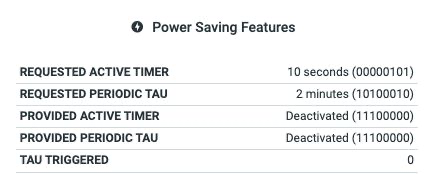
  • In Brazil, PSM is not commonly supported by the operators. I’ve already tried enabling PSM, but the network rejected the request.

    Given that, is there any way to perform %NCELLMEAS without relying on PSM?
    I've also tried to perform NCELLMEAS before active CFUN=1, but it return: ERROR.

  • "No PSM" is outside of my experience. I'm just an other user and I don't know, how to execute %NCELLMEAS with that.

    I guess you need to wait for an Nordic engineer.

Related