

Was able to build after I installed these two packages
/usr/local/opt/python/libexec/bin/python -m pip install --break-system-packages PyYAML
brew install pykwalify 2>&1 || pip3 install --break-system-packages pykwalify
Was able to build after I installed these two packages
/usr/local/opt/python/libexec/bin/python -m pip install --break-system-packages PyYAML
brew install pykwalify 2>&1 || pip3 install --break-system-packages pykwalify
Hi,
The pykwalify and PyYAML packages should be included in he toolchain (I verified that now for SDK 3.1.1 and have not found any reports of it missing in any other toolchain either), so it looks like you are building with a local toolchain and not from the toolchain manager. Is that intentional?

With 3.1.1 I need to use vscode to install and run. I have not been able to figure out how to select my custom board when creating a vscode build. I am running the terminal from the nrf menu and it seems to bring a 3.1.1 environment in and allows me to build, except for it does not find those two packages.
So It should be the full 3.1.1 tools environment, but not sure why it seems to want those two packages to be local.
env is
stevenriedl@Stevens-MacBook-Pro-1895 thermostat_2 % env
OSLogRateLimit=64
MallocNanoZone=0
USER=stevenriedl
COMMAND_MODE=unix2003
__CFBundleIdentifier=com.todesktop.230313mzl4w4u92
PATH=/usr/local/opt/ruby/bin:/Users/stevenriedl/Library/Application Support/cloud-code/installer/google-cloud-sdk/bin:/Users/stevenriedl/gn:/usr/local/opt/python/libexec/bin:/Users/stevenriedl/gn:/usr/local/bin:/System/Cryptexes/App/usr/bin:/usr/bin:/bin:/usr/sbin:/sbin:/var/run/com.apple.security.cryptexd/codex.system/bootstrap/usr/local/bin:/var/run/com.apple.security.cryptexd/codex.system/bootstrap/usr/bin:/var/run/com.apple.security.cryptexd/codex.system/bootstrap/usr/appleinternal/bin:/opt/pmk/env/global/bin:/Library/Apple/usr/bin:/Users/stevenriedl/Library/Application Support/cloud-code/installer/google-cloud-sdk/bin:/opt/nordic/ncs/toolchains/561dce9adf/bin:/opt/nordic/ncs/toolchains/561dce9adf/usr/bin:/opt/nordic/ncs/toolchains/561dce9adf/usr/local/bin:/opt/nordic/ncs/toolchains/561dce9adf/opt/bin:/opt/nordic/ncs/toolchains/561dce9adf/opt/nanopb/generator-bin:/opt/nordic/ncs/toolchains/561dce9adf/nrfutil/bin:/opt/nordic/ncs/toolchains/561dce9adf/opt/zephyr-sdk/arm-zephyr-eabi/bin:/opt/nordic/ncs/toolchains/561dce9adf/opt/zephyr-sdk/riscv64-zephyr-elf/bin:/usr/local/opt/ruby/bin:/Users/stevenriedl/gn:/usr/local/opt/python/libexec/bin:/Users/stevenriedl/.cargo/bin:/Applications/Commander.app/Contents/MacOS:/Applications/microchip/xc8/v3.00/bin:/Users/stevenriedl/.local/bin:/Applications/microchip/xc8/v2.46/bin:/Applications/Commander.app/Contents/MacOS:/Applications/microchip/xc8/v3.00/bin:/Users/stevenriedl/.local/bin:/Applications/microchip/xc8/v2.46/bin:/Applications/microchip/xc8/v3.00/bin:/Users/stevenriedl/.local/bin
LOGNAME=stevenriedl
SSH_AUTH_SOCK=/private/tmp/com.apple.launchd.0PWYZ1O6BZ/Listeners
HOME=/Users/stevenriedl
SHELL=/bin/zsh
TMPDIR=/var/folders/6w/xtzg9w6d1355665z9t85_1040000gn/T/
__CF_USER_TEXT_ENCODING=0x1F5:0x0:0x0
XPC_SERVICE_NAME=0
XPC_FLAGS=0x0
ORIGINAL_XDG_CURRENT_DESKTOP=undefined
CURSOR_TRACE_ID=c03afe8774834e3d896c88c6fa537588
SHLVL=1
PWD=/Users/stevenriedl/Github/thermostat_2
OLDPWD=/Users/stevenriedl/Github/thermostat_2
LANG=C.UTF-8
IFX_TOOLBOX_UUID=48919fdd-d881-30e0-9292-a56b35ff154f
ANDROID_HOME=/Users/stevenriedl/Library/Android/sdk
VSCODE_CODE_CACHE_PATH=/Users/stevenriedl/Library/Application Support/Cursor/CachedData/ba90f2f88e4911312761abab9492c42442117cf0
VSCODE_CRASH_REPORTER_PROCESS_TYPE=extensionHost
VSCODE_CWD=/
VSCODE_ESM_ENTRYPOINT=vs/workbench/api/node/extensionHostProcess
VSCODE_HANDLES_UNCAUGHT_ERRORS=true
VSCODE_IPC_HOOK=/Users/stevenriedl/Library/Application Support/Cursor/2.0.-main.sock
VSCODE_NLS_CONFIG={"userLocale":"en-us","osLocale":"en-us","resolvedLanguage":"en","defaultMessagesFile":"/Applications/Cursor.app/Contents/Resources/app/out/nls.messages.json","locale":"en-us","availableLanguages":{}}
VSCODE_PID=51563
VSCODE_PROCESS_TITLE=extension-host  [2-3]
APPLICATION_INSIGHTS_NO_DIAGNOSTIC_CHANNEL=1
NRF_CONNECT_VSCODE=1
CMAKE_EXPORT_COMPILE_COMMANDS=ON
GIT_EXEC_PATH=/opt/nordic/ncs/toolchains/561dce9adf/Cellar/git/2.37.3/libexec/git-core
GIT_TEMPLATE_DIR=/opt/nordic/ncs/toolchains/561dce9adf/Cellar/git/2.37.3/share/git-core/templates
NRFUTIL_HOME=/opt/nordic/ncs/toolchains/561dce9adf/nrfutil/home
ZEPHYR_SDK_INSTALL_DIR=/opt/nordic/ncs/toolchains/561dce9adf/opt/zephyr-sdk
ZEPHYR_TOOLCHAIN_VARIANT=zephyr
ZEPHYR_BASE=/opt/nordic/ncs/v3.1.1/zephyr
TERM_PROGRAM=vscode
TERM_PROGRAM_VERSION=2.0.77
COLORTERM=truecolor
GIT_ASKPASS=/Applications/Cursor.app/Contents/Resources/app/extensions/git/dist/askpass.sh
VSCODE_GIT_ASKPASS_NODE=/Applications/Cursor.app/Contents/Frameworks/Cursor Helper (Plugin).app/Contents/MacOS/Cursor Helper (Plugin)
VSCODE_GIT_ASKPASS_EXTRA_ARGS=
VSCODE_GIT_ASKPASS_MAIN=/Applications/Cursor.app/Contents/Resources/app/extensions/git/dist/askpass-main.js
VSCODE_GIT_IPC_HANDLE=/var/folders/6w/xtzg9w6d1355665z9t85_1040000gn/T/vscode-git-f968839405.sock
VSCODE_INJECTION=1
ZDOTDIR=/Users/stevenriedl
USER_ZDOTDIR=/Users/stevenriedl
TERM=xterm-256color
VSCODE_PROFILE_INITIALIZED=1
_=/usr/bin/env
stevenriedl@Stevens-MacBook-Pro-1895 thermostat_2 % 
Hi,
The hash for the toolchain does not match the one I have for 3.1.1 on Mac. How did you open the terminal in VS Code? In order to get a terminal with the toolchain you should open from here if you use VS Code:
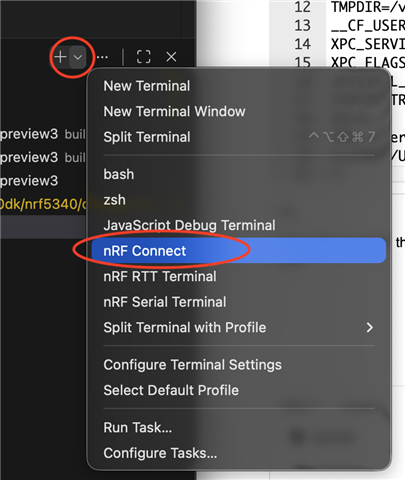
Then you will also see the SDK and toolchain printed in the terminal so you can verify it is correct. Like this:
Working directory: /opt/nordic/ncs/v3.1.1/nrf/samples/bluetooth/peripheral_hids_mouse/build_1
SDK:               nRF Connect SDK v3.1.1
Toolchain:         nRF Connect SDK Toolchain v3.1.1
This will by default use the toolchain that was used to build the last project, so the simplest to get the 3.1.1 toolchain is to build an example for 3.1.1 (that can be for an development kit if that is easier).
Regarding custom boards, you can add the path to the boards folder in VS Code where you edit the VS Code settings like this: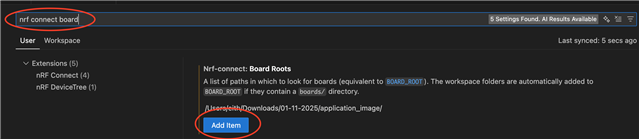
I started the terminal from the nrf sdk menu top left, seems to give me the same thing.
But I will also try installing the custom board in vscode settings.
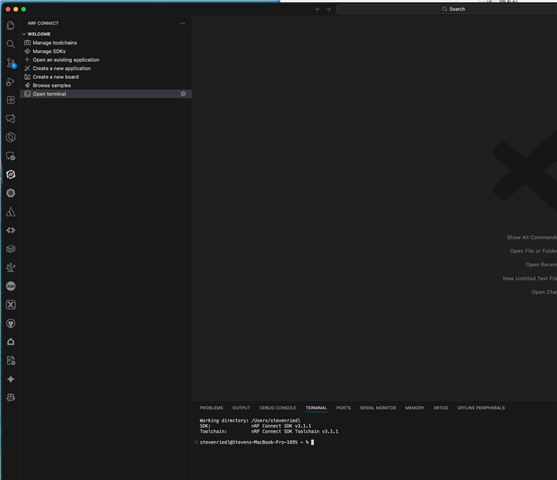
I see. Can you check which python install is being used by typing "which python" in the terminal window? It could be interesting to try to import the missing packages there as well. Similar to what I did here:
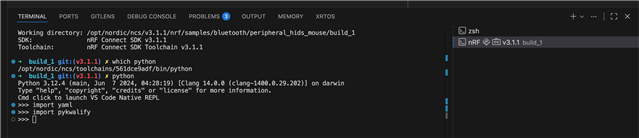
Also, I am wondering if you are testing on an Intel or ARM based Mac? (I am not reproducing on my ARM based).
So, this works on my arm Mac, my Intel Mac has a large amount of brew packages installed and probably a messed up path. I would think that when you run the nRF terminal it would put the toolkit ahead of those, but may not be happening. so....
/usr/local/opt/python/libexec/bin/python
Hi,
Thank you for confirming. I agree that it would be better (and expected) that the nRF Terminal put the toolchain components first in the path. This has been reported internally but I cannot promise if or when this will be updated.
Hi,
Thank you for confirming. I agree that it would be better (and expected) that the nRF Terminal put the toolchain components first in the path. This has been reported internally but I cannot promise if or when this will be updated.