NRF54L15 - Unable to use Programmer(V4.6.2) of nrf connect for Desktop(V5.2.0)

Hello,

I am trying to program a custom device of nrf54l15 using nrf connect for desktop app(V5.2.0) -> Programmer(V4.6.2)

I am able to program it but this is how I see the loaded file when I "READ" the file in the Device after programming.

And neither am I able to see any changes in my device.
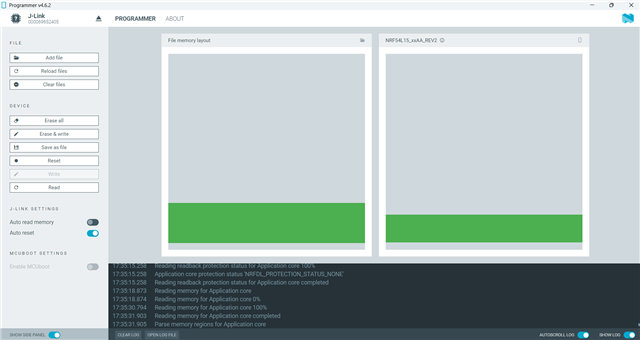
Can You please guide me with what I am doing wrong?

I have followed the steps from General Programming Procedure Document.

  • Yes, If I flash it using VS code, or nrfutil, I am getting the result. But if I do the same using the nrf connect for Desktop Application, it is not not showing the same result. 
    I actually wanted to flash the program on another device, which is not in my premises. And the process is being done by a non-technical person. I found that the nrf connect for desktop tool will be the best option, as I dont have to install python, nrfutil and so on, on their laptop.

  • I understand..

    Well, I can program the file that you first attached (2502.zephyr.hex) using nRF Connect for Desktop -> Programmer, and it boots up as expected. You don't see the same?

    If so, can you clear the log after opening the programmer app, and then do the whole procedure, until the write is done and the readback is done. Then copy the entire log, and paste it here.

    Note that you can make that person install nRF Connect for Desktop, but they still need to install JLink.exe on their computer. This can be found here:

    https://www.segger.com/downloads/jlink/

    Have them install the version that you are using. 

    Best regards,

    Edvin

Related