NRF52840 CHIP CONSUMING UNUSUAL CURRENT BURST WHILE DOING DFU UPDGRADE

Hi ,

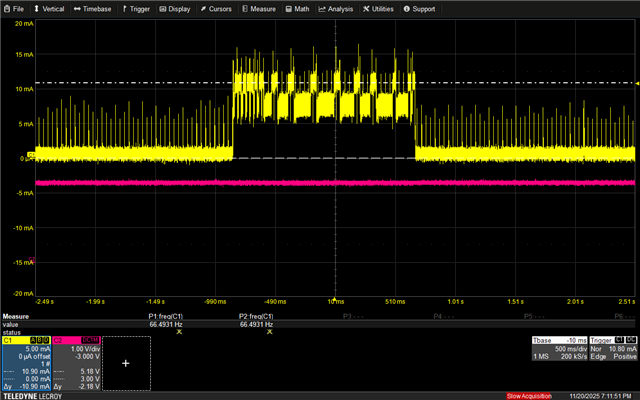
Our nRF52840 chip is drawing a high-current burst of about 1.5 seconds during the DFU upgrade. Because we have a 10 mA current limit on the battery, the system browns out during this period. We do not want to increase the current limit, so we need to understand why the nRF52840 is consuming this unusually high current only for a short duration at the beginning of the DFU process.

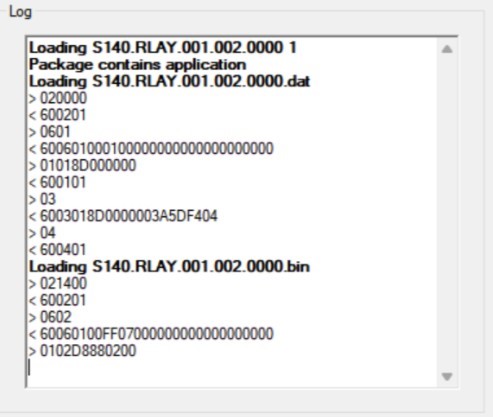
I will attach some images. The module starts drawing this high current right after sending the packet 0102D8880200. For troubleshooting, I temporarily bypassed the current limit only for this short interval, and the rest of the DFU upgrade proceeds without any issues.
Parents
  • I also suspect this is the erase of the flash. Can you please try remove the part in the bootloader that erases the second bank? It will still fail (because writing to this flash area will fail later), but at least it wouldn't brown out, helping pin-point the issue.

    Alternatively, set a breakpoint or log something (over RTT) at nrf_dfu_req_handler.c, line 452 to see whether this is where it tries to erase the flash, and if this is what is causing the issue:

        /* Erase the page we're at. */
        if (nrf_dfu_flash_erase((m_firmware_start_addr + s_dfu_settings.progress.firmware_image_offset),
                                CEIL_DIV(p_req->create.object_size, CODE_PAGE_SIZE), NULL) != NRF_SUCCESS)
        {
            NRF_LOG_ERROR("Erase operation failed");
            p_res->result = NRF_DFU_RES_CODE_INVALID_OBJECT;
            return;
        }

    If this is the issue, you could try to erase the pages manually, with some delay, to see if that helps, but I doubt it will, because later on, when the entire image is transferred, the MBR (part of the softdevice) will take over, and perform the swap of the old and new softdevice. This will also do a flash erase, and this is not open source (since the softdevice is delivered as a .hex file), and therefore you can not alter the behavior of it. 

    If it is in fact the erasing that is causing this issue, then you could try to use a capacitor. It really depends on whether the average current consumption (from your plot) is above or below 10mA. 

    Best regards,

    Edvin

Reply
  • I also suspect this is the erase of the flash. Can you please try remove the part in the bootloader that erases the second bank? It will still fail (because writing to this flash area will fail later), but at least it wouldn't brown out, helping pin-point the issue.

    Alternatively, set a breakpoint or log something (over RTT) at nrf_dfu_req_handler.c, line 452 to see whether this is where it tries to erase the flash, and if this is what is causing the issue:

        /* Erase the page we're at. */
        if (nrf_dfu_flash_erase((m_firmware_start_addr + s_dfu_settings.progress.firmware_image_offset),
                                CEIL_DIV(p_req->create.object_size, CODE_PAGE_SIZE), NULL) != NRF_SUCCESS)
        {
            NRF_LOG_ERROR("Erase operation failed");
            p_res->result = NRF_DFU_RES_CODE_INVALID_OBJECT;
            return;
        }

    If this is the issue, you could try to erase the pages manually, with some delay, to see if that helps, but I doubt it will, because later on, when the entire image is transferred, the MBR (part of the softdevice) will take over, and perform the swap of the old and new softdevice. This will also do a flash erase, and this is not open source (since the softdevice is delivered as a .hex file), and therefore you can not alter the behavior of it. 

    If it is in fact the erasing that is causing this issue, then you could try to use a capacitor. It really depends on whether the average current consumption (from your plot) is above or below 10mA. 

    Best regards,

    Edvin

Children
Related