NCS installation Linux

Hi,

I've already spent a lot of time on this issue. I develop on a Windows laptop. I need to run unit tests with Twister before committing to our repository. I can't do this on Windows because native_sim is not supported. I tried to setup the ncs toolchain on WSL2/ubuntu 24.04 LTS. I found many different install instruction but i failed. i've also tried to use the docker-image used in the CI of ncs-sample-application, but could not get it to work locally. Could you please write in simple sentences, what I need in what order to setup ncs to run twister unit test on native_sim on WSL2/Ubuntu? We have a free-standing application.

gcc-arm-none-eabi (which version)? zephyr-sdk? ncs-sdk? nrfutil? jlink? its really confusing.

Parents
  • Hi

    I would say the easiest way to install NCS in WSL is to use VScode

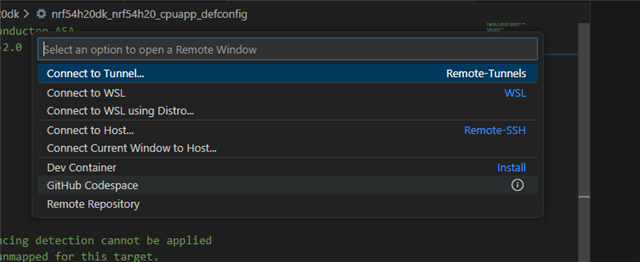
    Press CTRL+Shift+o to open the following menu

    Then connect to wsl and proceed to install NCS as you would in windows by installing the correct extensions and downloading the sdk

    When you have done this, you can continue to develop as normally only difference is that you are using windows. 

    If you are to connect a DK after you are done with your simulated board you will need to add usb passthrouch in wsl https://learn.microsoft.com/en-us/windows/wsl/connect-usb 

    Regards

    Runar

  • Hi, I didn't knew this way, thank you.

    When I follow the guide https://docs.nordicsemi.com/bundle/ncs-latest/page/nrf/app_dev/create_application.html

    and try to create a workspace application from the ncs-sample-application with  

    west init github.com/.../ncs-example-application my_sample

    it fails as 

    FATAL ERROR: already initialized in /home/me/ncs/v3.1.0, aborting.
    Note:
        In your environment, ZEPHYR_BASE is set to:
        /home/me/ncs/v3.1.0/zephyr

        This forces west to search for a workspace there.
        Try unsetting ZEPHYR_BASE and re-running this command.

  • When you are doing this, you are pulling down the entire ncs again and this can't be done inside a folder where you already have NCS. 

    To do this I would do the following (I will use command line commands to make it easier) inside wsl:

    # Launching a enviroment where west is loaded, switch version to your version
    nrfutil sdk-manager toolchain launch --ncs-version v3.1.1 --shell
    
    # Navigate to where you would like to create the workspace and make a folder
    mkdir folder_name
    cd folder_name
    
    west init -m https://github.com/nrfconnect/ncs-example-application --mr main my-workspace
    
    cd my-workspace
    
    west init
     

    Regards

    Runar

  • Hi, something is not working correctly with wsl and vs code nrf extension. i have a fresh Ubuntu 24.04 on WSL. I connect to remote via VS Code and install all extensions and 3.1.1 SDK and toolchain. When I create new application, it gets created but not opened. I see this error:

    2025-12-05 08:48:19.036 [error] Error: Unable to write file 'vscode-remote://wsl+ubuntu-24.04/home/.vscode/settings.json' (NoPermissions (FileSystemError): Error: EACCES: permission denied, mkdir '/home/.vscode')
Reply
  • Hi, something is not working correctly with wsl and vs code nrf extension. i have a fresh Ubuntu 24.04 on WSL. I connect to remote via VS Code and install all extensions and 3.1.1 SDK and toolchain. When I create new application, it gets created but not opened. I see this error:

    2025-12-05 08:48:19.036 [error] Error: Unable to write file 'vscode-remote://wsl+ubuntu-24.04/home/.vscode/settings.json' (NoPermissions (FileSystemError): Error: EACCES: permission denied, mkdir '/home/.vscode')
Children
No Data
Related