Example code

I have been forced to upgrade to the nRF54L15 from the nRF52840 DK.  The example code in the SDK  for the nRF52840 the 'ble-peripheral' had example code for 'ble_app_uart' which was perfect for me.  All I need to do is receive a string of characters from a smart phone, and then do what I need to do with it. 

In the 'ble_app_uart' example there is a routine called 'nus_data_handler'  which had an array called 'ble_data[]'  which received the string of data from the phone.

I have just installed the SDK for the nRF52840 Development Kit and I can not find anything comparable with the 'ble_app_uart' for nRF52840.

It must be in there somewhere, but I have looked, but can not find it.  I am hoping that you can point me in the right direction.

Cheers,

Brian Fleming

  • Hello,

    I seem to have resolved the python issue although I do not know how.

    [cmake] -- Found Python3: C:/Users/Brian/AppData/Local/Programs/Python/Python313/python.exe (found suitable version "3.13.2", minimum required is "3.10") found
    However, here is the next issue.  
    [cmake] CMake Error at C:/ncs/v3.1.1/zephyr/cmake/modules/extensions.cmake:3511 (message):
    [cmake]   BOARD is not being defined on the CMake command-line, in the environment or
    [cmake]   by the app.
    I have tried everything within the Visual Studio environment that I could think of  and have done many searches on the web but I have not found anything which makes sense for me.
    Sorry for my lengthy delay in replying, but I have many other work responsibilities.
    Cheers.
  • Hi Brian

    Are you using the VS Code extension to build the project? What board are you building the application for here? Start with the nRF54L15 DK and upload the full build log here. if you see the same issue. Also, make sure you have the same version of the nRF Connect SDK as the toolchain when you build. 

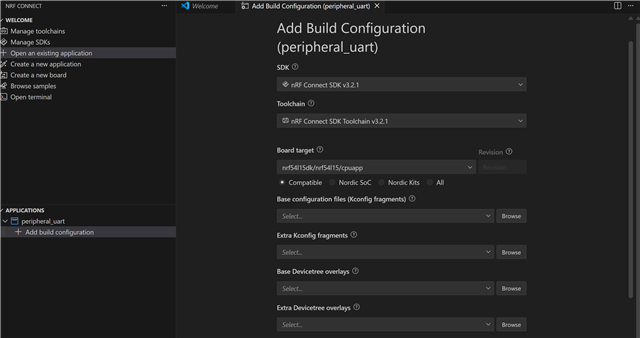
    Here's how the build page should look if you're building the project with the VS Code extension: 

    Best regards,

    Simon

  • Hello, 

    I am using the nRF54L15 Development Kit

    I think I am using the VS Code extension as I can see the same screen as per the image you have attached with the same parameters.

    I have saved a screen grab as a file and all parameters are the same as per your image.  I have tried to attached the image file, however I can not attach the file to this message. I have tried Insert\image/video/file\File/URL   I enter the complete path C:\Users\Brian\OneDrive\Desktop\IMAGES  followed by the full file name and nothing can be uploaded.  

    Cheers,

    Brian Fleming

  • Hi

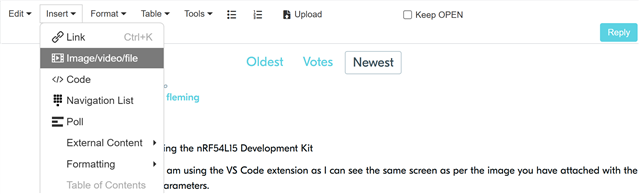
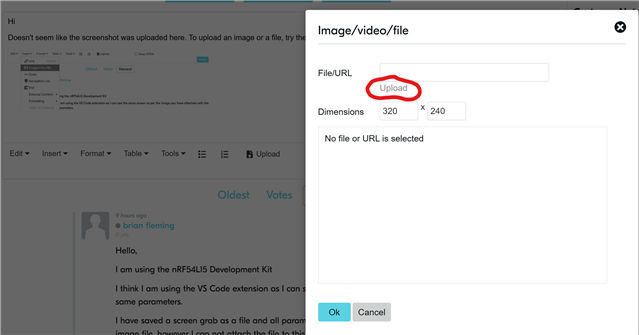
    Doesn't seem like the screenshot was uploaded here. To upload an image or a file, try the following:

    Then press Upload file here, and navigate to the image you want to upload.

    But if you see the same as me and build the same way, then the errors you're seeing most likely point to something having gone wrong during installation of the SDK or VS Code extension. If that's the case, uninstalling and reinstalling the VS Code extension, VS Code as a whole and the nRF Connect SDK, as it seems like CMake and Python dependencies haven't been installed correctly.

    Best regards,

    Simon

  • Previously we were using Kiel with another Nordic Product.  It worked perfectly, was easy to install and it worked.  What do we need to do to use Kiel again.

Related