[nRF54L15-DK] The SoC keeps being woken up from System OFF by the onboard debugger

Hi. I'm working on a code that performs an action and immediately goes into System OFF mode. Before that, it configures GRTC as a wake-up source with a 5 secs timeout.
I've used the official sample as a reference.

The problem I'm having is that when I power cycle the DK, the behavior is random and there are 3 scenarios that I've observed:
- the code works as expected (this one is not very common),
- the code resets immediately after going to System OFF with debugger reset cause (RESET_DEBUG) - this one is the most common,
- sometimes the code seems to not even start (it's rare).

I've tried to enable/disable multiple options in prj.conf but still cannot tell what may be causing this. The console/logging is disabled.
After the debugger reset the exact reason is the DIF bit in RESETREAS register.

I'm not debugging the code, I just use the onboard debugger for flashing.

My DK is v 1.0.0 (2025.36), I'm using SDK 3.1.1 integrated into VS Code.

I've posted my code here: mkoclega/nrf54l15dk-system-off-test

Thanks - Mariusz

Parents
  • Hi,


    I tested your firmware, and consistently see that LED0 flashes for a short period of time, repeated every 5 seconds. As far as I can tell, this is the expected behaviour.

    - the code resets immediately after going to System OFF with debugger reset cause (RESET_DEBUG) - this one is the most common,

    Do you have a RTT session, or terminal running in the background, which is continuously trying to re-attach?


    Kind regards,

    Håkon

  • Hi Håkon,

    Yes, this is the expected behavior - single flash of LED0 and going to System Off for 5 secs (with GRTC wakeup), and then repeat.

    No I didn't have any connection as far as I was aware.
    To be perfectly sure, I just powered the DK from a regular Samsung USB wall charger (a quite simple one, I think it doesn't support any advanced modes but 5V/2A via USB-A).

    The behavior stays the same. I recorded a short video showing it. I put it in "vid" folder on my GitHub repo. You have to download it because it's too big to be displayed on the page (33 MB), sorry for that.

    Thanks - Mariusz

  • Hi Mariusz,


    I found the issue for this scenario:

    - sometimes the code seems to not even start (it's rare).

    And that is when both inputs to this function are 0:

    static void flash_led(uint32_t reset_cause, bool wakeup)
    {
    	const struct gpio_dt_spec *p_led = NULL;
    
    	if (wakeup)
    		p_led = &led0;
    	else if (reset_cause & RESET_POR)
    		p_led = &led1;
    	else if (reset_cause & RESET_PIN)
    		p_led = &led2;
    	else if (reset_cause & RESET_DEBUG)
    		p_led = &led3;
    
    	gpio_pin_set_dt(p_led, 1);
    
    	k_msleep(200);
    
        gpio_pin_set_dt(p_led, 0);
    }

    Which causes p_led = NULL; to be dereferenced in the gpio calls:

    (gdb) bt
    #0  arch_system_halt (reason=0x24) at /opt/ncs/zephyr/kernel/fatal.c:30
    #1  0x00005fc8 in k_sys_fatal_error_handler (reason=<optimized out>, esf=<optimized out>) at /opt/ncs/zephyr/kernel/fatal.c:44
    #2  0x000035d8 in z_fatal_error (reason=<optimized out>, esf=<optimized out>) at /opt/ncs/zephyr/kernel/fatal.c:119
    #3  0x00005ad6 in z_arm_fatal_error (reason=<optimized out>, esf=esf@entry=0x20001530 <z_interrupt_stacks+1984>) at /opt/ncs/zephyr/arch/arm/core/fatal.c:86
    #4  0x00000f8e in z_arm_fault (msp=<optimized out>, psp=<optimized out>, exc_return=<optimized out>, callee_regs=<optimized out>) at /opt/ncs/zephyr/arch/arm/core/cortex_m/fault.c:1080
    #5  0x0000105c in z_arm_usage_fault () at /opt/ncs/zephyr/arch/arm/core/cortex_m/fault_s.S:102
    #6  <signal handler called>
    #7  0x000007f4 in gpio_pin_set_dt (value=0x1, spec=0x0 <_vector_table>) at /opt/ncs/zephyr/include/zephyr/drivers/gpio.h:1700
    #8  flash_led (wakeup=0x0, reset_cause=0x0) at /opt/repos/nrf54l15dk-system-off-test/src/main.c:33
    #9  main () at /opt/repos/nrf54l15dk-system-off-test/src/main.c:70


    If you either add a NULL-check, or set a default led to blink; you should be able to work around that scenario atleast.


    If your code has CONFIG_RESET_ON_FATAL_ERROR=y set, the above scenario will then look like a softreset.


    Kind regards,

    Håkon


  • Hi Håkon,

    Good catch! I wrote this function in a hurry, my bad. I'll fix it.
    Still, it's a bit odd that I'm getting various reset causes in result of the same action (power cycling the device). I'll investigate what cause it actually is.

    In my PoC app, I relied on logging mechanism, not the LEDs. You can see numerous calls to LOG_xxx(). I've also had a suspend routine for the console before going to system off.

    But I've removed that to eliminate the case that it may be caused by UART or something. Added the LED signalling instead.

    Anyways, it still doesn't solve the real issue, so I'm looking forward to get your help in solving that.

    Thanks - Mariusz

Reply
  • Hi Håkon,

    Good catch! I wrote this function in a hurry, my bad. I'll fix it.
    Still, it's a bit odd that I'm getting various reset causes in result of the same action (power cycling the device). I'll investigate what cause it actually is.

    In my PoC app, I relied on logging mechanism, not the LEDs. You can see numerous calls to LOG_xxx(). I've also had a suspend routine for the console before going to system off.

    But I've removed that to eliminate the case that it may be caused by UART or something. Added the LED signalling instead.

    Anyways, it still doesn't solve the real issue, so I'm looking forward to get your help in solving that.

    Thanks - Mariusz

Children
  • Hi,


    I see the same pattern as in your video if I keep your code as-is and let the fault occur, with CONFIG_RESET_ON_FATAL_ERROR=y, ie, that LED2 and LED3 blinks upon boot.

    Your cut down sample exhibits a fault, and it might not be related to the original issue.

    mkoclega said:
    In my PoC app, I relied on logging mechanism, not the LEDs. You can see numerous calls to LOG_xxx(). I've also had a suspend routine for the console before going to system off.

    Logging is usually done in a deferred thread, so add a second for debug purposes before entering system off mode.

    In this case, also try to set blocking assertions, ie. that the code does not reset itself when a fault occurs.


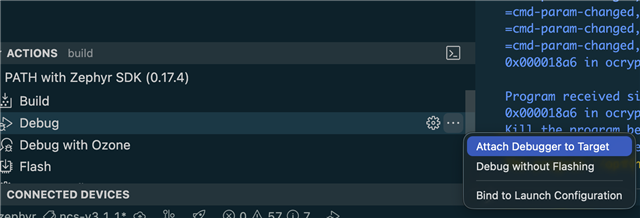
    Then use west attach to attach a debug session, or use vscode plugin and select attach debugger to target _after the issue has occurred_:


    Kind regards,

    Håkon

  • Hi,

    I just pushed a fix for flash_led() function. The behavior seems to be the same with that fix. I don't have CONFIG_RESET_ON_FATAL_ERROR set to 'y' (checked in the Kconfig GUI in Libraries -> Reset on fatal error). So if no LED blinks I guess the reset cause is different than the four I handled in the code, I'll check that in the evening.

    Yes, I'm aware of a background thread, and waiting an arbitrary time for it to finish is not a good option. So in my initial PoC app I simply set CONFIG_LOG_MODE_IMMEDIATE=y and also tried to call log_flush() just before suspending console, but it didn't have any impact on the issue.

    I'm new to Nordic SoCs and I still need to learn debugging on that platform. So not sure when I'm ready with that.

    I'm not sure if I got you right, you were able to reproduce the debugger reset loop issue on your end, is that right?

  • Hi Håkon,

    So I've updated my sample app to enable console logging and I've checked the "rare" reset reason behavior.

    It looks like from time to time the reset reason is zero. I've even used the nrfx function to confirm that.

    But apart from that, the main problem still persists. I'm not sure how to proceed further with that. Please advice.

    Thanks - Mariusz

  • Hi Mariusz,


    Reset cause of 0 indicates a power on reset, which is expected when you are power cycling the nRF.

    Q1: Which version of Segger JLink (https://www.segger.com/downloads/jlink/) are you using?

    Q2: Can you try to power on/off via the pin header ("VDD current measure") instead? I suspect the boot-up process of the Segger IC (depending on firmware version on this one as well) will reset the DUT, and thus give a debug and pin reset upon boot.

    Please note that you can get other sources set with pin reset in resetreas register, as per this errata:

    https://docs.nordicsemi.com/bundle/errata_nRF54L15_Rev2/page/ERR/nRF54L15/Rev2/latest/anomaly_L15_48.html#anomaly_L15_48


    Kind regards,

    Håkon

  • Hi Håkon,

    Reset cause of 0 indicates a power on reset, which is expected when you are power cycling the nRF.

    Oh, right. These mappings into Zephyr's generic reset cause codes are a bit misleading. I assumed I should expect RESET_POR.

    Q1: Which version of Segger JLink (https://www.segger.com/downloads/jlink/) are you using?

    I'm using v8.66. I actually initially installed the latest one but the nRF Connect warned me it's not supported yet and may lead to issues, if I remember correctly.
    Nevertheless is that even important when I run the DK without USB data connection and get the same behavior? I'd say it's rather the Segger firmware that may be causing that. Is there a way to update it?

    Q2: Can you try to power on/off via the pin header ("VDD current measure") instead?

    Yes, that helps! It's tricky at the moment to test it with many iterations, because when the SoC uses literally no power during System OFF and the VDD:nRF voltage drops very slowly. Need to connect some load or modify the app to discharge it quickly. I'll play with that.

    Please note that you can get other sources set with pin reset in resetreas register, as per this errata:

    Yep, I've noticed that in the errata. Planning to adjust my code eventually but for now it wasn't that importatant I guess.

    Thanks - Mariusz

Related