

Hi there, I've a following set:
- nPM1300-EK (PCA10152 / 1.3.0 / 2025.18 / Serial no. 10B3B784F5316C68)
- nRF Connect v5.2.0
- nPM PowerUP v2.2.3
After launching nPM PowerUP and before selection a board in the left top corner of the App, you can see the log:
19:53:33.283 Initialising the bundled nrfutil device
19:53:33.681 Using the bundled core version for nrfutil device: 8.1.1
19:53:33.721 Using nrfutil device version: 2.12.8
19:53:33.722 Using nrf-device-lib version: 0.17.87
19:53:33.723 Using nrf-probe version: 0.44.0
19:53:33.723 Using SEGGER J-Link version: JLink_V8.76
19:53:33.726 Your version of SEGGER J-Link (8.76) is newer than the one this app was tested with (8.42). The tested version is not required, and your J-Link version will most likely work fine. If you get issues related to J-Link with your devices, use the tested version.
19:53:33.781 Getting serial port options from the persistent store for 10B3B784F5316C68.pc-nrfconnect-npm
19:53:33.782 Device connected with the serial number 10B3B784F5316C68
19:53:33.782 Device Connected SN:10B3B784F5316C68
After the board is selected the pop-up window with two options (NO and PROGRAM) appears.
20:04:34.593 Selecting device with the serial number 10B3B784F5316C68
20:04:34.720 Selected device with the serial number 10B3B784F5316C68
20:04:34.720 Selected device with s/n 10B3B784F5316C68
20:04:34.726 Opened port with options: {"path":"COM3","baudRate":115200}
20:04:34.813 Closed port: COM3
If you select PROGRAM, nothing happens and the following log appears
20:06:10.389 Error: Failed with exit code 1. Subprocess C:\Users\admin\AppData\Roaming\nrfconnect\nrfutil-sandboxes\8.1.1\device\2.12.8\bin\nrfutil-device.exe failed with unexpected exit code Some(-1073741819)
20:06:10.389 Error while setting up device with the serial number 10B3B784F5316C68
20:06:10.389 "Failed with exit code 1.\nSubprocess C:\\Users\\admin\\AppData\\Roaming\\nrfconnect\\nrfutil-sandboxes\\8.1.1\\device\\2.12.8\\bin\\nrfutil-device.exe failed with unexpected exit code Some(-1073741819)\n"
20:06:10.390 Deselected device
20:06:10.390 Deselected device
If you select NO, three steps appear on the left side of the CONNECTION STATUS panel:
- CONNECTION = Connected to EK;
- SHELL = Wrong firmware;
- PMIC = without any status, grey colored.
And log is following:
20:04:50.236 Connected to the device with the serial number 10B3B784F5316C68 and family: Unknown
20:04:50.236 Connected to the device with the serial number 10B3B784F5316C68 and family: Unknown
20:04:50.237 Device setup ready for device with s/n 10B3B784F5316C68
20:04:50.242 Opened port with options: {"path":"COM3","baudRate":115200}
What the Log file contains:
2025-12-08T20:07:46.494Z INFO Initialising the bundled nrfutil device
2025-12-08T20:07:46.508Z DEBUG Application data folder: C:\Users\admin\AppData\Roaming\nrfconnect\pc-nrfconnect-npm
2025-12-08T20:07:46.603Z DEBUG Sending event "npm: running nrfutil device"
2025-12-08T20:07:46.647Z DEBUG App pc-nrfconnect-npm v2.2.3 (official)
2025-12-08T20:07:46.647Z DEBUG App path: C:\Users\admin\.nrfconnect-apps\node_modules\pc-nrfconnect-npm
2025-12-08T20:07:46.647Z DEBUG nRFConnect 5.2.0, required by the app is (>=5.2.0)
2025-12-08T20:07:46.648Z DEBUG nRFConnect path: C:\Users\admin\AppData\Local\Programs\nrfconnect\resources\app.asar
2025-12-08T20:07:46.648Z DEBUG HomeDir: C:\Users\admin
2025-12-08T20:07:46.648Z DEBUG TmpDir: C:\Users\admin\AppData\Local\Temp
2025-12-08T20:07:46.686Z DEBUG Sending event "npm: running nrfutil device"
2025-12-08T20:07:46.687Z DEBUG Sending event "npm: running nrfutil device"
2025-12-08T20:07:46.691Z DEBUG Sending event "npm: running nrfutil device"
2025-12-08T20:07:46.801Z INFO Using the bundled core version for nrfutil device: 8.1.1
2025-12-08T20:07:46.837Z INFO Using nrfutil device version: 2.12.8
2025-12-08T20:07:46.837Z INFO Using nrf-device-lib version: 0.17.87
2025-12-08T20:07:46.837Z INFO Using nrf-probe version: 0.44.0
2025-12-08T20:07:46.837Z INFO Using SEGGER J-Link version: JLink_V8.76
2025-12-08T20:07:46.839Z INFO Your version of SEGGER J-Link (8.76) is newer than the one this app was tested with (8.42). The tested version is not required, and your J-Link version will most likely work fine. If you get issues related to J-Link with your devices, use the tested version.
2025-12-08T20:07:46.879Z INFO Getting serial port options from the persistent store for 10B3B784F5316C68.pc-nrfconnect-npm
2025-12-08T20:07:46.880Z INFO Device connected with the serial number 10B3B784F5316C68
2025-12-08T20:07:46.880Z INFO Device Connected SN:10B3B784F5316C68
2025-12-08T20:07:46.882Z DEBUG Sending event "npm: device connected"
2025-12-08T20:07:51.492Z INFO Selecting device with the serial number 10B3B784F5316C68
2025-12-08T20:07:51.507Z DEBUG Sending event "npm: running nrfutil device"
2025-12-08T20:07:51.621Z INFO Selected device with the serial number 10B3B784F5316C68
2025-12-08T20:07:51.622Z INFO Selected device with s/n 10B3B784F5316C68
2025-12-08T20:07:51.624Z DEBUG Sending event "npm: device selected"
2025-12-08T20:07:51.627Z INFO Opened port with options: {"path":"COM3","baudRate":115200}
2025-12-08T20:07:51.724Z INFO Closed port: COM3
2025-12-08T20:07:52.437Z DEBUG Firmware updated finished
2025-12-08T20:07:52.444Z DEBUG Sending event "npm: running nrfutil device"
2025-12-08T20:07:52.555Z ERROR Error: Failed with exit code 1.
Subprocess C:\Users\admin\AppData\Roaming\nrfconnect\nrfutil-sandboxes\8.1.1\device\2.12.8\bin\nrfutil-device.exe failed with unexpected exit code Some(-1073741819)
2025-12-08T20:07:52.555Z ERROR Error while setting up device with the serial number 10B3B784F5316C68
2025-12-08T20:07:52.556Z ERROR "Failed with exit code 1.\nSubprocess C:\\Users\\admin\\AppData\\Roaming\\nrfconnect\\nrfutil-sandboxes\\8.1.1\\device\\2.12.8\\bin\\nrfutil-device.exe failed with unexpected exit code Some(-1073741819)\n"
2025-12-08T20:07:52.557Z INFO Deselected device
2025-12-08T20:07:52.557Z INFO Deselected device
2025-12-08T20:07:52.558Z DEBUG Sending event "npm: device deselected "
2025-12-08T20:09:52.223Z INFO Selecting device with the serial number 10B3B784F5316C68
2025-12-08T20:09:52.242Z DEBUG Sending event "npm: running nrfutil device"
2025-12-08T20:09:52.349Z INFO Selected device with the serial number 10B3B784F5316C68
2025-12-08T20:09:52.349Z INFO Selected device with s/n 10B3B784F5316C68
2025-12-08T20:09:52.350Z DEBUG Sending event "npm: device selected"
2025-12-08T20:09:52.354Z INFO Opened port with options: {"path":"COM3","baudRate":115200}
2025-12-08T20:09:52.438Z INFO Closed port: COM3
2025-12-08T20:09:53.451Z INFO Connected to the device with the serial number 10B3B784F5316C68 and family: Unknown
2025-12-08T20:09:53.452Z INFO Device setup ready for device with s/n 10B3B784F5316C68
2025-12-08T20:09:53.456Z INFO Opened port with options: {"path":"COM3","baudRate":115200}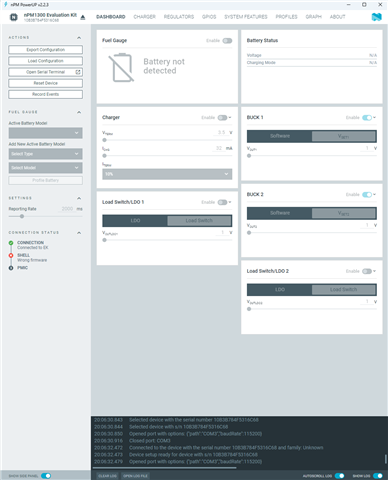
2025-12-08T20:07:46.508Z DEBUG Application data folder: C:\Users\admin\AppData\Roaming\nrfconnect\pc-nrfconnect-npm
2025-12-08T20:07:46.603Z DEBUG Sending event "npm: running nrfutil device"
2025-12-08T20:07:46.647Z DEBUG App pc-nrfconnect-npm v2.2.3 (official)
2025-12-08T20:07:46.647Z DEBUG App path: C:\Users\admin\.nrfconnect-apps\node_modules\pc-nrfconnect-npm
2025-12-08T20:07:46.647Z DEBUG nRFConnect 5.2.0, required by the app is (>=5.2.0)
2025-12-08T20:07:46.648Z DEBUG nRFConnect path: C:\Users\admin\AppData\Local\Programs\nrfconnect\resources\app.asar
2025-12-08T20:07:46.648Z DEBUG HomeDir: C:\Users\admin
2025-12-08T20:07:46.648Z DEBUG TmpDir: C:\Users\admin\AppData\Local\Temp
2025-12-08T20:07:46.686Z DEBUG Sending event "npm: running nrfutil device"
2025-12-08T20:07:46.687Z DEBUG Sending event "npm: running nrfutil device"
2025-12-08T20:07:46.691Z DEBUG Sending event "npm: running nrfutil device"
2025-12-08T20:07:46.801Z INFO Using the bundled core version for nrfutil device: 8.1.1
2025-12-08T20:07:46.837Z INFO Using nrfutil device version: 2.12.8
2025-12-08T20:07:46.837Z INFO Using nrf-device-lib version: 0.17.87
2025-12-08T20:07:46.837Z INFO Using nrf-probe version: 0.44.0
2025-12-08T20:07:46.837Z INFO Using SEGGER J-Link version: JLink_V8.76
2025-12-08T20:07:46.839Z INFO Your version of SEGGER J-Link (8.76) is newer than the one this app was tested with (8.42). The tested version is not required, and your J-Link version will most likely work fine. If you get issues related to J-Link with your devices, use the tested version.
2025-12-08T20:07:46.879Z INFO Getting serial port options from the persistent store for 10B3B784F5316C68.pc-nrfconnect-npm
2025-12-08T20:07:46.880Z INFO Device connected with the serial number 10B3B784F5316C68
2025-12-08T20:07:46.880Z INFO Device Connected SN:10B3B784F5316C68
2025-12-08T20:07:46.882Z DEBUG Sending event "npm: device connected"
2025-12-08T20:07:51.492Z INFO Selecting device with the serial number 10B3B784F5316C68
2025-12-08T20:07:51.507Z DEBUG Sending event "npm: running nrfutil device"
2025-12-08T20:07:51.621Z INFO Selected device with the serial number 10B3B784F5316C68
2025-12-08T20:07:51.622Z INFO Selected device with s/n 10B3B784F5316C68
2025-12-08T20:07:51.624Z DEBUG Sending event "npm: device selected"
2025-12-08T20:07:51.627Z INFO Opened port with options: {"path":"COM3","baudRate":115200}
2025-12-08T20:07:51.724Z INFO Closed port: COM3
2025-12-08T20:07:52.437Z DEBUG Firmware updated finished
2025-12-08T20:07:52.444Z DEBUG Sending event "npm: running nrfutil device"
2025-12-08T20:07:52.555Z ERROR Error: Failed with exit code 1.
Subprocess C:\Users\admin\AppData\Roaming\nrfconnect\nrfutil-sandboxes\8.1.1\device\2.12.8\bin\nrfutil-device.exe failed with unexpected exit code Some(-1073741819)
2025-12-08T20:07:52.555Z ERROR Error while setting up device with the serial number 10B3B784F5316C68
2025-12-08T20:07:52.556Z ERROR "Failed with exit code 1.\nSubprocess C:\\Users\\admin\\AppData\\Roaming\\nrfconnect\\nrfutil-sandboxes\\8.1.1\\device\\2.12.8\\bin\\nrfutil-device.exe failed with unexpected exit code Some(-1073741819)\n"
2025-12-08T20:07:52.557Z INFO Deselected device
2025-12-08T20:07:52.557Z INFO Deselected device
2025-12-08T20:07:52.558Z DEBUG Sending event "npm: device deselected "
2025-12-08T20:09:52.223Z INFO Selecting device with the serial number 10B3B784F5316C68
2025-12-08T20:09:52.242Z DEBUG Sending event "npm: running nrfutil device"
2025-12-08T20:09:52.349Z INFO Selected device with the serial number 10B3B784F5316C68
2025-12-08T20:09:52.349Z INFO Selected device with s/n 10B3B784F5316C68
2025-12-08T20:09:52.350Z DEBUG Sending event "npm: device selected"
2025-12-08T20:09:52.354Z INFO Opened port with options: {"path":"COM3","baudRate":115200}
2025-12-08T20:09:52.438Z INFO Closed port: COM3
2025-12-08T20:09:53.451Z INFO Connected to the device with the serial number 10B3B784F5316C68 and family: Unknown
2025-12-08T20:09:53.452Z INFO Device setup ready for device with s/n 10B3B784F5316C68
2025-12-08T20:09:53.456Z INFO Opened port with options: {"path":"COM3","baudRate":115200}

