nPM PowerUP: Battery Profiling stuck on "did not detect battery"

Hello,

we have an nPM1300 EK plus the profiling adapter board and are trying to profile some of our batteries.

We have already successfully completed profiling for 5 batteries, but are now suddenly running into an issue that keeps us from profiling anymore.

After the profiling has started and the battery is charged, we are stuck at the next screen with the error "Action: Did not detect battery. Please ensure battery is connected", as well as "Action required: You must disconnect USB PMIC to continue".
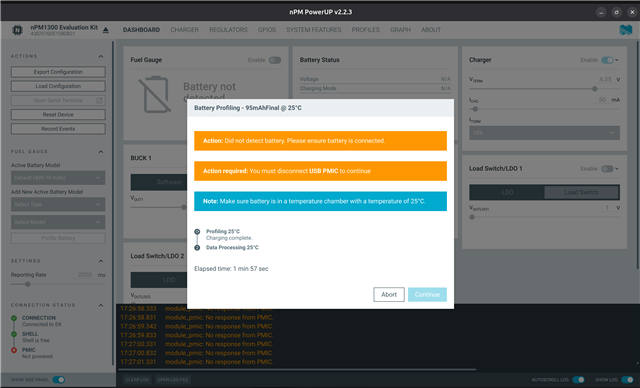
The battery just was detected and charged fine, but suddenly it is no longer detected? Unplugging the USB PMIC does not change anything (or make the second warning go away).

The only way to get a response from the UI is to disconnect both USB PMIC and the battery, which will lead to the following error screen after the profiling briefly seems to continue:
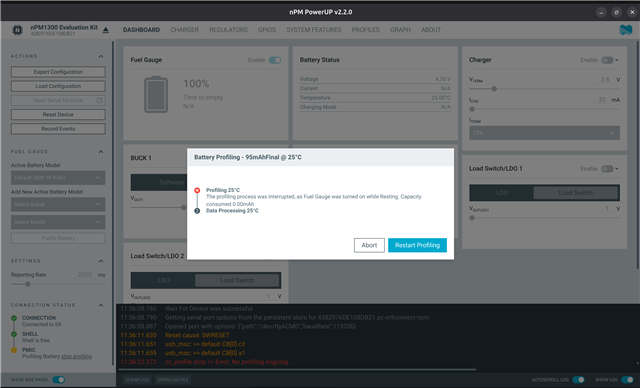


The screenshots are from nPM PowerUp 2.2.0, but we also tried with 2.2.3 and some older versions and get the same result.
Any idea what the issue could be? As far as we know, all jumpers are in their default (from factory) positions.

Parents
  • Hi

    This behavior is strange. It is unlikely that thiis is a UI/app issue; it more likely points to a I2C communication failing, power-path, or battery-connector issue on the nPM1300-EK during profiling.

    I also noticed from the screenshots that the “PMIC is not powered” warning. This indicates that PowerUP is unable to communicate with the PMIC because no valid supply is detected from either USB or the battery.

    Could you please help check the following:

    • Can you measure the VSYS and VBAT pin voltages on the nPM1300 EK when this error occurs?
    • Is the nPM1300 EK + nPM FG board,  connected to any other external DKs or systems during battery profiling?
    • How stable is the physical battery connection (no loose wires, clips, or intermittent contacts)?
    • Do you observe this “No response from PMIC / power loss” error in any other scenarios, or only during profiling?
    • Photo of the full setup.
    • Also, could you please share the profiling project folder generated by PowerUP to debug?

    Thanks !!

    Tharaka

Reply
  • Hi

    This behavior is strange. It is unlikely that thiis is a UI/app issue; it more likely points to a I2C communication failing, power-path, or battery-connector issue on the nPM1300-EK during profiling.

    I also noticed from the screenshots that the “PMIC is not powered” warning. This indicates that PowerUP is unable to communicate with the PMIC because no valid supply is detected from either USB or the battery.

    Could you please help check the following:

    • Can you measure the VSYS and VBAT pin voltages on the nPM1300 EK when this error occurs?
    • Is the nPM1300 EK + nPM FG board,  connected to any other external DKs or systems during battery profiling?
    • How stable is the physical battery connection (no loose wires, clips, or intermittent contacts)?
    • Do you observe this “No response from PMIC / power loss” error in any other scenarios, or only during profiling?
    • Photo of the full setup.
    • Also, could you please share the profiling project folder generated by PowerUP to debug?

    Thanks !!

    Tharaka

Children
No Data
Related