Issue: USB MSC with FATFS on nRF54H20 External Flash (Write Error & SCSI Opcode 0xa1)

Description: I am implementing USB Mass Storage with a FAT filesystem on external MX25UW63 flash (via EXMIF) using the nRF54H20 DK (NCS v3.2.0).

Setup:

  • Board: nRF54H20 DK

  • SDK: nRF Connect SDK v3.2.0

  • Reference: zephyr/samples/subsys/usb/mass

Configuration:

nrf54h20dk_nrf54h20_cpuapp.overlay:

/delete-node/ &storage_partition;

&exmif {
	status = "okay";
};

&gpio6 {
	status = "okay";
};

&mx25uw63 {
	status = "okay";

    partitions {
		compatible = "fixed-partitions";
		#address-cells = <1>;
		#size-cells = <1>;

		storage_partition: partition@0 {
			label = "storage";
			reg = <0x00000000 0x00020000>;
		};
	};
};

/ {
	msc_disk0 {
		compatible = "zephyr,flash-disk";
		partition = <&storage_partition>;
		disk-name = "NAND";
		cache-size = <4096>;
	};
};
nrf54h20dk_nrf54h20_cpuapp.conf:

CONFIG_APP_MSC_STORAGE_FLASH_FATFS=y

Error Log:

*** Booting nRF Connect SDK v3.2.0-5dcc6bd39b0f ***
*** Using Zephyr OS v4.2.99-a57ad913cf4e ***
Area 0 at 0x0 on mx25uw6345g@0 for 131072 bytes
[00:00:00.024,795] <inf> flashdisk: Initialize device NAND
[00:00:00.024,800] <inf> flashdisk: offset 0, sector size 512, page size 65536, volume size 131072
[00:00:00.024,806] <err> flashdisk: Cache too small (4096 needs 65536)
[00:00:00.024,812] <err> fs: fs mount error (-5)
[00:00:00.024,816] <err> main: Failed to mount filesystem
[00:00:00.024,915] <wrn> udc_dwc2: VBUS is not ready, block udc_enable()
[00:00:00.060,241] <wrn> udc_dwc2: Experimental DMA enabled
[00:00:00.060,287] <inf> main: The device is put in USB mass storage mode
[00:00:00.403,512] <inf> usbd_msc: Enable
[00:00:00.403,577] <inf> usbd_msc: Bulk-Only Mass Storage Reset
[00:00:01.456,398] <err> usbd_msc: Unknown SCSI opcode 0xa1

Current Status:

I initially had a cache error, which I resolved by increasing the cache size to 65536. However, I am now facing two issues:

  1. Write Failure: When I try to create a file on the disk, the operation fails with the following log:

    [INSERT FILE CREATION ERROR LOG HERE]
    
  2. SCSI Error: I also see this error in the logs:

    [00:00:01.594,387] <err> usbd_msc: Unknown SCSI opcode 0xa1
    

Questions:

  • What could be causing the file creation/write failure?

  • What does Unknown SCSI opcode 0xa1 mean in this context? Is it critical?

Any advice is appreciated.

  • Hi Simon,

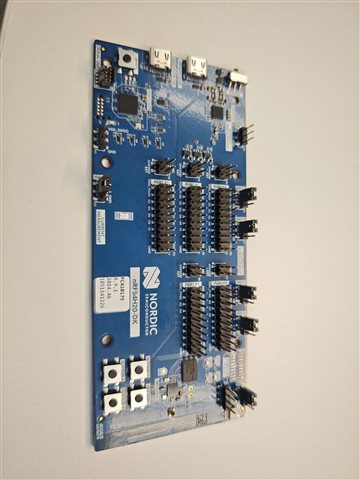
    I believe I have nRF54H20 DK v0.7.0 (you can check the DK in the attached image). I believe I've connected all the jumpers that I possibly can.


    Regarding power: I'm powering it via USB.

    For Ironside SE: I'm using nrf54h20_soc_binaries_v23.1.2+21.zip

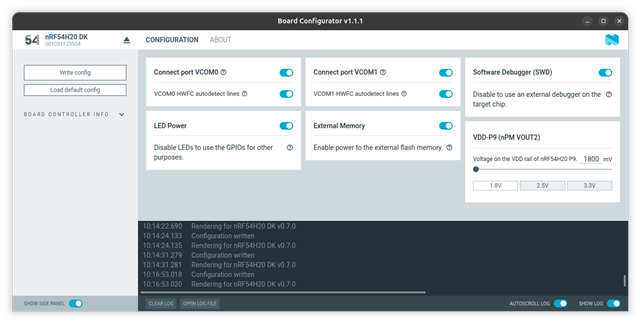
    Here is my board configuration


    Additional questions:

    • The SCSI opcode error appears when I connect the USB cable to the device
    • Have you tried creating a file on the drive using a PC? Any success?
    • I also get no errors without performing these steps (creating/writing files)


    Best regards,
    Kittitouch

  • Hi

    The image you uploaded shows a v0.9.1 DK (see the sticker for future reference). 

    You say you're powering it from USB, which USB port exactly?

    I just did a brief test on mounting the board yesterday. I'll test again tomorrow to see if I'm able to reproduce this again, but I don't see anything obviously wrong in your setup. 

    Best regards,

    Simon

  • Hi Simon,

    Thanks for checking the board version - I'll note that it's v0.9.1 for reference.

    Regarding the USB ports, I've tested both scenarios:

    1. Powering the debugger USB first, then plugging in the nRF54H20 USB later
    2. Using only the nRF54H20 USB port

    Both show the same error result.

    Did you use the project files I attached earlier when testing?

    Best regards,
    Kittitouch

  • The project you sent runs into a stack overflow when I connect the nRF54H20 USB, so I'm still not able to reproduce this I'm afraid. The errors you see though still point toward not enough space on the device to create the file you want to, so I recommend trying to increase the size on your file system.

    Best regards,

    Simon

  • Hi Simon,

    Thanks for testing this.

    Regarding the project you mentioned is working—did you experience the same issue where you couldn't write any files? On my end, I am unable to write any files at all through the USB MSC interface, including blank files or folders.

    Are there any known issues with the USB MSC + FAT filesystem on the nRF54H20 that might cause this? I have already tried increasing the partition size significantly:

    DTS
    storage_partition: partition@0 {
        label = "storage";
        reg = <0x00000000 0x00800000>;
    };
    

    I even increased it to match the full mx25uw6345g capacity (8MB), but the issue persists—I still cannot write any files regardless of the partition size.

    Interestingly, I tested the exact same configuration on the nRF5340 with the same partition size, and it works without any issues. This suggests the problem may be specific to the nRF54H20 hardware or its current driver implementation.

    I have also contacted the Regional Sales Manager for any further updates regarding this sample.

    Any insights you could provide would be greatly appreciated.

    Best regards,

    Kittitouch

Related