Wireshark BLE Sniffer missing packet, non-sequential event counter observed

I am using Wireshark with Nordic BLE Sniffer plugin. The sniffer dongle used is nRF52840. I using it to capture a BLE connection from my laptop BLE to a peripheral BLE device. 

I observe that the event counter of my BLE communication captured on Wireshark is not incrementing sequentially. I expect that "Event counter" after CONNECT_IND should be 0->1->2->3->..., but I observe that the "Event counter" after CONNECT_IND is 0->2->4->6->8->10->...

May I know why the "Event counter" is not sequentially incrementing? 

The screenshot below starts from Packet No. 4478.
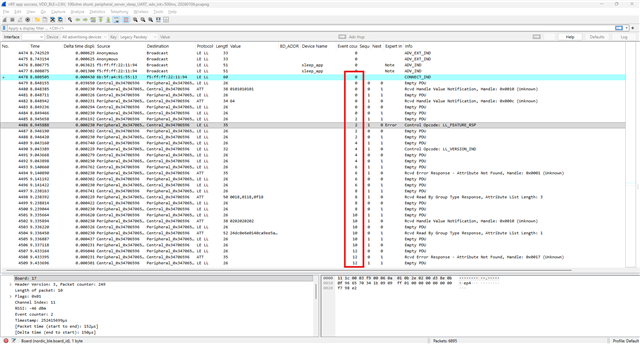
nRF app success, VDD_BLE=2.6V, 100ohm shunt, peripheral_server_sleep_UART, adv_int=500ms, 20260106.pcapng

  • Update:

    1. Reflashing the dongle firmware does not always help.

    2. Sometimes, restarting Wireshark and replugging the dongle helps, but not consistently.

    3. Occasionally, I can complete more than one successful trace before the sniffer enters this "weird state."

    4. Once it starts missing every other connection event, it does not recover on its own. Only steps 1 and 2 (reflashing or replugging) provide a temporary fix.

    Environment details:

    • Host OS: Tested on both Windows and macOS. 
      Windows wireshark versions 4.6.4 and 4.4.14.
      iOS wireshark version 4.4.1
      Windows nrfutil version 8.1.1

    • Central Devices: Using nRF Connect app on iOS (v2.8.1024) and Android (4.29.1).

    • Peripheral Devices: Based on nRF SDK BLE (s113_nrf52_7.2.0_softdevice, sdk v17.1.0) and a custom BLE implementation (on nRF52).

    • Note: These devices have no connection issues with other centrals; the problem appears to be specific to the sniffer's performance.


  • Update and solution:

    I downgraded Wireshark to the version 3.6 and now the sniffer works properly every time with the latest firmware and Wireshark plugins (v4.1.1).

    It seems that 4.6.4 and 4.4.14 Wireshark versions have an issue.

  • I have Wireshark version 4.0.12, do you recommend downgrading to version 3.6? What is puzzling me is that 4.0.12 was working for over 2 years only recently I started seeing the issue. 

  • Downgrading to 3.6 helped me to solve the issue. I didn’t check other wireshark version, maybe 3.8 will also work.

    I also had wireshark 4.4.1 on macOS working fine before, but I not sure maybe one day I accepted automatic wireshark update. Or maybe there was an OS update which conflicts with new wireshark versions. And also interesting that there is the same issue on both Windows and macOS OSs. 

Related