Problems setting up PPP using SLM in NRF9151DK

Hello!

I am facing issues when trying to set up a PPP connection using the Serial LTE Modem (SLM) application on the nRF9151 DK, and I would appreciate some guidance.

I am developing a system where an external ESP32-S3 is connected to the nRF9151 DK running SLM.
The idea is to use the nRF9151 purely as an LTE modem, while the ESP32-S3 runs its own TCP/IP stack and communicates with the modem via PPP over UART.

I'm using SDK v3.1.99 and zephyr v4.2.99. 

Since the SLM firmware present in nrfconnect doesn't have PPP enabled by default, I built and flashed the modem with configuration files to enable it using the following command:

west build -b nrf9151dk/nrf9151/ns nrf/applications/serial_lte_modem -- -DCONF_FILE="prj.conf;overlay-ppp.conf" -DDTC_OVERLAY_FILE="overlay-ppp-without-cmux.overlay;slm-uart.overlay"

prj.conf, overlay-ppp.conf and overlay-ppp-without-cmux.overlay weren't modified by me, being the standard ones for SLM (using UART1 for PPP). The slm-uart.overlay is a file I created only to define the UART to be used for AT commands before starting ppp, and has this inside:

/ {
     chosen {
          ncs,slm-uart = &uart0;
     };
}; 

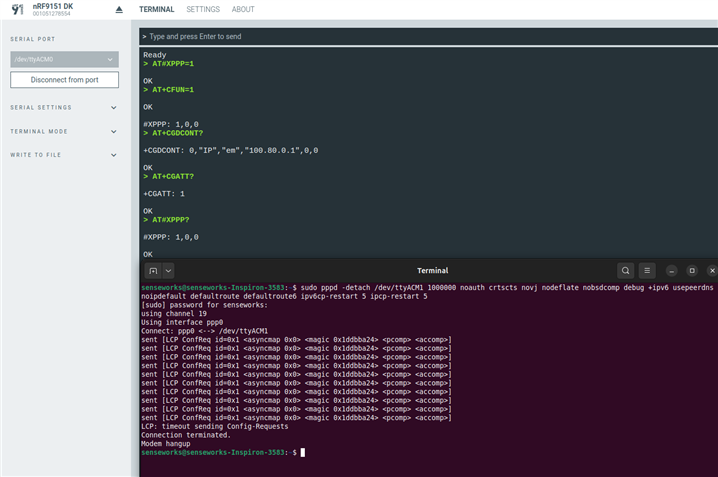
I was able to communicate with the modem using both my ESP32S3 and the Serial Terminal in nrfconnect to send the AT commands necessary to put the modem in data mode, but after that I can't seem to do much. I also tried to test it using the steps present here, but it always results in a timeout and modem hangup.

Below, prints from the serial terminal with the AT command sent before testing with Linux terminal, and also the output of the terminal command:
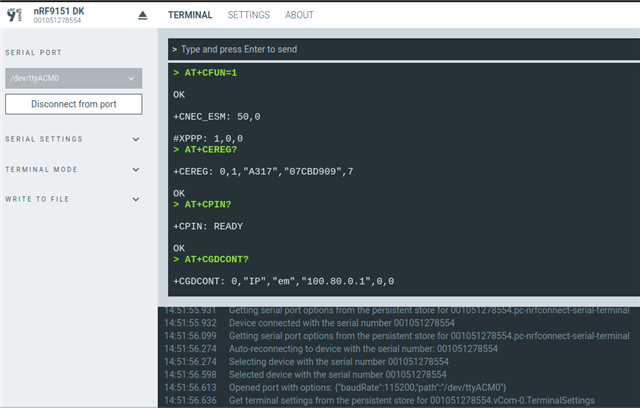
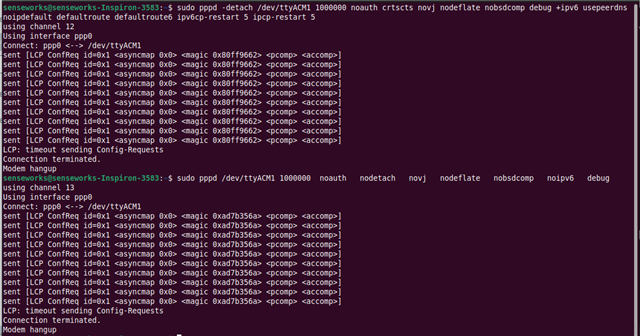


I'm kinda stuck right now, so any help would be appreciated!

Parents
  • Hi,

    I tried on my end (without your slm-uart.overlay), and it is working.

    Which version of the Serial Modem addon (previously called Serial LTE Modem - SLM) and which modem firmware are you using ? I used the latest Serial modem addon and the mfw 2.0.3

    I built and flashed the modem with configuration files to enable it using the following command:

    west build -b nrf9151dk/nrf9151/ns nrf/applications/serial_lte_modem -- -DCONF_FILE="prj.conf;overlay-ppp.conf" -DDTC_OVERLAY_FILE="overlay-ppp-without-cmux.overlay;slm-uart.overlay"

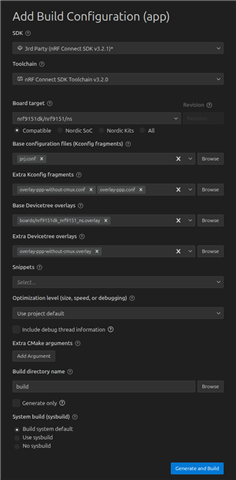
    I think you are missing overlay-ppp-without-cmux.conf in your build config.

    Here is the build config I used :

    Best regards,

    Simon D-M

  • Hello Simon, thanks for the answer!

    Which version of the Serial Modem addon (previously called Serial LTE Modem - SLM) and which modem firmware are you using ? I used the latest Serial modem addon and the mfw 2.0.3

    My modem firmware version is also v2.0.3, but I don't really know where to get the SLM version. Using AT#XSLMVER I only get #XSLMVER: "3.1.99","3.2.0-cellular-e91806dc2b3f", that is the ncs version and modem library version.

    I think you are missing overlay-ppp-without-cmux.conf in your build config.

    I don't seem to have this file in the project directory. Could you please send its contents so I can create it and replace slm-uart.overlay to see if that's the problem?

    I will also try updating ncs and integrating it with VSCode like yours.

  • Hi,

    ThiSo said:
    My modem firmware version is also v2.0.3, but I don't really know where to get the SLM version. Using AT#XSLMVER I only get #XSLMVER: "3.1.99","3.2.0-cellular-e91806dc2b3f", that is the ncs version and modem library version.

    To get the latest Serial Modem addon you can follow this guide (link).

    ThiSo said:
    I don't seem to have this file in the project directory. Could you please send its contents so I can create it and replace slm-uart.overlay to see if that's the problem?

    Here is the file from the Serial Modem addon GitHub (link).

    ThiSo said:
    I will also try updating ncs and integrating it with VSCode like yours.

    Here is our page for nRF Connect For VS Code (link).

    Best regards,

    Simon D-M

  • Hello again!

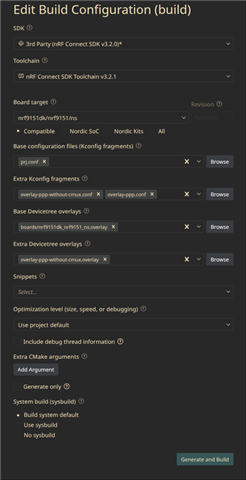
    I downloaded nRF Connect for VSCode and the newest SDK/Toolchain available, and also cloned the Serial Modem addon to the SDK workspace.

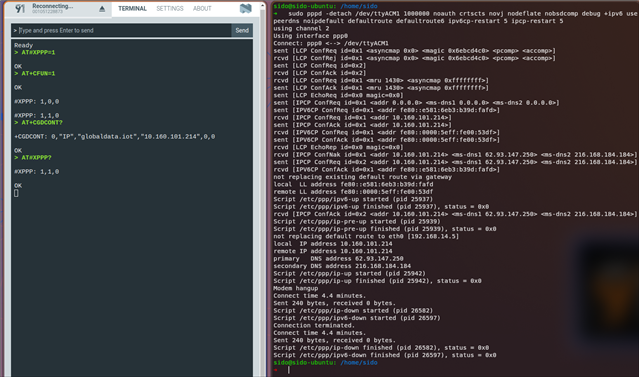
    Even so, my problem still stands and I'm not able to make it work even with the latest test guide (which had some different steps compared to the one I previously refered to). 

    Below, prints of my build configuration and the test done using nRF Connect and linux terminal:


  • Hi,

    Strange..., I just retried and it still works...

    To see if this is a build / firmware problem, can you try to upload my .hex file to your nRF9151 DK. It is the serial modem add-on that I built on my end.

    42320.merged.hex

    To flash this firmware, you can use the command "nrfutil device program --firmware /path/to/merged.hex". (You may need to use "nrfutil device recover" if you see an error stating that the application core is protected.) 

    Also, Just to be sure, can you please confirm with the cellular monitor that your device is indeed connected to the network before making the PPP connection ?

    Best regards,

    Simon D-M

  • Hi Simon!

    It turns out, the problem was hardware related. UART1 was disconnected by a colleague of mine in previous unrelated tests, and he forgot to connect it back again...

    Now the test on linux terminal works fine just like yours, and I could also connect it with my ESP32-S3.

    Thanks a lot for your help!

Reply Children
No Data
Related