Hi all,
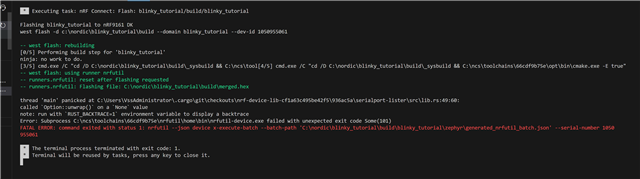
I have been attempting to get the nRF Connect VS Code extension setup to try out some samples on the nRF9161-DK board.
I'm currently having a problem with a version mismatch between what the extension wants for nrfutil-device.exe and what the latest version of nrfutil installs.
Specifically the generated_nrfutil_batch.json file gets generated as follows:
{
  "nrfutil_device_version": "2.15.2",
  "family": "NRF91_FAMILY",
  "operations": [
    {
      "core": "NRFDL_DEVICE_CORE_APPLICATION",
      "operation": {
        "chip_erase_mode": "ERASE_RANGES_TOUCHED_BY_FIRMWARE",
        "firmware": {
          "file": "C:\\nordic\\blinky_tutorial\\build\\merged.hex"
        },
        "type": "program",
        "verify": "VERIFY_READ"
      }
    }
  ]
}
However when I run nrfutil install device using version 8.1.1 of nrfutil, it installs version 2.15.7:
nrfutil --version
nrfutil 8.1.1 (b6089d0 2025-08-21)
commit-hash: b6089d08a9cfdb292f8ab8d21e0908ded814cd11
commit-date: 2025-08-21
host: x86_64-pc-windows-msvc
build-timestamp: 2025-08-21T14:12:43.593658000Z
classification: nrf-external

nrfutil search
Command            Installed  Latest  Status
91                            0.5.0   Not installed
ble-sniffer                   0.17.1  Not installed
completion                    1.5.0   Not installed
core               8.1.1      8.1.1   Installed
device             2.15.7     2.15.7  Installed
mcu-manager                   0.8.0   Not installed
npm                           0.3.1   Not installed
nrf5sdk-tools      1.1.0      1.1.0   Installed
sdk-manager                   1.9.4   Not installed
suit                          0.9.0   Not installed
toolchain-manager  0.15.0     0.15.0  Installed
trace
The effect of this is the Flash command fails within VS Code (toochain v3.2.1, SDK v3.2.1):
FATAL ERROR: command exited with status 1: nrfutil --json device x-execute-batch --batch-path 'C:\nordic\blinky_tutorial\build\blinky_tutorial\zephyr\generated_nrfutil_batch.json' --serial-number 1050
955061
If I run the same command from Windows Powershell I get more information stating that it is due to the version mismatch in the generated json file:
nrfutil --json device x-execute-batch --batch-path 'C:\nordic\blinky_tutorial\build\blinky_tutorial\zephyr\generated_nrfutil_batch.json' --serial-number 1050955061
Error: Unsupported batch file nrfutil device version: 2.15.2 - please regenerate your batch file with this version of nrfutil-device
I was able to temporarily work around this issue by manually editing the generated_nrfutil_batch.json file to be "nrfutil_device_version": "2.15.7".
Unfortunately this only works for flashing, when attempting to "Debug" the json file is autogenerated again and this gets reset to "2.15.2".
Another thing that was attempted was forcing nrfutil to install this older version, however this seemingly breaks nrfutil 8.1.1.
Also attempted to install nrfutil 7.7.0 as a co-worker had more success with that version, however it seems the Nordic URL paths have changed so I am unable to run the nrfutil install device command successfully.
Thanks any help would be appreciated with this issue.