New project copy, in SDK 3.2.1

Looks like the new project behavior changed between 3.2.0 and 3.2.1. When creating a new project with the copy function, in 3.2.1 it no longer copies the source code to the new project directory. Is this the desired behavior? Should source files now be modified in the SDK folder directly?

Parents
  • Hi James Atwell,

    I just tried that myself with VS Code and ncs v3.2.1

    - Created a directory and selected the directory within VS Code
    - Chose “create a new application”
    - Chose “copy a sample”
    - Chose a sample — just to try — BME280 Sensor sample
    - Chose where to store the application
    - Chose “Add to Workspace”
    - Trust the Author
    - The source code was copied to the chosen directory like expected

    At least within my installation, everything works like expected.

    Kind regards, Dani

Reply
  • Hi James Atwell,

    I just tried that myself with VS Code and ncs v3.2.1

    - Created a directory and selected the directory within VS Code
    - Chose “create a new application”
    - Chose “copy a sample”
    - Chose a sample — just to try — BME280 Sensor sample
    - Chose where to store the application
    - Chose “Add to Workspace”
    - Trust the Author
    - The source code was copied to the chosen directory like expected

    At least within my installation, everything works like expected.

    Kind regards, Dani

Children
  • Thanks for looking at this. I figured it out. I was opening the Blinky Sample and it depends on which version of the sample that you open, as to whether it includes the src folder or not.

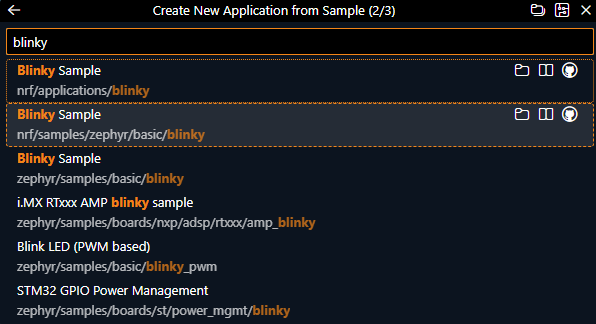
    In ncs 3.2.1 there is an additional blinky sample in the list when choosing the copy option. So when I picked the second one, as shown in the SDK Fundamentals course, it is a version that does not include the src folder. C:\ncs\v3.2.1\nrf\samples\zephyr\basic\blinky


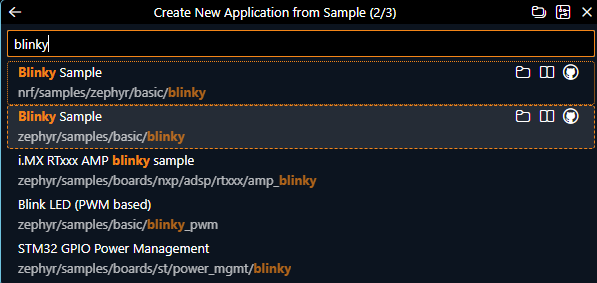
    In 3.2.0, the second one is the version that does include the src folder. C:\ncs\v3.2.0\zephyr\samples\basic\blinky


    Thanks again for replying, much appreciated!

    James

Related