
I have create a model (which is now marked as complete), but when I go to the results tab the options (and below) just show a spinning circle. How can this be fixed?

I have create a model (which is now marked as complete), but when I go to the results tab the options (and below) just show a spinning circle. How can this be fixed?
The spinning circle in the results tab usually indicates that the Nordic Edge AI Lab tool is hanging due to a backend issue or incomplete data retrieval. The fix often involves refreshing your session, clearing cached data, or contacting Nordic support to check if the model results were properly generated and stored.
https://insinuator.net/2021/10/change-your-ble-passkey-like-you-change-your-underwear/ fnaf

I tried creating a new model with the same data and see the same thing, so sounds like a Nordic problem... How do I best contact them?
I've attached my model data.
it's audio data:
The only features I used for the model were Sample and Target

Will try your data and see if I get the same.
Did you check with the dummy file i added? was the issue the same?
Regards,
Jonathan
I did try the dummy file from you and it works fine.
Thats good to know.
I did test you data and I do have a issue it seems, but that could be user error from my side.
I have contacted the AI Labs team and will update.
Regards,
Jonathan
Update from the team:
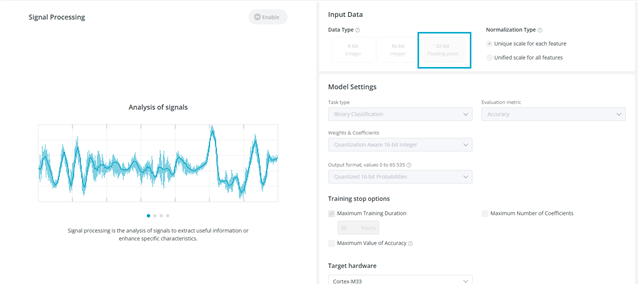
We analyzed your dataset and ran an experiment. Since the dataset contains a column with Float32 values, the input data type should be set to Float32 (https://docs.nordicsemi.com/bundle/edge-ai-lab/page/doc/model_creating_pipeline/model_settings.html…).
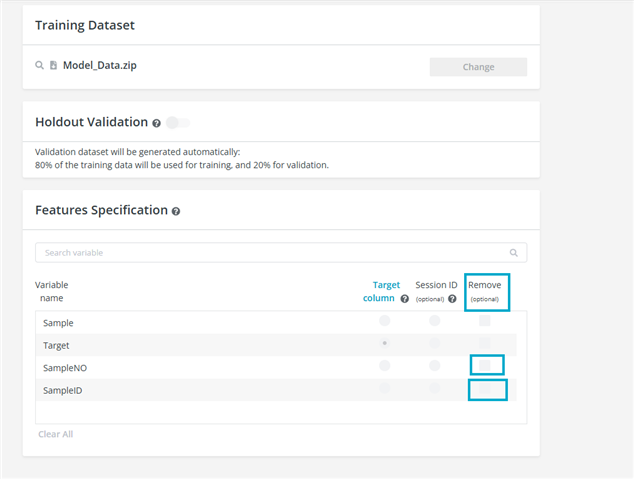
Additionally, you can remove unnecessary columns (e.g., SampleNO, SampleID) from the dataset using our platform after uploading the data.
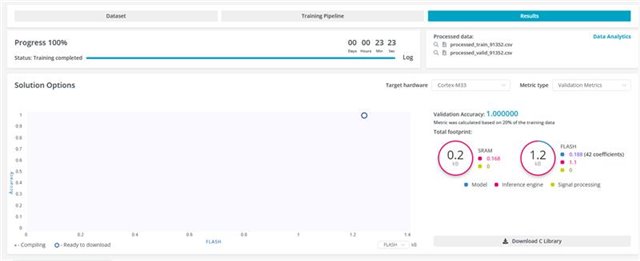
After changing the input data type to Float32, the training completed successfully, and we were able to download the archive from the platform.
Also, we have improved notifications to better support users with similar or different issues.
One additional note: our platform is currently focused on time-series sensor data and is not intended for processing audio data, so the results may not be fully relevant to your use case.
Update from me:
I also did a mistake here setting it to multi classification instead of Binary so will re-run it but all should be ok now.
Regards,
Jonathan
Update from the team:
We analyzed your dataset and ran an experiment. Since the dataset contains a column with Float32 values, the input data type should be set to Float32 (https://docs.nordicsemi.com/bundle/edge-ai-lab/page/doc/model_creating_pipeline/model_settings.html…).
Additionally, you can remove unnecessary columns (e.g., SampleNO, SampleID) from the dataset using our platform after uploading the data.
After changing the input data type to Float32, the training completed successfully, and we were able to download the archive from the platform.
Also, we have improved notifications to better support users with similar or different issues.
One additional note: our platform is currently focused on time-series sensor data and is not intended for processing audio data, so the results may not be fully relevant to your use case.
Update from me:
I also did a mistake here setting it to multi classification instead of Binary so will re-run it but all should be ok now.
Regards,
Jonathan
Thanks - I'll try re-running it and get back to you if I have any problems (not expected).
Are there any plans for Audio data in the future?
(I'll need to test a bunch to see how well what you have now works)
Hi,
Geoffr said:Are there any plans for Audio data in the future?
I will ask to see if we can share anything here.
Usually its best to direct these kind of questions to the sales force, can contact through here: https://www.nordicsemi.com/About-us/Contact-Us
Regards,
Jonathan